


People still swear by this quirky controller, leading to Nintendo supporting it for 25 years and counting.
As the GameCube (GCN) turns 25 this year, there’s no better testament to its legacy than the controller. Despite Nintendo experimenting with various input methods in the years since, every one of its ensuing home consoles has officially supported a GameCube pad. And the company has re-released it in new editions multiple times.
A combination of factors led to popularity long after the console left production. It was perfect for games designed for GameCube, became synonymous with one of Nintendo’s biggest franchises, and its library was kept alive on future platforms. To this day, it’s one of our top Nintendo Switch controllers.
It’s not perfect — it has issues compared to the competition at the time as well as modern pads. Even though the design wasn’t iterated on for future consoles like the PS2 and Xbox controllers were, it’s still a delight to use. You should really give it a try if you never have. Thankfully, it’s easy to do that today.
A unique layout and buttons

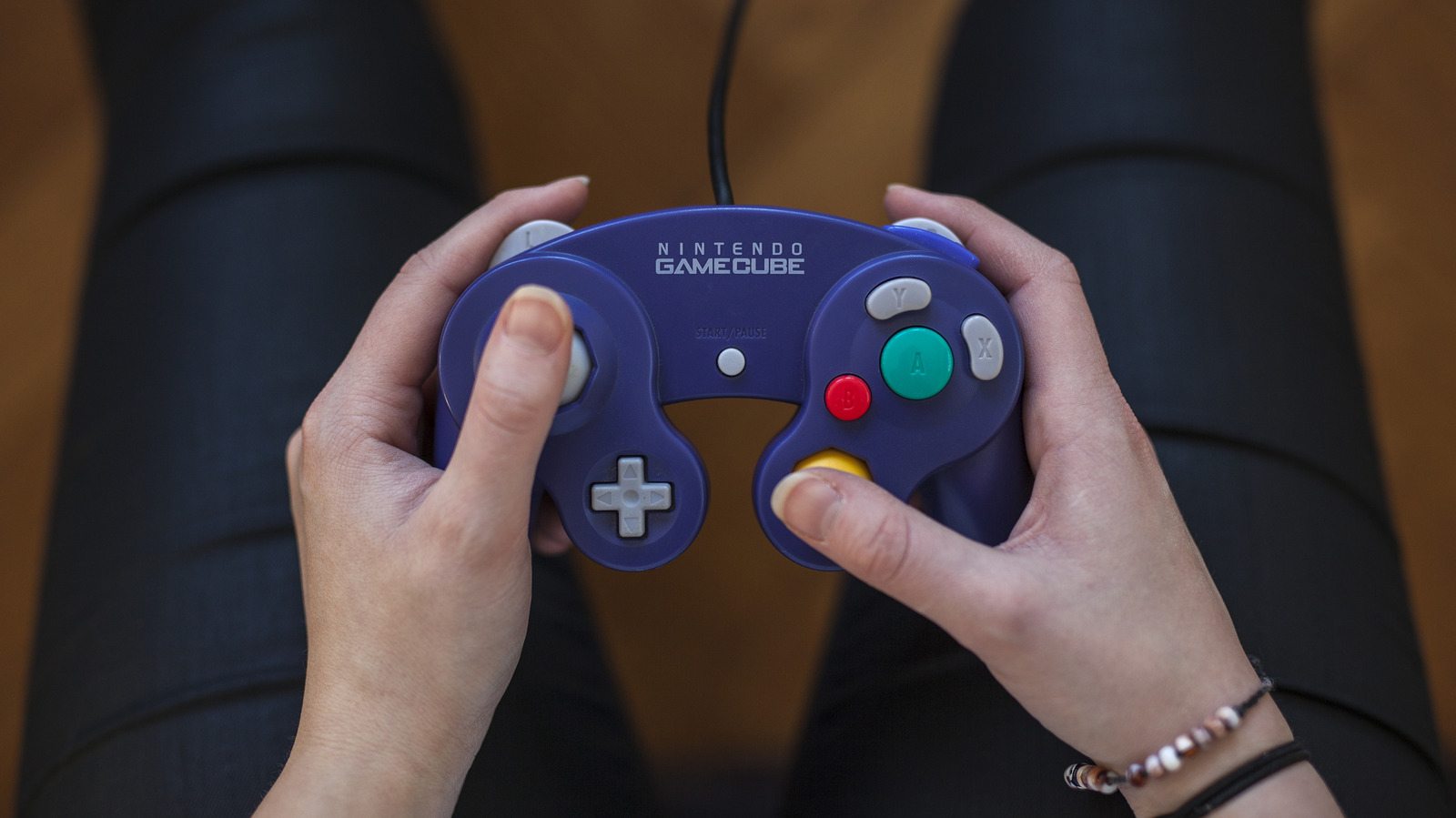
From your first look at the GameCube controller, you’ll notice it’s not like other pads. Instead of the four-button diamond layout most controllers have, it has an oversized green A button, a tiny red B button, and two kidney-shaped X and Y buttons. This has a few advantages. For newcomers, they’ll immediately infer that the A button is the most important, and it’s easier to feel which button your finger is on without looking. Also, this layout enabled you to easily press A along with any other button.
The L and R buttons are analog, meaning they react to how much force you use instead of being a simple on/off switch. Lots of titles on the system took advantage of this. For instance, in Super Mario Sunshine, pressing the R button partway allows Mario to shoot water while walking around, while fully pressing it locks Mario in place while spraying. In the Super Mario 3D All-Stars Switch port, it doesn’t feel the same using separate buttons for these actions on a Joy-Con or Pro Controller.
In contrast to most controllers’ circular control stick gate (the “guard” that restricts a stick’s movement), the GameCube’s primary thumbstick has an octagonal gate, just like the N64 controller that preceded it. This makes it way easier to input specific directions accurately, which is vital for some of the console’s top games. The Super Monkey Ball titles require precision movements to move around narrow stages, while Soulcalibur II takes advantage of these to easily differentiate between inputs for the directional attacks common in fighting games.
The Super Smash Bros. tradition

It’s impossible to separate the legacy of the GameCube controller from the Super Smash Bros. series. Super Smash Bros. Melee was the best-selling title on the console, offering an excellent casual party game experience that makes good use of the console’s four controller ports. However, it also spawned a massive competitive scene. Melee has all kinds of hidden mechanics (like wavedashing) that give it an extremely high skill ceiling. It’s fast-paced, which makes competitive matches enjoyable to watch. And its character roster is (mostly) balanced to allow for a variety of approaches.
Melee‘s sequel, Super Smash Bros. Brawl, was released for Wii in 2008. Since the Wii was backward-compatible with GCN discs and had four GameCube controller ports, players (competitive and otherwise) could use the familiar input method with the new game. It was also much better than using the Wii Remote. Ahead of Super Smash Bros. for Wii U‘s debut in 2014, Nintendo revealed an adapter that let you connect GameCube controllers to that system. This same accessory worked with the Nintendo Switch (and was sold again with updated branding) when Super Smash Bros. Ultimate, one of our favorite Nintendo Switch games, arrived in 2018.
Melee‘s success for both casual and competitive play meant tons of people built up muscle memory with it. Nintendo has kept this control method available with adapters, as well as GCN controller re-releases. A Smash edition GameCube controller arrived in 2014, with a near-identical one also going on sale in November 2018, shortly before Ultimate. To support the Switch 2’s GCN titles available via Nintendo Classics, Nintendo now sells a revamped wireless GameCube controller with a few extra modern buttons, like ZL and Home.
A triumphant controller, though not a perfect one

While the GameCube received far fewer games than its contemporaries, the controller feels incredibly natural for exclusive games made with it in mind, like Luigi’s Mansion and The Legend of Zelda: The Wind Waker. However, the gamepad isn’t perfect, making it worse for certain genres. Its tiny D-pad and nub-like C-stick are two core flaws. The D-pad is mushy, which combined with its size means it’s easy to accidentally push in more than one direction. The C-stick is OK for quick camera adjustments, but it’s far worse than the now-standard two-stick setup. The irregular button layout also makes this one a poor choice when playing games made for other systems. For example, many SNES games have you hold the Y button to run and press B to jump, which is much more awkward with the unique GCN layout.
Another milestone was the 2002 release of the WaveBird, one of the first mainstream wireless gamepads. Older consoles had experimented with wireless connections before but relied on IR, which doesn’t work without a clear line of sight. The WaveBird requires you to set a matching channel on the receiver and controller, lacks rumble, and is a bit bulkier at the bottom than the standard model. But it’s a great option with excellent battery life and few wireless drops; I used a WaveBird for much of my time with the GameCube growing up.
Speaking of this, the GameCube controller has held up remarkably well over the decades. I still use my originals when playing multiplayer games with friends; they have few signs of wear and no annoying issues to work around. Contrast that with the Switch’s Joy-Con, where stick drift has been such a pervasive issue that Nintendo paid a $40 million fine in France.
Credit: Source link