In this tutorial, we’ll show how to create a Knowledge Graph from an unstructured document using an LLM. While traditional NLP methods have been used for extracting entities and relationships, Large Language Models (LLMs) like GPT-4o-mini make this process more accurate and context-aware. LLMs are especially useful when working with messy, unstructured data. Using Python, Mirascope, and OpenAI’s GPT-4o-mini, we’ll build a simple knowledge graph from a sample medical log.
Installing the dependencies
!pip install "mirascope[openai]" matplotlib networkx OpenAI API Key
To get an OpenAI API key, visit https://platform.openai.com/settings/organization/api-keys and generate a new key. If you’re a new user, you may need to add billing details and make a minimum payment of $5 to activate API access. Check out the full Codes here.
import os
from getpass import getpass
os.environ["OPENAI_API_KEY"] = getpass('Enter OpenAI API Key: ')
Defining Graph Schema
Before we extract information, we need a structure to represent it. In this step, we define a simple schema for our Knowledge Graph using Pydantic. The schema includes:
- Node: Represents an entity with an ID, a type (such as “Doctor” or “Medication”), and optional properties.
- Edge: Represents a relationship between two nodes.
- KnowledgeGraph: A container for all nodes and edges.
Check out the full Codes here.
from pydantic import BaseModel, Field

class Edge(BaseModel):
    source: str
    target: str
    relationship: str

class Node(BaseModel):
    id: str
    type: str
    properties: dict | None = None

class KnowledgeGraph(BaseModel):
    nodes: list[Node]
    edges: list[Edge]
Defining the Patient Log
Now that we have a schema, let’s define the unstructured data we’ll use to generate our Knowledge Graph. Below is a sample patient log, written in natural language. It contains key events, symptoms, and observations related to a patient named Mary. Check out the full Codes here.
patient_log = """
Mary called for help at 3:45 AM, reporting that she had fallen while going to the bathroom. This marks the second fall incident within a week. She complained of dizziness before the fall.

Earlier in the day, Mary was observed wandering the hallway and appeared confused when asked basic questions. She was unable to recall the names of her medications and asked the same question multiple times.

Mary skipped both lunch and dinner, stating she didn't feel hungry. When the nurse checked her room in the evening, Mary was lying in bed with mild bruising on her left arm and complained of hip pain.

Vital signs taken at 9:00 PM showed slightly elevated blood pressure and a low-grade fever (99.8°F). Nurse also noted increased forgetfulness and possible signs of dehydration.

This behavior is similar to previous episodes reported last month.
"""
Generating the Knowledge Graph
To transform unstructured patient logs into structured insights, we use an LLM-powered function that extracts a Knowledge Graph. Each patient entry is analyzed to identify entities (like people, symptoms, events) and their relationships (such as “reported”, “has symptom”).
The generate_kg function is decorated with @openai.call, leveraging the GPT-4o-mini model and the previously defined KnowledgeGraph schema. The prompt clearly instructs the model on how to map the log into nodes and edges. Check out the full Codes here.
from mirascope.core import openai, prompt_template

@openai.call(model="gpt-4o-mini", response_model=KnowledgeGraph)
@prompt_template(
    """
    SYSTEM:
    Extract a knowledge graph from this patient log.
    Use Nodes to represent people, symptoms, events, and observations.
    Use Edges to represent relationships like "has symptom", "reported", "noted", etc.

    The log:
    {log_text}

    Example:
    Mary said help, I've fallen.
    Node(id="Mary", type="Patient", properties={{}})
    Node(id="Fall Incident 1", type="Event", properties={{"time": "3:45 AM"}})
    Edge(source="Mary", target="Fall Incident 1", relationship="reported")
    """
)
def generate_kg(log_text: str) -> openai.OpenAIDynamicConfig:
    return {"log_text": log_text}
kg = generate_kg(patient_log)
print(kg)
Querying the graph
Once the KnowledgeGraph has been generated from the unstructured patient log, we can use it to answer medical or behavioral queries. We define a function run() that takes a natural language question and the structured graph, and passes them into a prompt for the LLM to interpret and respond. Check out the full Codes here.
@openai.call(model="gpt-4o-mini")
@prompt_template(
    """
    SYSTEM:
    Use the knowledge graph to answer the user's question.

    Graph:
    {knowledge_graph}

    USER:
    {question}
    """
)
def run(question: str, knowledge_graph: KnowledgeGraph): ...
question = "What health risks or concerns does Mary exhibit based on her recent behavior and vitals?"
print(run(question, kg))
Visualizing the Graph
At last, we use render_graph(kg) to generate a clear and interactive visual representation of the knowledge graph, helping us better understand the patient’s condition and the connections between observed symptoms, behaviors, and medical concerns.
import matplotlib.pyplot as plt
import networkx as nx

def render_graph(kg: KnowledgeGraph):
    G = nx.DiGraph()

    for node in kg.nodes:
        G.add_node(node.id, label=node.type, **(node.properties or {}))

    for edge in kg.edges:
        G.add_edge(edge.source, edge.target, label=edge.relationship)

    plt.figure(figsize=(15, 10))
    pos = nx.spring_layout(G)
    nx.draw_networkx_nodes(G, pos, node_size=2000, node_color="lightgreen")
    nx.draw_networkx_edges(G, pos, arrowstyle="->", arrowsize=20)
    nx.draw_networkx_labels(G, pos, font_size=12, font_weight="bold")
    edge_labels = nx.get_edge_attributes(G, "label")
    nx.draw_networkx_edge_labels(G, pos, edge_labels=edge_labels, font_color="blue")
    plt.title("Healthcare Knowledge Graph", fontsize=15)
    plt.show()

render_graph(kg)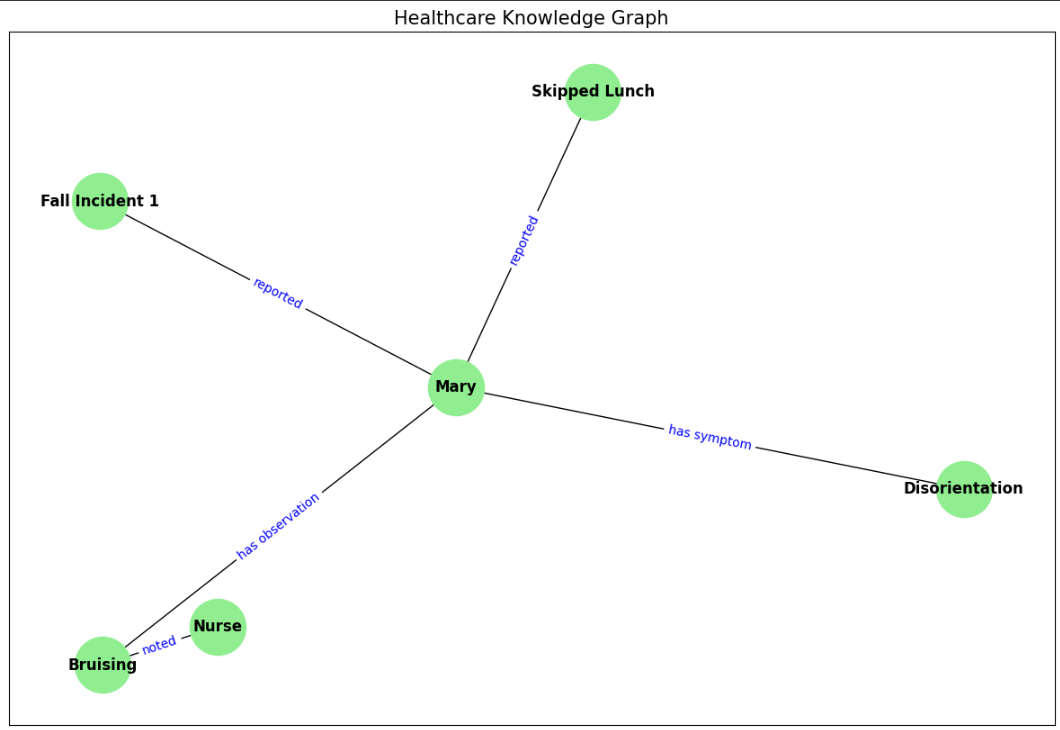
Check out the Codes. All credit for this research goes to the researchers of this project. Also, feel free to follow us on Twitter and don’t forget to join our 100k+ ML SubReddit and Subscribe to our Newsletter.

I am a Civil Engineering Graduate (2022) from Jamia Millia Islamia, New Delhi, and I have a keen interest in Data Science, especially Neural Networks and their application in various areas.

Credit: Source link