














• bitcoinBitcoin(BTC)$75,801.000.03%
  • ethereumEthereum(ETH)$2,235.73-0.22%
  • tetherTether(USDT)$1.00-0.02%
  • binancecoinBNB(BNB)$695.210.30%
  • rippleXRP(XRP)$1.160.18%
  • usd-coinUSDC(USDC)$1.00-0.01%
  • solanaSolana(SOL)$89.19-0.75%
  • tronTRON(TRX)$0.3202530.89%
  • Figure HelocFigure Heloc(FIGR_HELOC)$1.074.25%
  • zcashZcash(ZEC)$1,264.58-4.67%
  • HyperliquidHyperliquid(HYPE)$77.41-2.48%
  • moneroMonero(XMR)$597.65-1.02%
  • dogecoinDogecoin(DOGE)$0.071240-0.89%
  • USDSUSDS(USDS)$1.00-0.01%
  • whitebitWhiteBIT Coin(WBT)$72.84-0.04%
  • leo-tokenLEO Token(LEO)$9.30-0.51%
  • chainlinkChainlink(LINK)$10.760.00%
  • cardanoCardano(ADA)$0.180357-1.84%
  • stellarStellar(XLM)$0.150529-1.02%
  • bitcoin-cashBitcoin Cash(BCH)$248.76-5.01%
  • nearNEAR Protocol(NEAR)$3.70-0.82%
  • Ethena USDeEthena USDe(USDE)$1.000.00%
  • daiDai(DAI)$1.000.00%
  • uniswapUniswap(UNI)$7.111.87%
  • litecoinLitecoin(LTC)$52.11-0.17%
  • RainRain(RAIN)$0.005614-3.04%
  • CantonCanton(CC)$0.092779-1.73%
  • avalanche-2Avalanche(AVAX)$8.19-1.15%
  • suiSui(SUI)$0.85-1.56%
  • USD1USD1(USD1)$1.00-0.03%
  • tether-goldTether Gold(XAUT)$4,055.44-0.05%
  • the-open-networkGram (prev. Toncoin)(GRAM)$1.05-3.38%
  • hedera-hashgraphHedera(HBAR)$0.066693-0.33%
  • quant-networkQuant(QNT)$194.550.69%
  • paypal-usdPayPal USD(PYUSD)$1.00-0.01%
  • Global DollarGlobal Dollar(USDG)$1.000.00%
  • Ripple USDRipple USD(RLUSD)$1.00-0.01%
  • shiba-inuShiba Inu(SHIB)$0.000004-0.52%
  • BittensorBittensor(TAO)$221.52-1.15%
  • crypto-com-chainCronos(CRO)$0.048563-2.37%
  • Ondo US Dollar YieldOndo US Dollar Yield(USDY)$1.15-0.22%
  • okbOKB(OKB)$101.37-3.64%
  • Circle USYCCircle USYC(USYC)$1.140.00%
  • EthenaEthena(ENA)$0.154418-6.01%
  • pepePepe(PEPE)$0.000005-1.79%
  • aaveAave(AAVE)$131.692.04%
  • Spiko Amundi Overnight Swap Fund (EUR)Spiko Amundi Overnight Swap Fund (EUR)(EURSAFO)$1.130.00%
  • MemeCoreMemeCore(M)$0.820.80%
  • BitwayBitway(BTW)$1.24-3.69%
  • Falcon USDFalcon USD(USDF)$0.99-0.01%
TradePoint.io
  • Main
  • AI & Technology
  • Stock Charts
  • Market & News
  • Business
  • Finance Tips
  • Trade Tube
  • Blog
  • Shop
No Result
View All Result
TradePoint.io
No Result
View All Result

Syncing Apple Music Across Your Devices Is Easier Than You Think

November 8, 2026
in AI & Technology
Reading Time: 4 mins read
A A
Syncing Apple Music Across Your Devices Is Easier Than You Think
ShareShareShareShareShare

Using Apple Music on multiple devices? Keeping them in sync is a breeze.


Primakov/Shutterstock

Apple Music is one of the best music streaming platforms right now, especially for Apple device owners. But despite its association with the tech giant, Apple Music is not exclusive to Apple devices and is available on multiple platforms. You can, for example, sign in with your Apple Account and listen to your favorite songs on an Android phone, Windows PC or even smart TVs. 

YOU MAY ALSO LIKE

Here’s How To Sign Up For The Program

Claude Personal Finance Vs. ChatGPT Finances: What Sets Them Apart?

After signing in on a new device, though, you may notice that your music library isn’t synced and your songs aren’t there. If this has happened to you, don’t worry. Changing a single setting in Apple Music will prompt it to sync your music across all your devices, ensuring you don’t have to manage your library manually on each one.

How to turn on Sync Library on Apple Music
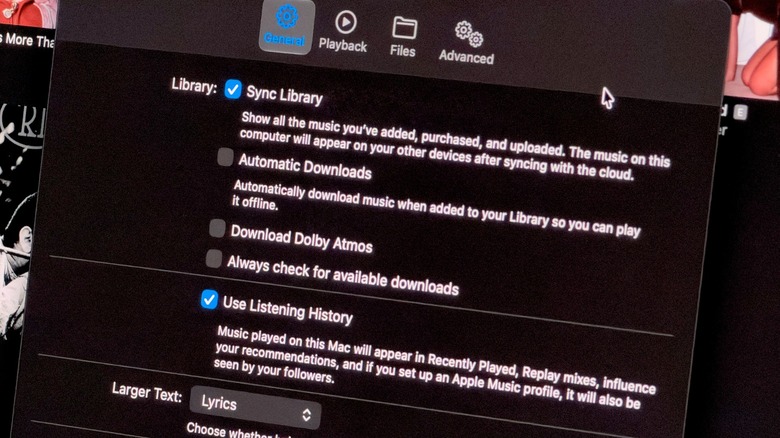

Apple Music settings on a Mac with the Sync Library option turned on.
Filipe Espósito for Engadget

The main reason Apple Music might not sync your library across devices is that you’re using different accounts on each device, so check that first. If you’re not sure which account you’re using, open the Apple Music app and tap your profile picture on the Home tab. If the email address on the unsynced device doesn’t match, you’re signed in on a different account. Sign out, then log in using your primary Apple Account.

Now make sure Sync Library is enabled on your devices. On your iPhone or iPad, open Settings and look for Apps. Then, find the Music app in the list and enable Sync Library. On a Mac, open the Music app and click the “Music” menu at the top of the screen, then go to Settings. Now, under the General tab, make sure Sync Library is enabled and click OK to save your settings. The process is pretty much the same in Windows, but you need to click the three-dot button instead to find Settings. If you have an Android phone, this option is enabled by default, and you don’t need to change anything. 

No matter the platform, the first sync might take a while, especially if you have a large music library. If you don’t see your songs right away after enabling syncing, leave the Music app open and wait a few minutes.

What to do when Apple Music won’t sync
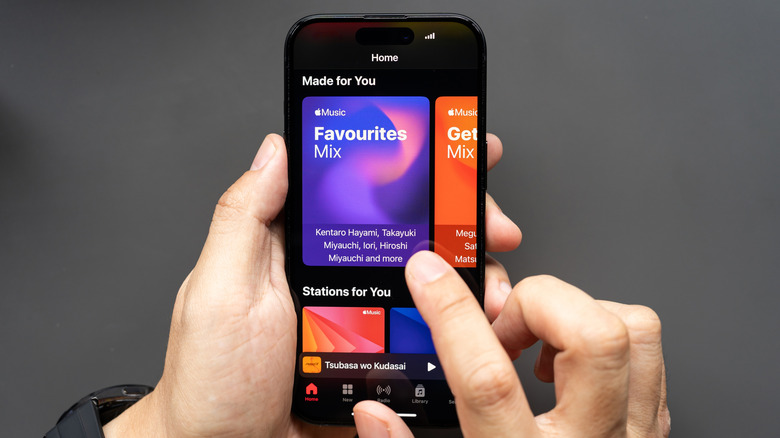

A person interacting with Apple Music on an iPhone.
Wongsakorn 2468/Shutterstock

In the Mac app, click the File menu, then go to Library and select Update Cloud Library — this will force the app to sync and check for updates in your personal library. This option is also available in the Windows app and can be found in the sidebar. Unfortunately, the Android and iOS apps don’t have that option. 

Also, make sure your mobile devices are connected to Wi-Fi and not in Low Power Mode, as this may prevent them from syncing your music library. If nothing else has worked, your best option is to go back to Settings, turn off Sync Library and then turn it back on. You can also try signing out of your Apple Account and logging back in. If you don’t subscribe to Apple Music and have an offline library on your Mac or PC, the only way to sync your library is to manually transfer the Music folder to another computer via Apple iTunes or Apple Devices. 

Syncing behavior isn’t the only setting you might want to change in Apple Music. While you’re there, it’s worth exploring some other toggles, like changing the audio quality options to enable lossless audio.

Credit: Source link

ShareTweetSendSharePin

Related Posts

Here’s How To Sign Up For The Program
AI & Technology

Here’s How To Sign Up For The Program

November 8, 2026
Claude Personal Finance Vs. ChatGPT Finances: What Sets Them Apart?
AI & Technology

Claude Personal Finance Vs. ChatGPT Finances: What Sets Them Apart?

November 7, 2026
There Is No End In Sight For The GPU Supply Problem
AI & Technology

There Is No End In Sight For The GPU Supply Problem

November 7, 2026
5 Things You Didn’t Know Steam’s Overlay Could Do
AI & Technology

5 Things You Didn’t Know Steam’s Overlay Could Do

November 7, 2026
Next Post
Kornacki’s 10.5-hour livestream in 3 minutes

Kornacki's 10.5-hour livestream in 3 minutes

Leave a Reply Cancel reply

Your email address will not be published. Required fields are marked *

Search

No Result
View All Result
Meet the Press NOW — October 2

Meet the Press NOW — October 2

November 2, 2026
Chipmaker Selloff Deepens on Fears of Tighter Regulation

Chipmaker Selloff Deepens on Fears of Tighter Regulation

November 7, 2026
Tech Stocks Rebound as Dip Buyers Return to AI Trade

Tech Stocks Rebound as Dip Buyers Return to AI Trade

November 7, 2026

About

Learn more

Our Services

Legal

Privacy Policy

Terms of Use

Bloggers

Learn more

Article Links

Contact

Advertise

Ask us anything

©2020- TradePoint.io - All rights reserved!

Tradepoint.io, being just a publishing and technology platform, is not a registered broker-dealer or investment adviser. So we do not provide investment advice. Rather, brokerage services are provided to clients of Tradepoint.io by independent SEC-registered broker-dealers and members of FINRA/SIPC. Every form of investing carries some risk and past performance is not a guarantee of future results. “Tradepoint.io“, “Instant Investing” and “My Trading Tools” are registered trademarks of Apperbuild, LLC.

This website is operated by Apperbuild, LLC. We have no link to any brokerage firm and we do not provide investment advice. Every information and resource we provide is solely for the education of our readers. © 2020 Apperbuild, LLC. All rights reserved.

No Result
View All Result
  • Main
  • AI & Technology
  • Stock Charts
  • Market & News
  • Business
  • Finance Tips
  • Trade Tube
  • Blog
  • Shop

© 2023 - TradePoint.io - All Rights Reserved!