
















• bitcoinBitcoin(BTC)$60,428.00-3.63%
  • ethereumEthereum(ETH)$1,695.23-4.52%
  • tetherTether(USDT)$1.000.01%
  • binancecoinBNB(BNB)$551.62-3.38%
  • usd-coinUSDC(USDC)$1.000.01%
  • rippleXRP(XRP)$0.92-6.18%
  • solanaSolana(SOL)$69.95-8.24%
  • tronTRON(TRX)$0.307582-0.93%
  • Figure HelocFigure Heloc(FIGR_HELOC)$1.051.00%
  • HyperliquidHyperliquid(HYPE)$62.45-7.22%
  • zcashZcash(ZEC)$730.69-14.41%
  • moneroMonero(XMR)$497.94-1.83%
  • dogecoinDogecoin(DOGE)$0.055403-5.57%
  • leo-tokenLEO Token(LEO)$9.11-0.57%
  • chainlinkChainlink(LINK)$8.89-4.10%
  • whitebitWhiteBIT Coin(WBT)$57.20-4.41%
  • USDSUSDS(USDS)$1.000.02%
  • cardanoCardano(ADA)$0.145326-5.02%
  • Ethena USDeEthena USDe(USDE)$1.000.03%
  • stellarStellar(XLM)$0.125530-6.61%
  • daiDai(DAI)$1.00-0.01%
  • bitcoin-cashBitcoin Cash(BCH)$199.02-4.57%
  • nearNEAR Protocol(NEAR)$2.90-8.24%
  • litecoinLitecoin(LTC)$40.81-4.71%
  • CantonCanton(CC)$0.076031-4.35%
  • avalanche-2Avalanche(AVAX)$6.61-5.56%
  • tether-goldTether Gold(XAUT)$3,617.42-0.96%
  • uniswapUniswap(UNI)$4.74-7.68%
  • USD1USD1(USD1)$1.000.00%
  • Ripple USDRipple USD(RLUSD)$1.000.00%
  • the-open-networkGram (prev. Toncoin)(GRAM)$0.97-3.64%
  • suiSui(SUI)$0.65-8.32%
  • Global DollarGlobal Dollar(USDG)$1.00-0.03%
  • Ondo US Dollar YieldOndo US Dollar Yield(USDY)$1.150.01%
  • paypal-usdPayPal USD(PYUSD)$1.000.01%
  • hedera-hashgraphHedera(HBAR)$0.051067-7.09%
  • RainRain(RAIN)$0.003044-7.09%
  • BittensorBittensor(TAO)$183.20-7.29%
  • quant-networkQuant(QNT)$147.55-10.00%
  • shiba-inuShiba Inu(SHIB)$0.000004-5.30%
  • Spiko Amundi Overnight Swap Fund (EUR)Spiko Amundi Overnight Swap Fund (EUR)(EURSAFO)$1.120.40%
  • crypto-com-chainCronos(CRO)$0.039739-5.44%
  • Circle USYCCircle USYC(USYC)$1.140.01%
  • MemeCoreMemeCore(M)$0.79-0.38%
  • okbOKB(OKB)$81.48-4.70%
  • Falcon USDFalcon USD(USDF)$0.99-0.06%
  • pax-goldPAX Gold(PAXG)$3,617.52-1.01%
  • United StablesUnited Stables(U)$1.000.01%
  • BlackRock USD Institutional Digital Liquidity FundBlackRock USD Institutional Digital Liquidity Fund(BUIDL)$1.000.00%
  • usddUSDD(USDD)$1.00-0.06%
TradePoint.io
  • Main
  • AI & Technology
  • Stock Charts
  • Market & News
  • Business
  • Finance Tips
  • Trade Tube
  • Blog
  • Shop
No Result
View All Result
TradePoint.io
No Result
View All Result

Remember MapQuest? You Can Now Use It With Android Auto

October 6, 2026
in AI & Technology
Reading Time: 3 mins read
A A
Remember MapQuest? You Can Now Use It With Android Auto
ShareShareShareShareShare

If you use Android Auto, you can try out the beta mapping service today.

YOU MAY ALSO LIKE

OpenAI and Cisco Releases Shirudo: An Open-Source Linux Runtime Allowing Agents to Defend Systems Without Downtime

Exein Launches Ray AI Agent to Prioritize Firmware Security Fixes – Unite.AI

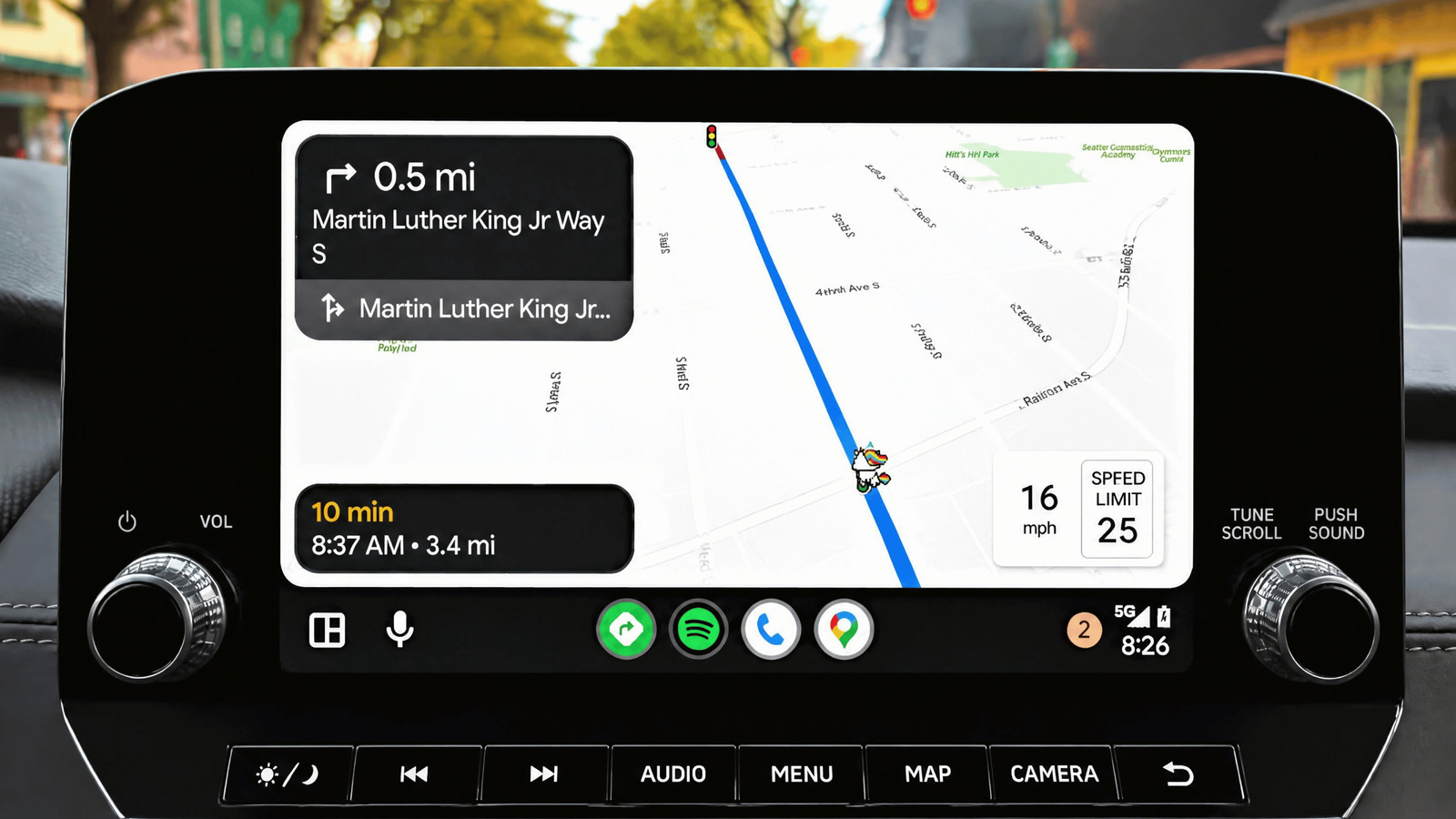
Launched in 1996, MapQuest, the world’s oldest commercially available web mapping service, recently introduced Android Auto support, making it an alternative to Google and Apple Maps with the added distinction of calling a certain body of water in North America Lake Ontario, despite pressure from President Donald Trump.

The decision to retain the lake’s 380-year-old name drew a lot of attention. While both Apple and Google bowed to that pressure and changed how the name appears to map users in the US, MapQuest did not. This refusal prompted a huge spike in interest in its service, the company said. Usage grew to 50 times its normal rate, and the apps it offers generated over 1.5 million downloads. MapQuest quickly became the No. 1 mapping app on Apple’s App Store. “Hundreds of thousands of people signaled to us this weekend that we got it right, by downloading our app,” said Doug Berger, general manager of MapQuest in a statement.

The company is feeding this interest with the introduction of beta support for Android Auto on Google Play. 

How to install MapQuest with Android Auto

Using MapQuest with Android Auto is simple:

  • Open Google Play on your Android smartphone, find MapQuest, download and install the app, or update it to the latest version if already installed.
  • Scroll down the MapQuest page in Google Play, join the beta program and update the app.
  • Connect your smartphone to your car in the usual way, using Bluetooth or a compatible USB cable. The MapQuest icon should appear on your dashboard alongside any other mapping services you have installed, such as Google Maps and Waze.
  • If it does not, open Settings on your smartphone and go to Connected devices > Android Auto > Customize launcher and ensure the MapQuest checkbox is actually checked.

Once these steps are complete — including joining the beta program — you should find MapQuest available to you in your vehicle.

Using MapQuest on Android Auto

Initial user feedback on MapQuest’s Android Auto beta suggests the application remains a little rough around the edges in comparison to Google or Apple Maps. Various reports claim there have been complaints of app crashes, delayed response times and voice navigation prompts that cut off in the middle of sentences. Interface quirks have been identified, and there may be some frustration that some real-time features are limited to North America (US and Canada).

To be fair, this is beta software; flaws and foibles are to be expected, and the company’s social media feeds suggest its developers are actively working to improve the app, including regular software patches.

What features does MapQuest on Android Auto provide?

MapQuest’s Android Auto solution currently provides:

  • Turn-by-turn navigation
  • Real-time traffic updates
  • Route optimization
  • Search for locations, such as gas stations or EV chargers
  • Favorites and saved locations
  • Voice search
  • Speedometer display to show current speed against the speed limit
  • Crowdsourced incident reporting

While the software moves through the beta process, drivers seeking immediate alternatives for Android Auto or Apple’s CarPlay may also want to try and download Waze, Sygic or TomTom Go.

Credit: Source link

ShareTweetSendSharePin

Related Posts

OpenAI and Cisco Releases Shirudo: An Open-Source Linux Runtime Allowing Agents to Defend Systems Without Downtime
AI & Technology

OpenAI and Cisco Releases Shirudo: An Open-Source Linux Runtime Allowing Agents to Defend Systems Without Downtime

November 24, 2026
Exein Launches Ray AI Agent to Prioritize Firmware Security Fixes – Unite.AI
AI & Technology

Exein Launches Ray AI Agent to Prioritize Firmware Security Fixes – Unite.AI

November 24, 2026
ASRock Industrial Launches RBK-100 Physical AI Development Kit – Unite.AI
AI & Technology

ASRock Industrial Launches RBK-100 Physical AI Development Kit – Unite.AI

November 24, 2026
OpenAI Employee Who Secretly Recorded Meetings Allegedly Affiliated With The Saudi Government
AI & Technology

OpenAI Employee Who Secretly Recorded Meetings Allegedly Affiliated With The Saudi Government

November 24, 2026
Next Post
Jalen Brunson brings Knicks players to ‘SNL’

Jalen Brunson brings Knicks players to 'SNL'

Leave a Reply Cancel reply

Your email address will not be published. Required fields are marked *

Search

No Result
View All Result
Danske Bank A/S (DNKEY) Presents at J.P. Morgan European Financials Conference Transcript

Danske Bank A/S (DNKEY) Presents at J.P. Morgan European Financials Conference Transcript

November 20, 2026
Return of Huang to Nvidia Raises More Questions, Says Investor Yoshioka

Return of Huang to Nvidia Raises More Questions, Says Investor Yoshioka

November 23, 2026
Nvidia: This Has Gone Too Far

Nvidia: This Has Gone Too Far

November 21, 2026

About

Learn more

Our Services

Legal

Privacy Policy

Terms of Use

Bloggers

Learn more

Article Links

Contact

Advertise

Ask us anything

©2020- TradePoint.io - All rights reserved!

Tradepoint.io, being just a publishing and technology platform, is not a registered broker-dealer or investment adviser. So we do not provide investment advice. Rather, brokerage services are provided to clients of Tradepoint.io by independent SEC-registered broker-dealers and members of FINRA/SIPC. Every form of investing carries some risk and past performance is not a guarantee of future results. “Tradepoint.io“, “Instant Investing” and “My Trading Tools” are registered trademarks of Apperbuild, LLC.

This website is operated by Apperbuild, LLC. We have no link to any brokerage firm and we do not provide investment advice. Every information and resource we provide is solely for the education of our readers. © 2020 Apperbuild, LLC. All rights reserved.

No Result
View All Result
  • Main
  • AI & Technology
  • Stock Charts
  • Market & News
  • Business
  • Finance Tips
  • Trade Tube
  • Blog
  • Shop

© 2023 - TradePoint.io - All Rights Reserved!