
• bitcoinBitcoin(BTC)$84,694.000.32%
  • ethereumEthereum(ETH)$2,685.521.00%
  • tetherTether(USDT)$1.000.00%
  • binancecoinBNB(BNB)$785.332.69%
  • rippleXRP(XRP)$1.491.04%
  • usd-coinUSDC(USDC)$1.000.00%
  • solanaSolana(SOL)$119.601.50%
  • tronTRON(TRX)$0.3353840.32%
  • Figure HelocFigure Heloc(FIGR_HELOC)$1.03-2.02%
  • zcashZcash(ZEC)$1,314.892.66%
  • HyperliquidHyperliquid(HYPE)$89.433.68%
  • dogecoinDogecoin(DOGE)$0.0928491.57%
  • chainlinkChainlink(LINK)$14.023.11%
  • moneroMonero(XMR)$557.163.57%
  • whitebitWhiteBIT Coin(WBT)$84.250.35%
  • USDSUSDS(USDS)$1.000.01%
  • cardanoCardano(ADA)$0.2448272.15%
  • leo-tokenLEO Token(LEO)$8.990.43%
  • RainRain(RAIN)$0.0113772.25%
  • stellarStellar(XLM)$0.2157281.67%
  • bitcoin-cashBitcoin Cash(BCH)$316.753.49%
  • nearNEAR Protocol(NEAR)$4.741.95%
  • uniswapUniswap(UNI)$9.053.83%
  • litecoinLitecoin(LTC)$68.87-0.50%
  • avalanche-2Avalanche(AVAX)$11.104.79%
  • Ethena USDeEthena USDe(USDE)$1.000.00%
  • CantonCanton(CC)$0.1221403.49%
  • suiSui(SUI)$1.184.94%
  • Blockchain USDBlockchain USD(USDB)$0.871,000.00%
  • daiDai(DAI)$1.000.00%
  • hedera-hashgraphHedera(HBAR)$0.1020972.43%
  • USD1USD1(USD1)$1.000.01%
  • BitwayBitway(BTW)$1.5915.82%
  • the-open-networkGram (prev. Toncoin)(GRAM)$1.511.64%
  • quant-networkQuant(QNT)$266.9617.42%
  • shiba-inuShiba Inu(SHIB)$0.0000062.37%
  • BittensorBittensor(TAO)$296.833.63%
  • tether-goldTether Gold(XAUT)$4,139.90-0.07%
  • crypto-com-chainCronos(CRO)$0.0662790.67%
  • Global DollarGlobal Dollar(USDG)$1.000.00%
  • Pump.funPump.fun(PUMP)$0.00629219.48%
  • paypal-usdPayPal USD(PYUSD)$1.000.00%
  • aaveAave(AAVE)$180.750.31%
  • okbOKB(OKB)$120.200.15%
  • Ripple USDRipple USD(RLUSD)$1.000.00%
  • Circle USYCCircle USYC(USYC)$1.140.00%
  • OndoOndo(ONDO)$0.4937011.49%
  • EthenaEthena(ENA)$0.2379982.42%
  • MemeCoreMemeCore(M)$1.04-0.98%
  • Ondo US Dollar YieldOndo US Dollar Yield(USDY)$1.15-0.02%
TradePoint.io
  • Main
  • AI & Technology
  • Stock Charts
  • Market & News
  • Business
  • Finance Tips
  • Trade Tube
  • Blog
  • Shop
No Result
View All Result
TradePoint.io
No Result
View All Result

One Problem With Android Auto Can Be Fixed With A Simple Update

September 12, 2026
in AI & Technology
Reading Time: 4 mins read
A A
One Problem With Android Auto Can Be Fixed With A Simple Update
ShareShareShareShareShare

Your phone isn’t the only device that may need an update when Android Auto starts acting up.


TY Lim/Shutterstock

There are many reasons why Android Auto may stop connecting, and the initial fixes typically focus on the phone and connection. You inspect the cable, restart the device, forget the car, reconnect it and make sure Android Auto is up to date. If all that fails, however, the software that requires attention might be in the dashboard.

YOU MAY ALSO LIKE

How To Check The Temperature Of Your PC’s CPU

How To Customize Camera Control On Your iPhone

Your car’s infotainment system also has software, and if it’s out of date, it can cause Android Auto connection problems. Google advises users to restart the infotainment system and, if the receiver is an aftermarket Pioneer or Kenwood unit, to visit the manufacturer’s website and check for a firmware update. 

Android Auto relies on the phone and car working correctly, and if you just focus on the phone, you may be missing half the equation. If none of the above has worked, including changing cables, reconnecting the phone or restarting the phone, then the car’s software is another area to consider.

Your car might need an update as well
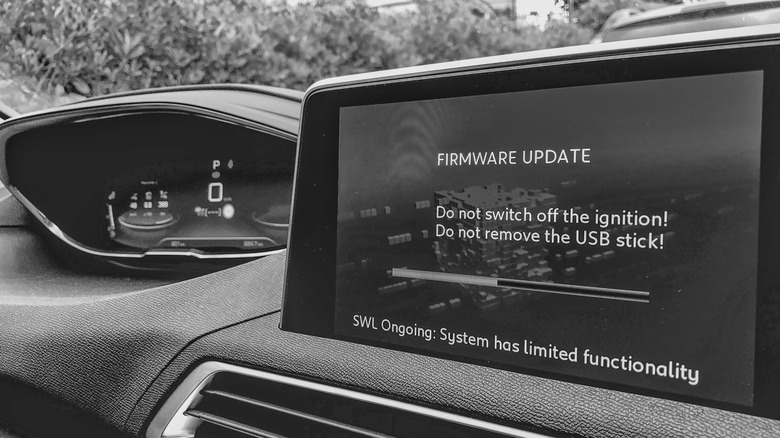

Infotainment screen in a car showing an ongoing firmware update.
Jovannig/Getty Images

Automakers have been sending out infotainment updates that can improve Android Auto, and Hyundai’s February 2026 infotainment update for ccNC-equipped cars in Europe included improved wireless Android Auto and Apple CarPlay connectivity, quicker reconnection if the phone goes unresponsive and automatic restoration after a restart. Chevrolet makes the point more directly: on applicable vehicles, it lists updating both the phone and vehicle software as the first troubleshooting step when Android Auto won’t connect.

How you install an update depends on the car. Some systems can download software via Wi-Fi, while others use a USB drive or SD card, and some manufacturers also offer dealer assistance. For example, Uconnect allows supported systems to be connected to Wi-Fi via the vehicle’s settings menu.

Therefore, there is no universal button for updating infotainment firmware. Start at your car manufacturer’s website and follow the directions for that infotainment system. If the site asks for your VIN or model details, provide them. If the process is not clear (or the manufacturer states that it must be installed by a dealer), a dealer is the safer route than getting an update file from elsewhere. 

A firmware update won’t fix every Android Auto problem
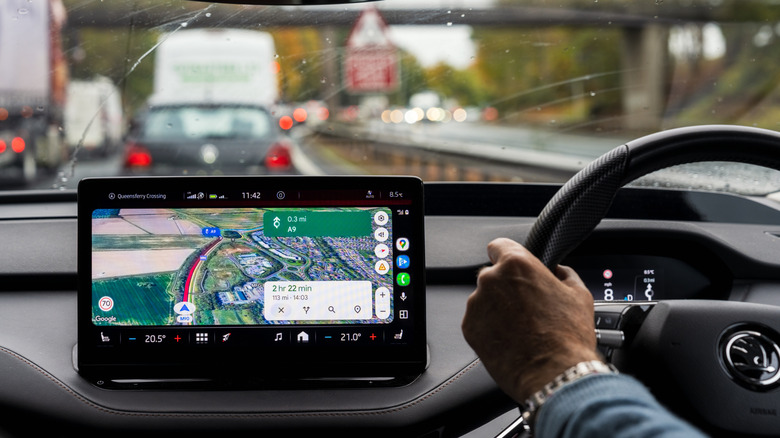

A driver using Google Maps for navigation on Android Auto.
Georgeclerk/Getty Images

If Android Auto stopped working right after a phone or Android Auto update, check Google’s Android Auto Known Issues page before changing the car’s software. Google recently addressed connection problems affecting Pixel 10 and Samsung S26 phones and was still investigating an S25 connection issue. That timing can help you decide which side of the connection deserves attention first.

If Android Auto has stopped working right after a phone or Android Auto update, begin there before making any changes in the car. Google advises users to verify that the car is compatible, check that Android Auto is turned on in the infotainment system and test the USB connection. For wired Android Auto, its current guidance is to use a quality cable that is under 3 feet long.

Updating the car is a troubleshooting measure and not a magic bullet. If Android Auto was working before, the standard phone-side troubleshooting has failed and newer infotainment software is available, an update is one more thing to check off before scheduling a service appointment.

Firmware is not without its restrictions. It’s not always able to add Android Auto to hardware that didn’t support it to begin with. Uconnect says its systems can’t simply be upgraded to add Android Auto or CarPlay, while Uconnect 5 and select Uconnect 4 and 4C systems include both.

Credit: Source link

ShareTweetSendSharePin

Related Posts

How To Check The Temperature Of Your PC’s CPU
AI & Technology

How To Check The Temperature Of Your PC’s CPU

October 3, 2026
How To Customize Camera Control On Your iPhone
AI & Technology

How To Customize Camera Control On Your iPhone

October 3, 2026
What Does FDM Stand For In 3D Printing And How Does It Work?
AI & Technology

What Does FDM Stand For In 3D Printing And How Does It Work?

October 3, 2026
How To Adjust The Audio Quality In Apple Music
AI & Technology

How To Adjust The Audio Quality In Apple Music

October 3, 2026
Next Post
Iconic firefighters photo from 9/11: Where are they now?

Iconic firefighters photo from 9/11: Where are they now?

Leave a Reply Cancel reply

Your email address will not be published. Required fields are marked *

Search

No Result
View All Result
Judge Dismisses Lawsuits Claiming Google’s AI Overviews Siphon Web Traffic

Judge Dismisses Lawsuits Claiming Google’s AI Overviews Siphon Web Traffic

October 1, 2026
Lockheed CEO Maps Pivot to Move at `Skunk Works’ Speed

Lockheed CEO Maps Pivot to Move at `Skunk Works’ Speed

October 2, 2026
Prince Harry and Meghan to move back to United Kingdom

Prince Harry and Meghan to move back to United Kingdom

September 27, 2026

About

Learn more

Our Services

Legal

Privacy Policy

Terms of Use

Bloggers

Learn more

Article Links

Contact

Advertise

Ask us anything

©2020- TradePoint.io - All rights reserved!

Tradepoint.io, being just a publishing and technology platform, is not a registered broker-dealer or investment adviser. So we do not provide investment advice. Rather, brokerage services are provided to clients of Tradepoint.io by independent SEC-registered broker-dealers and members of FINRA/SIPC. Every form of investing carries some risk and past performance is not a guarantee of future results. “Tradepoint.io“, “Instant Investing” and “My Trading Tools” are registered trademarks of Apperbuild, LLC.

This website is operated by Apperbuild, LLC. We have no link to any brokerage firm and we do not provide investment advice. Every information and resource we provide is solely for the education of our readers. © 2020 Apperbuild, LLC. All rights reserved.

No Result
View All Result
  • Main
  • AI & Technology
  • Stock Charts
  • Market & News
  • Business
  • Finance Tips
  • Trade Tube
  • Blog
  • Shop

© 2023 - TradePoint.io - All Rights Reserved!