
• bitcoinBitcoin(BTC)$81,010.00-0.24%
  • ethereumEthereum(ETH)$2,362.41-1.74%
  • tetherTether(USDT)$1.000.01%
  • binancecoinBNB(BNB)$710.53-0.50%
  • rippleXRP(XRP)$1.27-1.53%
  • usd-coinUSDC(USDC)$1.000.00%
  • solanaSolana(SOL)$101.80-1.44%
  • tronTRON(TRX)$0.332089-0.78%
  • Figure HelocFigure Heloc(FIGR_HELOC)$1.084.05%
  • zcashZcash(ZEC)$1,081.56-4.49%
  • HyperliquidHyperliquid(HYPE)$77.01-2.04%
  • dogecoinDogecoin(DOGE)$0.077407-2.29%
  • moneroMonero(XMR)$590.538.02%
  • USDSUSDS(USDS)$1.000.01%
  • whitebitWhiteBIT Coin(WBT)$79.05-0.58%
  • chainlinkChainlink(LINK)$11.72-1.44%
  • leo-tokenLEO Token(LEO)$9.04-0.01%
  • cardanoCardano(ADA)$0.215619-1.94%
  • RainRain(RAIN)$0.0091845.17%
  • nearNEAR Protocol(NEAR)$4.76-3.02%
  • stellarStellar(XLM)$0.174274-1.20%
  • bitcoin-cashBitcoin Cash(BCH)$268.71-1.31%
  • Ethena USDeEthena USDe(USDE)$1.000.02%
  • litecoinLitecoin(LTC)$58.19-1.01%
  • daiDai(DAI)$1.000.00%
  • uniswapUniswap(UNI)$6.97-1.34%
  • avalanche-2Avalanche(AVAX)$9.50-2.89%
  • USD1USD1(USD1)$1.000.01%
  • CantonCanton(CC)$0.099052-4.43%
  • suiSui(SUI)$0.96-2.20%
  • hedera-hashgraphHedera(HBAR)$0.0861614.33%
  • the-open-networkGram (prev. Toncoin)(GRAM)$1.33-1.23%
  • tether-goldTether Gold(XAUT)$4,146.42-0.13%
  • BitwayBitway(BTW)$2.20-6.70%
  • Global DollarGlobal Dollar(USDG)$1.000.03%
  • BittensorBittensor(TAO)$260.40-2.67%
  • shiba-inuShiba Inu(SHIB)$0.000005-1.87%
  • paypal-usdPayPal USD(PYUSD)$1.000.00%
  • crypto-com-chainCronos(CRO)$0.055242-2.98%
  • quant-networkQuant(QNT)$189.06-5.37%
  • EthenaEthena(ENA)$0.181473-3.91%
  • Ripple USDRipple USD(RLUSD)$1.000.02%
  • Circle USYCCircle USYC(USYC)$1.140.00%
  • Ondo US Dollar YieldOndo US Dollar Yield(USDY)$1.150.02%
  • okbOKB(OKB)$112.15-2.75%
  • aaveAave(AAVE)$149.28-1.62%
  • BlackRock USD Institutional Digital Liquidity FundBlackRock USD Institutional Digital Liquidity Fund(BUIDL)$1.000.00%
  • OndoOndo(ONDO)$0.425101-3.08%
  • Pump.funPump.fun(PUMP)$0.004122-5.37%
  • AsterAster(ASTER)$0.70-0.52%
TradePoint.io
  • Main
  • AI & Technology
  • Stock Charts
  • Market & News
  • Business
  • Finance Tips
  • Trade Tube
  • Blog
  • Shop
No Result
View All Result
TradePoint.io
No Result
View All Result

How To Keep Your Smart Home Running Even If The Internet Goes Down

October 17, 2026
in AI & Technology
Reading Time: 5 mins read
A A
How To Keep Your Smart Home Running Even If The Internet Goes Down
ShareShareShareShareShare

Your smart devices don’t have to stop working when your Wi-Fi does.


Nanoleaf

With Apple finally developing new smart home products, now’s a great time to remind everyone that though the technology can improve your home’s look and convenience, there are also a few hazards involved. If you’re overly ambitious with your routines, for example, smart bulbs might switch off when people need them. Once, while we installed a smart thermostat, the heat ran dangerously out of control until we fixed an obscure flaw.

YOU MAY ALSO LIKE

The Reason Why Your Drive Shows Less Storage Than You Paid For

How To Use Your Windows PC To Make And Receive Phone Calls

For many of you, the biggest issue is going to be offline resilience. When internet access goes down, some smart home accessories can go “dumb,” either maintaining their last state or failing to work at all. Usually, this is just an inconvenience. If you’re counting on an accessory for health or security, however, this can become a legitimate crisis.

Thankfully, there are ways of building a smart home around offline automation without investing in the custom systems you find in mansions. It’s just a matter of anchoring your gear around the right peripherals and protocols. And if you caught the pun just now, you’re one step ahead.

Let the hubs do the talking
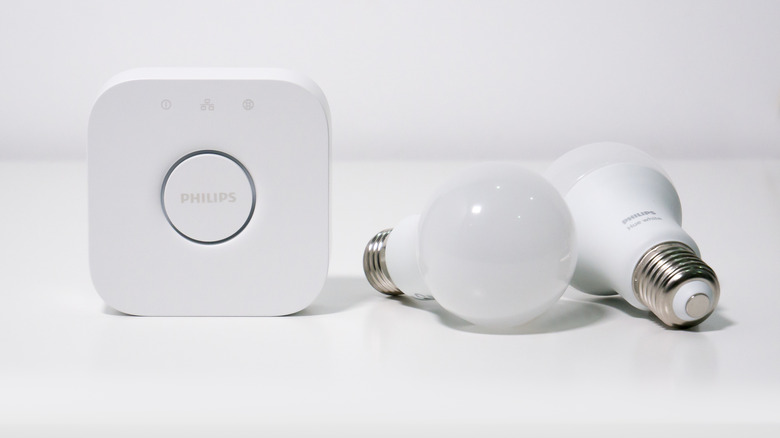

A Philips Hue Bridge with a pair of Hue White smart bulbs.
Barry Paterson/Shutterstock

The reason so many accessories turn dumb is that they connect directly to Wi-Fi to fetch instructions from a cloud server. Wi-Fi accessories are often the easiest to set up — if the internet goes down, however, or if your Wi-Fi router encounters hiccups, they may have no way of storing and triggering automations on their own. They may not even switch on or off at scheduled times, which you’d think would be dead simple.

Whenever possible, then, it’s best to turn to accessories that route everything through a local hub. These hubs still connect to the internet, but they can store and process many automations locally as long as everything still has power. The only major exceptions are automations that depend on live data, like current weather conditions, or involve sharing data remotely. If you’re going to install a smart security system and internet outages are a regular issue, cellular backup is a must.

These hubs can take many forms. If you’re using Apple Home, for example, HomePods and Apple TVs can act as home hubs, enabling both remote access and local automations. Some security cameras can record to local hub storage, even if they have to go online to trigger alerts or perform advanced functions. Matter-enabled smart speakers and displays are capable of executing offline commands, though in practice, companies like Amazon and Google don’t really exploit this. We discovered this the hard way.

The most bulletproof hubs tend to be those that link local hardware not through Wi-Fi, but through Thread, Zigbee or Z-Wave radios. All three are low-power, low-bandwidth mesh standards. A hub can often connect many compatible accessories simultaneously, and the mesh aspect means that accessories farther away from the hub won’t drop off. Thread is preferable, since some Wi-Fi accessories can act as Thread “border routers,” but we’ve had great experiences with Zigbee-based hubs like the Philips Hue Bridge. The only real problem with these technologies is that their low bandwidth limits them to things like lights, locks and sensors.

What about the power problem?


A woman slaps her forehead while holding a candle in a lightless room.
Nicoletaionescu/Getty Images

The ideal setup would involve using an entirely hub-based smart home ecosystem paired with whole-home power backup. That’s not realistic for most people, unfortunately. Some accessories don’t exist in a hub-compatible form, and more importantly, whole-home battery systems cost thousands or tens of thousands of dollars. Assuming that’s in your budget, it might still not be worth the outlay unless your job or safety is at stake. You can deal with your soundbar or light panels being down for 30 minutes.

A workable compromise involves hunting for accessories with their own redundancy, whether that means batteries, backup controls or both. The Philips Hue Go, for example, can connect to a Hue Bridge, but includes a battery to operate as a portable lamp as well. It can keep shining for hours when it loses AC power, and it cycles through some basic effects using an onboard button or app-based Bluetooth commands. Smart thermostats will always keep operating on their last schedule as long as your HVAC system is powered.

You won’t be able to secure redundancy for every smart home accessory. But if you think ahead when shopping, at least some of them should keep running 24/7. Don’t just pick the cheapest or slickest options at hand.

Credit: Source link

ShareTweetSendSharePin

Related Posts

The Reason Why Your Drive Shows Less Storage Than You Paid For
AI & Technology

The Reason Why Your Drive Shows Less Storage Than You Paid For

October 18, 2026
How To Use Your Windows PC To Make And Receive Phone Calls
AI & Technology

How To Use Your Windows PC To Make And Receive Phone Calls

October 18, 2026
What Is a Reranker? The Second-Stage Model That Improves Search Results – Unite.AI
AI & Technology

What Is a Reranker? The Second-Stage Model That Improves Search Results – Unite.AI

October 18, 2026
Google Open-Sources Harness2, a Recursive Agent Harnessing Framework
AI & Technology

Google Open-Sources Harness2, a Recursive Agent Harnessing Framework

October 18, 2026
Next Post
Why Your Wi-Fi Speeds Can Drop In The Evening, And What To Do About It

Why Your Wi-Fi Speeds Can Drop In The Evening, And What To Do About It

Leave a Reply Cancel reply

Your email address will not be published. Required fields are marked *

Search

No Result
View All Result
ASML Struggles to Keep Up With High AI Demand

ASML Struggles to Keep Up With High AI Demand

October 16, 2026
Trump defends son over wedding party controversy

Trump defends son over wedding party controversy

October 15, 2026
Being dropped from tour puts Macklemore in spotlight

Being dropped from tour puts Macklemore in spotlight

October 13, 2026

About

Learn more

Our Services

Legal

Privacy Policy

Terms of Use

Bloggers

Learn more

Article Links

Contact

Advertise

Ask us anything

©2020- TradePoint.io - All rights reserved!

Tradepoint.io, being just a publishing and technology platform, is not a registered broker-dealer or investment adviser. So we do not provide investment advice. Rather, brokerage services are provided to clients of Tradepoint.io by independent SEC-registered broker-dealers and members of FINRA/SIPC. Every form of investing carries some risk and past performance is not a guarantee of future results. “Tradepoint.io“, “Instant Investing” and “My Trading Tools” are registered trademarks of Apperbuild, LLC.

This website is operated by Apperbuild, LLC. We have no link to any brokerage firm and we do not provide investment advice. Every information and resource we provide is solely for the education of our readers. © 2020 Apperbuild, LLC. All rights reserved.

No Result
View All Result
  • Main
  • AI & Technology
  • Stock Charts
  • Market & News
  • Business
  • Finance Tips
  • Trade Tube
  • Blog
  • Shop

© 2023 - TradePoint.io - All Rights Reserved!