
• bitcoinBitcoin(BTC)$82,958.000.39%
  • ethereumEthereum(ETH)$2,508.330.58%
  • tetherTether(USDT)$1.00-0.01%
  • binancecoinBNB(BNB)$748.020.40%
  • rippleXRP(XRP)$1.40-0.59%
  • usd-coinUSDC(USDC)$1.000.00%
  • solanaSolana(SOL)$109.980.09%
  • tronTRON(TRX)$0.330403-0.16%
  • Figure HelocFigure Heloc(FIGR_HELOC)$1.076.38%
  • zcashZcash(ZEC)$1,226.390.21%
  • HyperliquidHyperliquid(HYPE)$85.471.13%
  • dogecoinDogecoin(DOGE)$0.085985-0.28%
  • USDSUSDS(USDS)$1.000.03%
  • chainlinkChainlink(LINK)$13.051.43%
  • moneroMonero(XMR)$522.711.03%
  • whitebitWhiteBIT Coin(WBT)$81.600.43%
  • cardanoCardano(ADA)$0.249011-1.39%
  • leo-tokenLEO Token(LEO)$8.900.13%
  • RainRain(RAIN)$0.0110266.93%
  • nearNEAR Protocol(NEAR)$5.306.14%
  • stellarStellar(XLM)$0.1963010.25%
  • bitcoin-cashBitcoin Cash(BCH)$278.64-0.02%
  • litecoinLitecoin(LTC)$63.76-0.04%
  • uniswapUniswap(UNI)$7.633.32%
  • Ethena USDeEthena USDe(USDE)$1.00-0.02%
  • CantonCanton(CC)$0.119146-2.78%
  • avalanche-2Avalanche(AVAX)$10.36-0.41%
  • suiSui(SUI)$1.111.80%
  • daiDai(DAI)$1.00-0.02%
  • BitwayBitway(BTW)$1.591.54%
  • USD1USD1(USD1)$1.00-0.03%
  • the-open-networkGram (prev. Toncoin)(GRAM)$1.461.07%
  • hedera-hashgraphHedera(HBAR)$0.092671-0.05%
  • quant-networkQuant(QNT)$236.88-4.21%
  • tether-goldTether Gold(XAUT)$4,181.670.07%
  • BittensorBittensor(TAO)$285.132.82%
  • shiba-inuShiba Inu(SHIB)$0.000005-1.13%
  • Global DollarGlobal Dollar(USDG)$1.000.00%
  • crypto-com-chainCronos(CRO)$0.060494-2.43%
  • EthenaEthena(ENA)$0.2233941.50%
  • paypal-usdPayPal USD(PYUSD)$1.00-0.01%
  • okbOKB(OKB)$125.75-0.57%
  • aaveAave(AAVE)$168.99-0.66%
  • Pump.funPump.fun(PUMP)$0.005473-0.44%
  • Ripple USDRipple USD(RLUSD)$1.000.01%
  • OndoOndo(ONDO)$0.492470-0.62%
  • Circle USYCCircle USYC(USYC)$1.140.00%
  • Ondo US Dollar YieldOndo US Dollar Yield(USDY)$1.15-0.06%
  • MemeCoreMemeCore(M)$0.98-4.24%
  • BlackRock USD Institutional Digital Liquidity FundBlackRock USD Institutional Digital Liquidity Fund(BUIDL)$1.000.00%
TradePoint.io
  • Main
  • AI & Technology
  • Stock Charts
  • Market & News
  • Business
  • Finance Tips
  • Trade Tube
  • Blog
  • Shop
No Result
View All Result
TradePoint.io
No Result
View All Result

How To Enable Live Activities On iPhone And CarPlay

October 11, 2026
in AI & Technology
Reading Time: 3 mins read
A A
How To Enable Live Activities On iPhone And CarPlay
ShareShareShareShareShare

Keep track of important updates without having to open the app every two minutes.


Adnan Ahmed for Engadget

At a time when most Android phones had already switched to tiny hole-punch cutouts to house their front-facing cameras, the iPhone 14 Pro launched with a long pill-shaped cutout. Apple has used this as its standard since then, aside from the budget “e” phones and iPhone Duo, and even made it smaller for the iPhone 18 Pro series.

YOU MAY ALSO LIKE

What Is The 3-2-1 Rule For Backing Up Your Data?

This Android Auto Problem Is Affecting Calls On Foldable Phones

This is because iPhones pack more than just a camera inside the cutout; there are additional sensors required for Face ID to work. Instead of hiding the pill with cleverly designed wallpapers, Apple leaned into it with the Dynamic Island, using the surrounding area to turn an otherwise awkward design constraint into a useful part of the iOS experience.

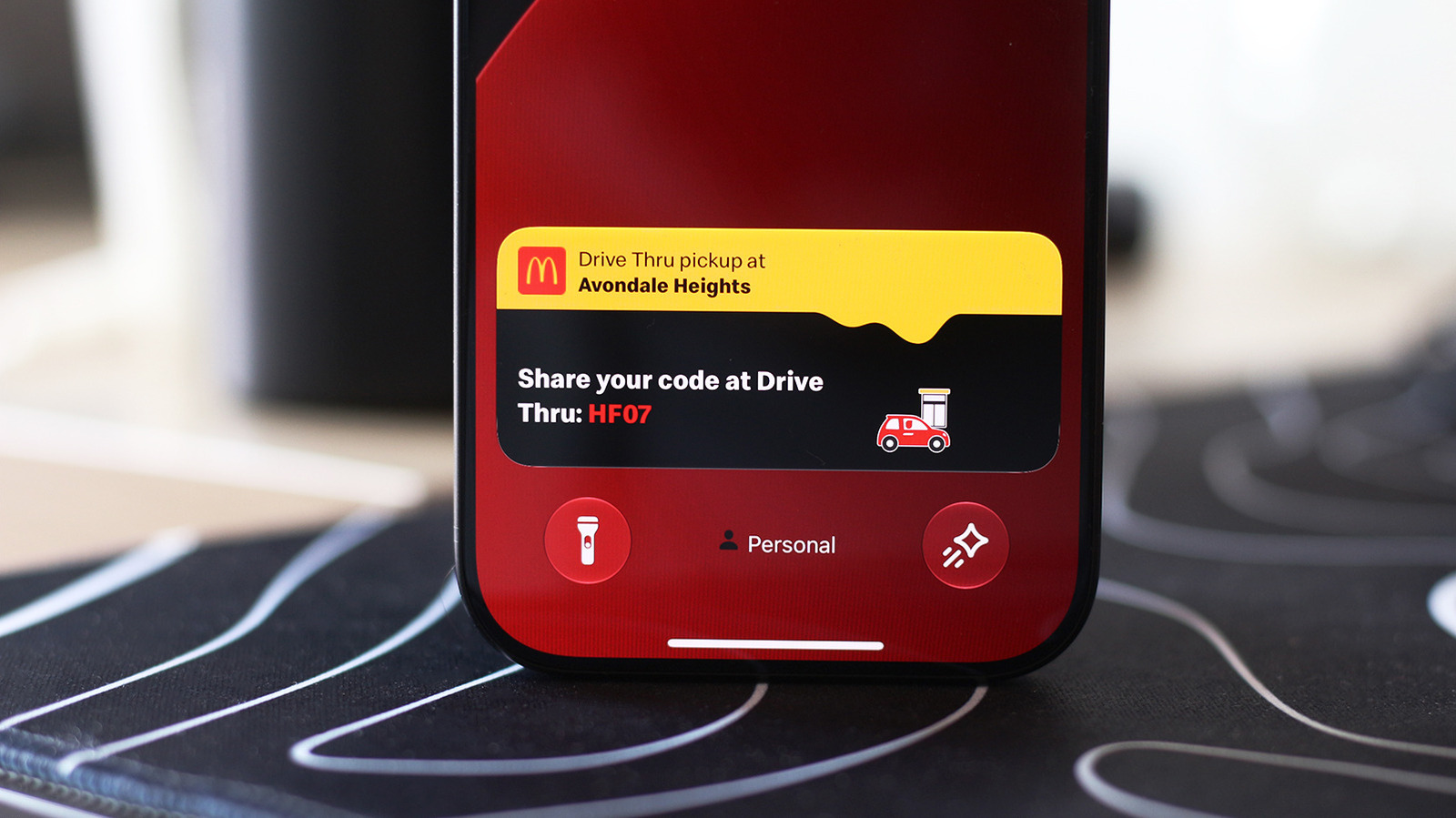
Your iPhone’s Live Activities show up on the Dynamic Island when using your phone. They display information you might want to keep an eye on without having to constantly switch back to the associated app: timers, navigation directions, music playback and sports scores can be displayed as Live Activities. Many third-party apps like food delivery and flight tracking services have also adapted to use the Dynamic Island.

Live Activities should be enabled by default, but if you don’t see them for certain apps, check if they’ve accidentally been turned off. On your iPhone, navigate to Settings > Apps and select any app that’s been giving you trouble. Make sure the Live Activities slider is enabled. Though Live Activities work independently of regular notifications, you might want to also enable notifications for the app if you’re not seeing the expected updates.

These activities will also appear on the Lock screen when you’re not using your device. To make sure this is enabled, visit Settings > Face ID & Passcode. Confirm your passcode, then scroll down to the Allow Access When Locked section and be sure Live Activities is on.

Using Live Activities on CarPlay
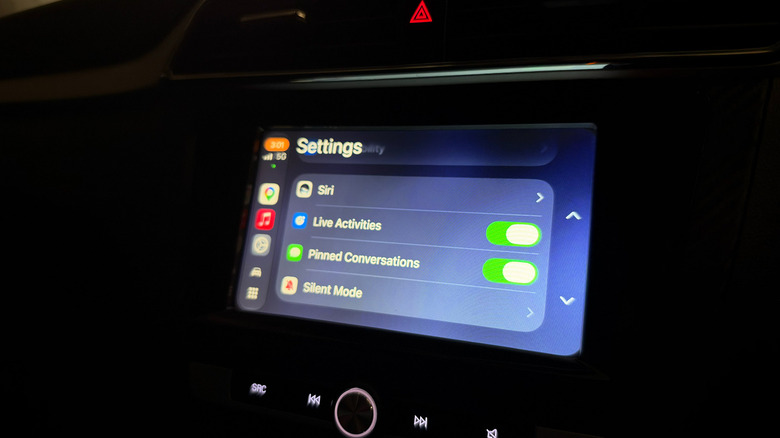

The Live Activities toggle in CarPlay.
Adnan Ahmed for Engadget

CarPlay makes it easy to access vital info from your iPhone without getting too distracted while driving. As part of this, it can display Live Activities so you can track the status of a food delivery or updates for an upcoming flight. 

Live Activities from your iPhone are automatically displayed on the CarPlay Dashboard, the split-screen view to the left of your app list. If you’re using an app that covers the entire screen, Live Activities will still be shown as notifications at the bottom of the display. If they become too distracting, you can always turn the feature off in CarPlay or disable Live Activities for specific noisy apps, as above.

In case you’re not seeing them, open the Settings app in CarPlay, scroll down and make sure the Live Activities toggle is enabled. You should also confirm the Suggestions in CarPlay (or Suggestions in Dashboard) option is turned on. If they still don’t appear, try turning off Driving Focus if it’s running.

Besides this, you can add widgets to CarPlay for quick controls and information from apps without having to open them. Widgets live in the leftmost section of the CarPlay Dashboard. Spend a little more time in the Settings app, and you’ll discover more ways to customize how CarPlay looks on your car’s display.

Credit: Source link

ShareTweetSendSharePin

Related Posts

What Is The 3-2-1 Rule For Backing Up Your Data?
AI & Technology

What Is The 3-2-1 Rule For Backing Up Your Data?

October 10, 2026
This Android Auto Problem Is Affecting Calls On Foldable Phones
AI & Technology

This Android Auto Problem Is Affecting Calls On Foldable Phones

October 10, 2026
What Is Ray Tracing In Gaming And Does It Really Make A Difference?
AI & Technology

What Is Ray Tracing In Gaming And Does It Really Make A Difference?

October 10, 2026
How Xiaomi, Oppo And Other Non-US Brands Are Challenging The iPhone Duo
AI & Technology

How Xiaomi, Oppo And Other Non-US Brands Are Challenging The iPhone Duo

October 10, 2026
Next Post
Alabama vs. Georgia live updates: No. 6 Crimson Tide meet No. 2 Bulldogs in pivotal SEC showdown – CBS Sports

Alabama vs. Georgia live updates: No. 6 Crimson Tide meet No. 2 Bulldogs in pivotal SEC showdown - CBS Sports

Leave a Reply Cancel reply

Your email address will not be published. Required fields are marked *

Search

No Result
View All Result
This Android Auto Problem Is Affecting Calls On Foldable Phones

This Android Auto Problem Is Affecting Calls On Foldable Phones

October 10, 2026
SpaceX Seeks To Join AI Borrowing Bonanza

SpaceX Seeks To Join AI Borrowing Bonanza

October 8, 2026
Trump says U.S. is still talking to Iran despite rejecting offer

Trump says U.S. is still talking to Iran despite rejecting offer

October 5, 2026

About

Learn more

Our Services

Legal

Privacy Policy

Terms of Use

Bloggers

Learn more

Article Links

Contact

Advertise

Ask us anything

©2020- TradePoint.io - All rights reserved!

Tradepoint.io, being just a publishing and technology platform, is not a registered broker-dealer or investment adviser. So we do not provide investment advice. Rather, brokerage services are provided to clients of Tradepoint.io by independent SEC-registered broker-dealers and members of FINRA/SIPC. Every form of investing carries some risk and past performance is not a guarantee of future results. “Tradepoint.io“, “Instant Investing” and “My Trading Tools” are registered trademarks of Apperbuild, LLC.

This website is operated by Apperbuild, LLC. We have no link to any brokerage firm and we do not provide investment advice. Every information and resource we provide is solely for the education of our readers. © 2020 Apperbuild, LLC. All rights reserved.

No Result
View All Result
  • Main
  • AI & Technology
  • Stock Charts
  • Market & News
  • Business
  • Finance Tips
  • Trade Tube
  • Blog
  • Shop

© 2023 - TradePoint.io - All Rights Reserved!