
• bitcoinBitcoin(BTC)$78,876.00-0.64%
  • ethereumEthereum(ETH)$2,498.25-0.19%
  • tetherTether(USDT)$1.000.01%
  • binancecoinBNB(BNB)$754.821.69%
  • rippleXRP(XRP)$1.421.04%
  • usd-coinUSDC(USDC)$1.000.01%
  • solanaSolana(SOL)$103.82-0.47%
  • tronTRON(TRX)$0.3390661.25%
  • Figure HelocFigure Heloc(FIGR_HELOC)$1.040.00%
  • zcashZcash(ZEC)$1,187.243.41%
  • HyperliquidHyperliquid(HYPE)$85.610.22%
  • dogecoinDogecoin(DOGE)$0.090349-0.97%
  • RainRain(RAIN)$0.016129-1.23%
  • USDSUSDS(USDS)$1.000.00%
  • whitebitWhiteBIT Coin(WBT)$81.636.24%
  • chainlinkChainlink(LINK)$12.50-2.10%
  • moneroMonero(XMR)$495.68-4.84%
  • leo-tokenLEO Token(LEO)$9.23-0.79%
  • cardanoCardano(ADA)$0.219549-1.33%
  • stellarStellar(XLM)$0.188261-2.71%
  • bitcoin-cashBitcoin Cash(BCH)$258.42-1.35%
  • daiDai(DAI)$1.000.00%
  • Ethena USDeEthena USDe(USDE)$1.000.01%
  • CantonCanton(CC)$0.1081870.94%
  • USD1USD1(USD1)$1.00-0.01%
  • uniswapUniswap(UNI)$6.79-4.54%
  • litecoinLitecoin(LTC)$54.30-2.61%
  • the-open-networkGram (prev. Toncoin)(GRAM)$1.390.42%
  • hedera-hashgraphHedera(HBAR)$0.078776-4.58%
  • avalanche-2Avalanche(AVAX)$7.97-2.02%
  • suiSui(SUI)$0.82-1.40%
  • Global DollarGlobal Dollar(USDG)$1.000.00%
  • shiba-inuShiba Inu(SHIB)$0.000005-1.48%
  • nearNEAR Protocol(NEAR)$2.33-0.30%
  • crypto-com-chainCronos(CRO)$0.0616247.48%
  • paypal-usdPayPal USD(PYUSD)$1.000.01%
  • BlackRock USD Institutional Digital Liquidity FundBlackRock USD Institutional Digital Liquidity Fund(BUIDL)$1.000.00%
  • MemeCoreMemeCore(M)$1.224.05%
  • tether-goldTether Gold(XAUT)$4,371.64-1.42%
  • Circle USYCCircle USYC(USYC)$1.140.01%
  • BittensorBittensor(TAO)$257.61-1.19%
  • Ripple USDRipple USD(RLUSD)$1.00-0.01%
  • okbOKB(OKB)$114.13-2.53%
  • Ondo US Dollar YieldOndo US Dollar Yield(USDY)$1.15-0.15%
  • mantleMantle(MNT)$0.630.86%
  • AsterAster(ASTER)$0.76-3.04%
  • polkadotPolkadot(DOT)$1.2013.11%
  • aaveAave(AAVE)$129.33-2.45%
  • pax-goldPAX Gold(PAXG)$4,375.39-1.41%
  • Pump.funPump.fun(PUMP)$0.004449-1.68%
TradePoint.io
  • Main
  • AI & Technology
  • Stock Charts
  • Market & News
  • Business
  • Finance Tips
  • Trade Tube
  • Blog
  • Shop
No Result
View All Result
TradePoint.io
No Result
View All Result

How To Change And Customize Your Apple CarPlay Display

September 8, 2026
in AI & Technology
Reading Time: 4 mins read
A A
How To Change And Customize Your Apple CarPlay Display
ShareShareShareShareShare

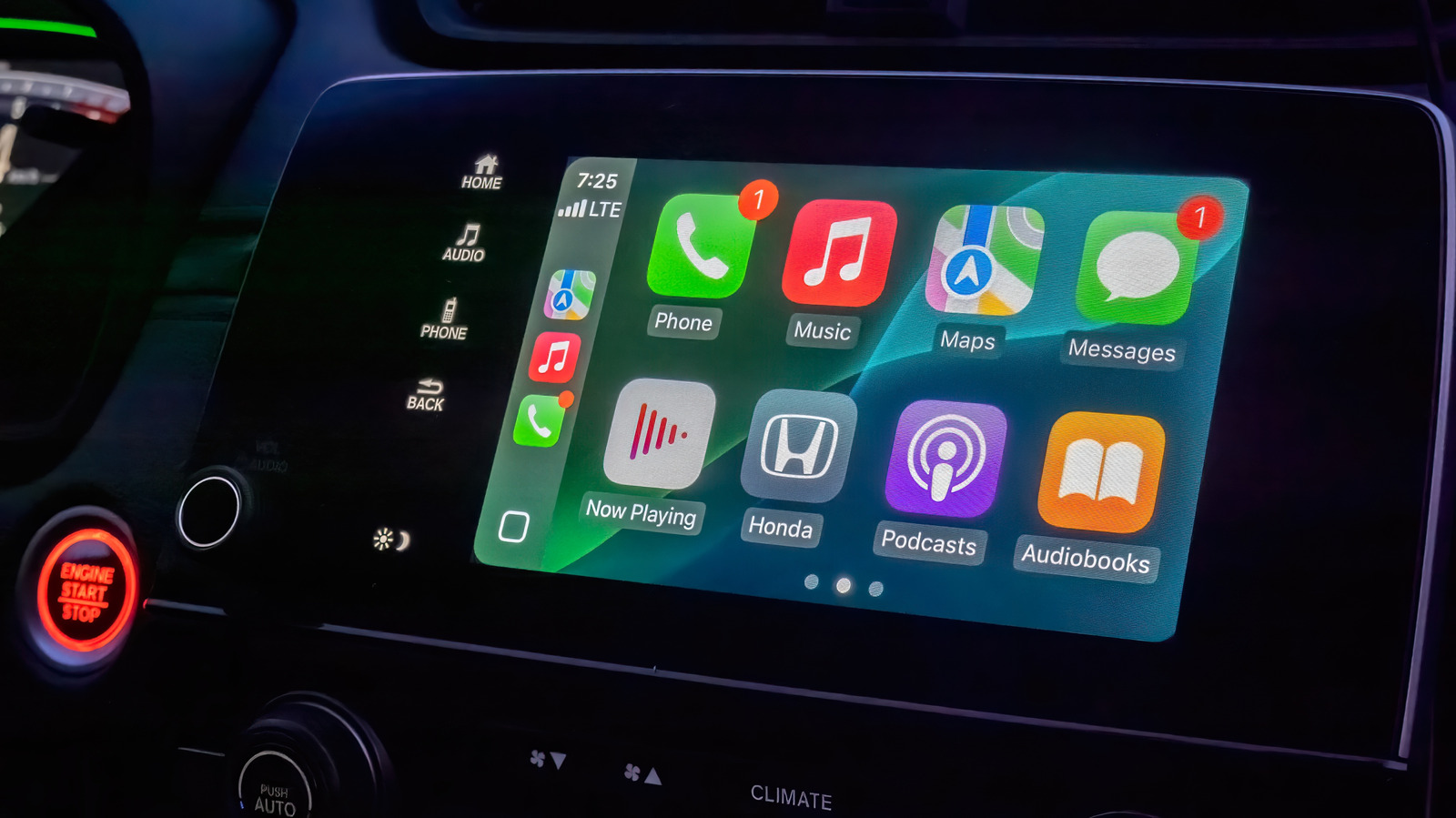
CarPlay is great as it comes, but a few personalization tweaks make it even more convenient.


Habanero Pixel/Shutterstock

If your vehicle supports the feature, one of the best quality-of-life upgrades you can make to your drives is setting up Apple CarPlay with a cable or wirelessly. This way, you don’t need to deal with the clunkiness of a phone mount. Your navigation app of choice and essential media controls are displayed directly on your car’s infotainment screen. Plus, with Siri receiving a major overhaul in iOS 27, interacting with your device completely hands-free should finally feel reliable while you’re driving.

YOU MAY ALSO LIKE

Sierra Open-Sources Hyper-τ-Bench, a Benchmark for Agent Construction

SpaceX’s Recovered Starship 40 Will Take Months To Get Back To Texas

CarPlay’s user interface uses a lot of bold text and large icons to make information easy to glance at and touch. It’s solid by default, but making a few tweaks will put the most important items in front of you and make everything easy to process.

By default, CarPlay uses dark mode so your car’s infotainment screen doesn’t blind you in dim environments. If this makes readability during the day more difficult, you can switch to light mode by navigating to Settings > Appearance in CarPlay using the touch screen or your vehicle’s controls. Here, select Automatic to have CarPlay switch between light and dark modes depending on the ambient lighting conditions.

The Settings app inside CarPlay (Settings > Wallpaper) is also where you can change the background that shows behind all your apps. Though you can’t use a custom image from your phone’s gallery, there are a handful of Apple-designed wallpapers with different color and pattern options to choose from. 

Similarly, visit Settings > Customize Icons to pick a dark icon pack or switch to clear icons that follow Apple’s Liquid Glass design philosophy. In the Accessibility submenu, you can alter the text size to improve readability.

Rearrange apps and use widgets in CarPlay
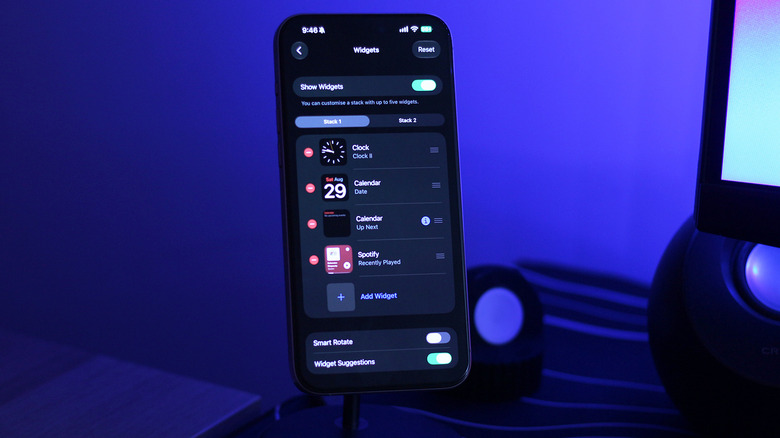

Customizing CarPlay widgets on an iPhone.
Adnan Ahmed for Engadget

One of the best ways to personalize the display in CarPlay is rearranging the apps on the home screen. Unlike the above, this customization happens on your iPhone. Navigate to Settings > General > CarPlay and select your vehicle, then tap Apps.

To bring your frequently used CarPlay apps to the first page, reorder the list using the handles. Your car’s display size affects how many apps appear on each page, so keep that number in mind as you adjust the list. Tap the Remove icon for any apps you don’t use; a few default ones can’t be removed, so drag them to the bottom if you don’t care about them.

It took forever for the iPhone to feature widget support on the home screen and even longer for Apple to bring widgets over to CarPlay. Widgets were finally added to CarPlay with iOS 26; they live on a separate page accessible access by swiping right from the main dashboard. 

Depending on how wide your car’s infotainment screen is, you’ll see one or more stacks of widgets at a time. By default, CarPlay lists widgets it thinks you might find useful, like the clock, calendar, media player and weather. To make better use of this space, you should customize which widgets show up in what stack. After all, you don’t want to be frantically going through the entire stack while on the road to find the widget you’re looking for. 

To do this, visit the same CarPlay settings page on your phone as mentioned above. Tap Widgets and make sure the Show Widgets toggle is turned on. You can add widgets in each stack or reorder them to keep the essential ones easily accessible. What shows here depends on your installed apps.

Credit: Source link

ShareTweetSendSharePin

Related Posts

Sierra Open-Sources Hyper-τ-Bench, a Benchmark for Agent Construction
AI & Technology

Sierra Open-Sources Hyper-τ-Bench, a Benchmark for Agent Construction

September 8, 2026
SpaceX’s Recovered Starship 40 Will Take Months To Get Back To Texas
AI & Technology

SpaceX’s Recovered Starship 40 Will Take Months To Get Back To Texas

September 8, 2026
What Is Roku’s Secret Menu And How Do You Unlock It?
AI & Technology

What Is Roku’s Secret Menu And How Do You Unlock It?

September 8, 2026
NVIDIA Announces CUDA Rust with cuda-oxide (SIMT) and cutile-rs (Tile) for Compile-Time-Safe GPU Kernels
AI & Technology

NVIDIA Announces CUDA Rust with cuda-oxide (SIMT) and cutile-rs (Tile) for Compile-Time-Safe GPU Kernels

September 8, 2026
Next Post
AI Stocks Are Propping Up the Market — Peter Schiff On What To Buy Instead

AI Stocks Are Propping Up the Market — Peter Schiff On What To Buy Instead

Leave a Reply Cancel reply

Your email address will not be published. Required fields are marked *

Search

No Result
View All Result
Mamdani says New Yorkers who wanted Netanyahu arrested can still protest his visit

Mamdani says New Yorkers who wanted Netanyahu arrested can still protest his visit

September 7, 2026
Trump attends dignified transfer for four U.S. service members killed in Iran War

Trump attends dignified transfer for four U.S. service members killed in Iran War

September 7, 2026
Florida city issues warning to stay away from wild monkeys

Florida city issues warning to stay away from wild monkeys

September 6, 2026

About

Learn more

Our Services

Legal

Privacy Policy

Terms of Use

Bloggers

Learn more

Article Links

Contact

Advertise

Ask us anything

©2020- TradePoint.io - All rights reserved!

Tradepoint.io, being just a publishing and technology platform, is not a registered broker-dealer or investment adviser. So we do not provide investment advice. Rather, brokerage services are provided to clients of Tradepoint.io by independent SEC-registered broker-dealers and members of FINRA/SIPC. Every form of investing carries some risk and past performance is not a guarantee of future results. “Tradepoint.io“, “Instant Investing” and “My Trading Tools” are registered trademarks of Apperbuild, LLC.

This website is operated by Apperbuild, LLC. We have no link to any brokerage firm and we do not provide investment advice. Every information and resource we provide is solely for the education of our readers. © 2020 Apperbuild, LLC. All rights reserved.

No Result
View All Result
  • Main
  • AI & Technology
  • Stock Charts
  • Market & News
  • Business
  • Finance Tips
  • Trade Tube
  • Blog
  • Shop

© 2023 - TradePoint.io - All Rights Reserved!