
• bitcoinBitcoin(BTC)$85,835.001.48%
  • ethereumEthereum(ETH)$2,705.630.82%
  • tetherTether(USDT)$1.000.00%
  • binancecoinBNB(BNB)$791.770.76%
  • rippleXRP(XRP)$1.511.32%
  • usd-coinUSDC(USDC)$1.000.00%
  • solanaSolana(SOL)$121.231.37%
  • tronTRON(TRX)$0.3356330.04%
  • Figure HelocFigure Heloc(FIGR_HELOC)$1.074.31%
  • zcashZcash(ZEC)$1,331.060.99%
  • HyperliquidHyperliquid(HYPE)$90.561.38%
  • dogecoinDogecoin(DOGE)$0.0960753.37%
  • chainlinkChainlink(LINK)$14.171.15%
  • moneroMonero(XMR)$546.40-2.02%
  • whitebitWhiteBIT Coin(WBT)$85.321.33%
  • USDSUSDS(USDS)$1.000.00%
  • cardanoCardano(ADA)$0.2511602.56%
  • leo-tokenLEO Token(LEO)$8.98-0.05%
  • RainRain(RAIN)$0.0114180.42%
  • stellarStellar(XLM)$0.2203322.13%
  • nearNEAR Protocol(NEAR)$4.933.65%
  • bitcoin-cashBitcoin Cash(BCH)$315.76-0.25%
  • uniswapUniswap(UNI)$9.03-0.05%
  • litecoinLitecoin(LTC)$70.752.62%
  • CantonCanton(CC)$0.1279764.83%
  • suiSui(SUI)$1.202.41%
  • Ethena USDeEthena USDe(USDE)$1.000.00%
  • avalanche-2Avalanche(AVAX)$11.05-0.31%
  • daiDai(DAI)$1.000.00%
  • hedera-hashgraphHedera(HBAR)$0.1034901.10%
  • USD1USD1(USD1)$1.00-0.01%
  • the-open-networkGram (prev. Toncoin)(GRAM)$1.531.47%
  • quant-networkQuant(QNT)$252.45-4.98%
  • shiba-inuShiba Inu(SHIB)$0.0000062.13%
  • BittensorBittensor(TAO)$302.211.85%
  • BitwayBitway(BTW)$1.26-17.94%
  • crypto-com-chainCronos(CRO)$0.0679852.72%
  • tether-goldTether Gold(XAUT)$4,140.12-0.02%
  • Global DollarGlobal Dollar(USDG)$1.000.00%
  • Pump.funPump.fun(PUMP)$0.0064342.92%
  • paypal-usdPayPal USD(PYUSD)$1.000.00%
  • aaveAave(AAVE)$178.57-1.12%
  • okbOKB(OKB)$121.731.21%
  • Ripple USDRipple USD(RLUSD)$1.000.00%
  • EthenaEthena(ENA)$0.2398621.24%
  • Circle USYCCircle USYC(USYC)$1.140.00%
  • OndoOndo(ONDO)$0.493003-0.15%
  • MemeCoreMemeCore(M)$1.051.08%
  • Ondo US Dollar YieldOndo US Dollar Yield(USDY)$1.15-0.02%
  • BlackRock USD Institutional Digital Liquidity FundBlackRock USD Institutional Digital Liquidity Fund(BUIDL)$1.000.00%
TradePoint.io
  • Main
  • AI & Technology
  • Stock Charts
  • Market & News
  • Business
  • Finance Tips
  • Trade Tube
  • Blog
  • Shop
No Result
View All Result
TradePoint.io
No Result
View All Result

How To Adjust The Liquid Glass Effect On Your iPhone With iOS 27

September 13, 2026
in AI & Technology
Reading Time: 4 mins read
A A
How To Adjust The Liquid Glass Effect On Your iPhone With iOS 27
ShareShareShareShareShare

Apple’s new controls make it easier to set things just how you like them.


Filipe Espósito for Engadget

Apple’s Liquid Glass interface doesn’t appeal to everyone. Some people love the glossy look, while others criticize it for reducing readability. Apple quickly became aware of this after it launched and introduced new ways of adjusting the Liquid Glass effect in iOS 26.1. Dubbed Tinted Mode, the feature reduces the opacity of Liquid Glass and increases its contrast. Still, that wasn’t enough to satisfy frustrated users who continued to complain about Apple’s modern design language.

YOU MAY ALSO LIKE

The Upcoming Touchscreen OLED MacBook Pro Is Reportedly ‘Significantly Lighter’

Sony Digital Camera Model Numbers Explained: Bigger Isn’t Always Better

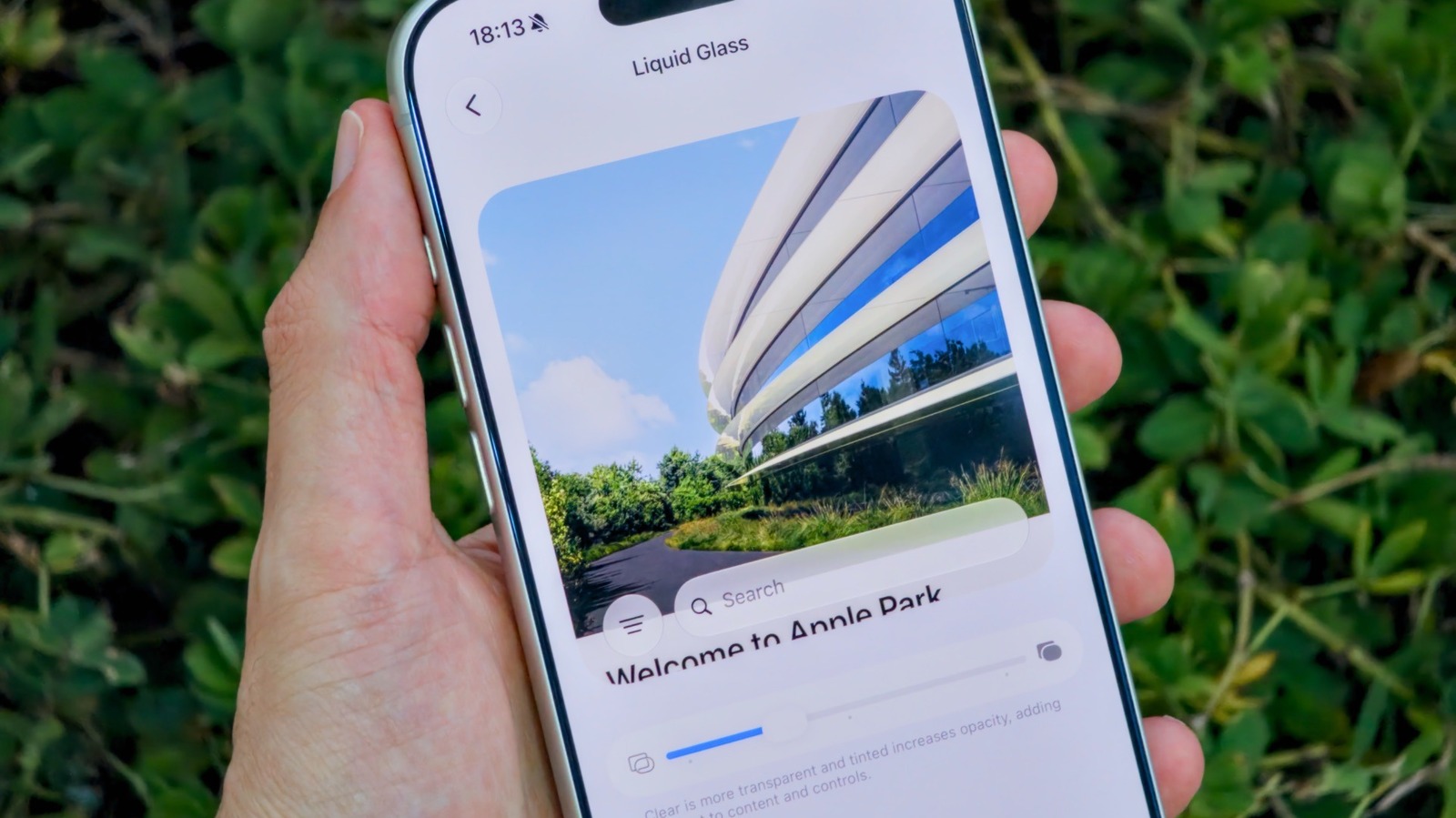
An even bigger update to Liquid Glass arrived with the release of iOS 27. If you’ve never been satisfied with the Tinted or Clear options on your iPhone, then you’ll probably like Apple’s latest update. It adds a much-requested slider for making Liquid Glass more readable and customizable, putting you in more control over how iOS looks and feels.

It begins with a slider
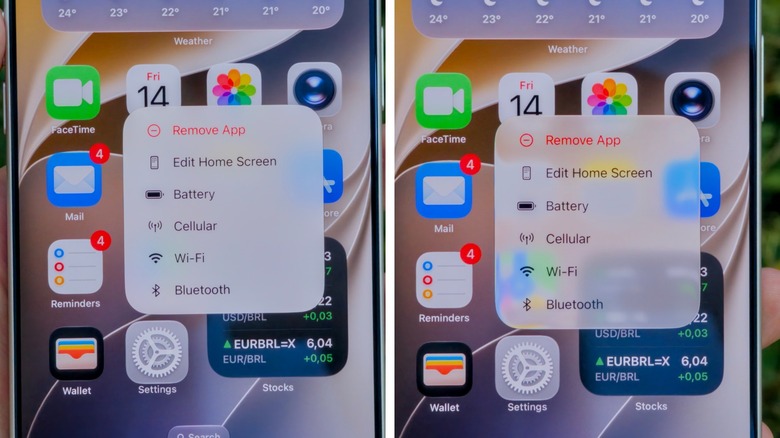

Comparing different opacity levels of Liquid Glass in iOS 27.
Filipe Espósito for Engadget

In order to customize how Liquid Glass presents on your phone, you’ll first need to go into your iPhone’s Settings app. From there, look for the Appearance section and select the Liquid Glass menu. Instead of the old rigid toggles, you’ll now see a slider. Dragging it to the left will make the glass look more like, well, glass. Dragging it to the right gives it that more opaque look from earlier versions of iOS.

If you want something that does a little bit of both, just leave the slider in the center. Apple gives you a quick preview of the effect right on that same screen, so you don’t have to keep switching between apps just to see the changes in action. It should be noted that the option to adjust the intensity of the glass effect on the Lock Screen remains separate from the slider in the Settings app.

Of course, this option is only available in iOS 27, so you’ll have to update your iPhone if you want to tweak the appearance of Liquid Glass. Fortunately, Apple has made iOS 27 compatible with iPhone 11 models and upwards, so your old iPhone likely won’t be stuck with a limited version of the UI.

How to turn off Liquid Glass completely
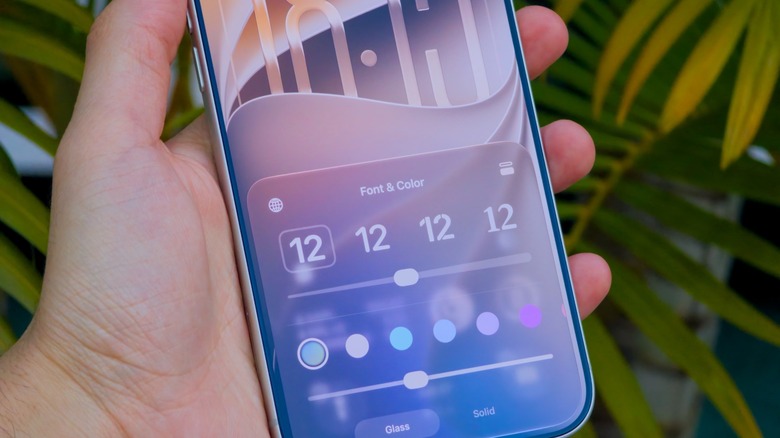

Fine-tuning the glass effect on the iPhone Lock Screen.
Filipe Espósito for Engadget

If you don’t like Liquid Glass and want to disable it almost completely, there’s a way to do just that in the Accessibility settings. There, look for Display & Text Size and enable the Reduce Transparency toggle. This option is much more aggressive than the Liquid Glass slider, but it works best for those who really don’t like the glassy effects in iOS.

iOS 27 updates have been accessible to developers and beta testers for a little while, but the public release rolled out in September. If you’re willing to get the beta version on your iPhone, then you won’t have to wait for future updates to Liquid Glass and other iOS features: Just sign up for the Apple Beta Program, and be aware there could be a few bugs here and there.

Credit: Source link

ShareTweetSendSharePin

Related Posts

The Upcoming Touchscreen OLED MacBook Pro Is Reportedly ‘Significantly Lighter’
AI & Technology

The Upcoming Touchscreen OLED MacBook Pro Is Reportedly ‘Significantly Lighter’

October 4, 2026
Sony Digital Camera Model Numbers Explained: Bigger Isn’t Always Better
AI & Technology

Sony Digital Camera Model Numbers Explained: Bigger Isn’t Always Better

October 4, 2026
Trump Announces Super Intelligence Force Led by Four Officials – Unite.AI
AI & Technology

Trump Announces Super Intelligence Force Led by Four Officials – Unite.AI

October 4, 2026
The Pros And Cons Of Enabling Wi-Fi Calling
AI & Technology

The Pros And Cons Of Enabling Wi-Fi Calling

October 4, 2026
Next Post
Trump pokes the U.K., and Ireland’s unity debate catches fire – The Washington Post

Trump pokes the U.K., and Ireland’s unity debate catches fire - The Washington Post

Leave a Reply Cancel reply

Your email address will not be published. Required fields are marked *

Search

No Result
View All Result
Passenger describes FlyDubai stabbing incident

Passenger describes FlyDubai stabbing incident

October 3, 2026
New study finds 78% of Americans blame inflation for their debt

New study finds 78% of Americans blame inflation for their debt

September 30, 2026
The Inverse Correlation Between Gold And Interest Rates Is Breaking Down (NYSEARCA:GLD)

The Inverse Correlation Between Gold And Interest Rates Is Breaking Down (NYSEARCA:GLD)

September 29, 2026

About

Learn more

Our Services

Legal

Privacy Policy

Terms of Use

Bloggers

Learn more

Article Links

Contact

Advertise

Ask us anything

©2020- TradePoint.io - All rights reserved!

Tradepoint.io, being just a publishing and technology platform, is not a registered broker-dealer or investment adviser. So we do not provide investment advice. Rather, brokerage services are provided to clients of Tradepoint.io by independent SEC-registered broker-dealers and members of FINRA/SIPC. Every form of investing carries some risk and past performance is not a guarantee of future results. “Tradepoint.io“, “Instant Investing” and “My Trading Tools” are registered trademarks of Apperbuild, LLC.

This website is operated by Apperbuild, LLC. We have no link to any brokerage firm and we do not provide investment advice. Every information and resource we provide is solely for the education of our readers. © 2020 Apperbuild, LLC. All rights reserved.

No Result
View All Result
  • Main
  • AI & Technology
  • Stock Charts
  • Market & News
  • Business
  • Finance Tips
  • Trade Tube
  • Blog
  • Shop

© 2023 - TradePoint.io - All Rights Reserved!