• bitcoinBitcoin(BTC)$84,156.000.18%
  • ethereumEthereum(ETH)$2,675.130.01%
  • tetherTether(USDT)$1.00-0.01%
  • binancecoinBNB(BNB)$771.490.23%
  • rippleXRP(XRP)$1.532.18%
  • usd-coinUSDC(USDC)$1.00-0.01%
  • solanaSolana(SOL)$116.721.75%
  • tronTRON(TRX)$0.339721-1.15%
  • zcashZcash(ZEC)$1,544.152.77%
  • Figure HelocFigure Heloc(FIGR_HELOC)$1.03-0.73%
  • HyperliquidHyperliquid(HYPE)$91.34-0.69%
  • dogecoinDogecoin(DOGE)$0.0948871.66%
  • moneroMonero(XMR)$559.521.15%
  • whitebitWhiteBIT Coin(WBT)$83.90-0.60%
  • chainlinkChainlink(LINK)$13.328.24%
  • USDSUSDS(USDS)$1.00-0.04%
  • cardanoCardano(ADA)$0.2470823.56%
  • RainRain(RAIN)$0.011980-1.70%
  • leo-tokenLEO Token(LEO)$8.86-1.42%
  • stellarStellar(XLM)$0.2184708.47%
  • bitcoin-cashBitcoin Cash(BCH)$338.25-0.71%
  • nearNEAR Protocol(NEAR)$4.483.26%
  • uniswapUniswap(UNI)$9.08-2.63%
  • litecoinLitecoin(LTC)$71.006.80%
  • Ethena USDeEthena USDe(USDE)$1.000.00%
  • daiDai(DAI)$1.00-0.01%
  • CantonCanton(CC)$0.1146834.46%
  • avalanche-2Avalanche(AVAX)$10.14-0.79%
  • USD1USD1(USD1)$1.00-0.02%
  • suiSui(SUI)$1.014.67%
  • hedera-hashgraphHedera(HBAR)$0.0922871.75%
  • the-open-networkGram (prev. Toncoin)(GRAM)$1.41-0.53%
  • shiba-inuShiba Inu(SHIB)$0.0000061.11%
  • BittensorBittensor(TAO)$294.552.60%
  • Global DollarGlobal Dollar(USDG)$1.000.01%
  • crypto-com-chainCronos(CRO)$0.0645554.17%
  • MemeCoreMemeCore(M)$1.22-1.26%
  • paypal-usdPayPal USD(PYUSD)$1.00-0.03%
  • tether-goldTether Gold(XAUT)$4,274.69-0.27%
  • BitwayBitway(BTW)$0.95-11.31%
  • OndoOndo(ONDO)$0.5224.43%
  • okbOKB(OKB)$119.650.07%
  • Circle USYCCircle USYC(USYC)$1.140.01%
  • Ripple USDRipple USD(RLUSD)$1.000.00%
  • BlackRock USD Institutional Digital Liquidity FundBlackRock USD Institutional Digital Liquidity Fund(BUIDL)$1.000.00%
  • Ondo US Dollar YieldOndo US Dollar Yield(USDY)$1.150.02%
  • EthenaEthena(ENA)$0.2235528.31%
  • aaveAave(AAVE)$144.954.94%
  • mantleMantle(MNT)$0.682.25%
  • MorphoMorpho(MORPHO)$2.818.00%
TradePoint.io
  • Main
  • AI & Technology
  • Stock Charts
  • Market & News
  • Business
  • Finance Tips
  • Trade Tube
  • Blog
  • Shop
No Result
View All Result
TradePoint.io
No Result
View All Result

Hello, AI Formulas: Why =COPILOT() Is the Biggest Excel Upgrade in Years

August 20, 2025
in AI & Technology
Reading Time: 8 mins read
A A
Hello, AI Formulas: Why =COPILOT() Is the Biggest Excel Upgrade in Years
ShareShareShareShareShare


Microsoft has officially introduced the COPILOT function in Excel for Windows and Mac, bringing the power of large language models (LLMs) directly into spreadsheets. This move represents a fundamental shift: AI is now a native feature, not just an external add-in or separate tool. Users can now analyze, summarize, and generate data using natural language prompts directly inside their Excel formulas.

How the COPILOT Function Works

The COPILOT function allows users to enter prompts using natural language in any cell, referencing cell values or ranges as context. The syntax is straightforward:

YOU MAY ALSO LIKE

Warzone Is Adding A Button To Hide All The Goofy Skins

How These AI Glasses Compare

text=COPILOT(prompt_part1, [context1], [prompt_part2], [context2], ...)
  • Prompt_part: Text that describes the AI’s task (e.g., “Classify this feedback” or “Summarize A1:A50”).
  • Context (optional): Reference to cells or ranges for the AI to process.
Key Features

  • Instant AI-Powered Analysis: Input a prompt and context—the function generates summaries, categories, or lists, instantly updating as your data changes.
  • Seamless Integration: COPILOT sits within Excel’s calculation engine and works alongside standard functions like IF, SWITCH, or LAMBDA, enabling fusion of traditional Excel logic with AI-generated results.
  • Dynamic Updates: No need to rerun scripts or refresh add-ins. Any change in data automatically recalculates the AI output.
  • Multiple Use Cases: From sentiment analysis of customer feedback, summary generation, SEO keyword brainstorming, to table/list creation—COPILOT adapts to diverse analytical and creative workflows.

Example Usage

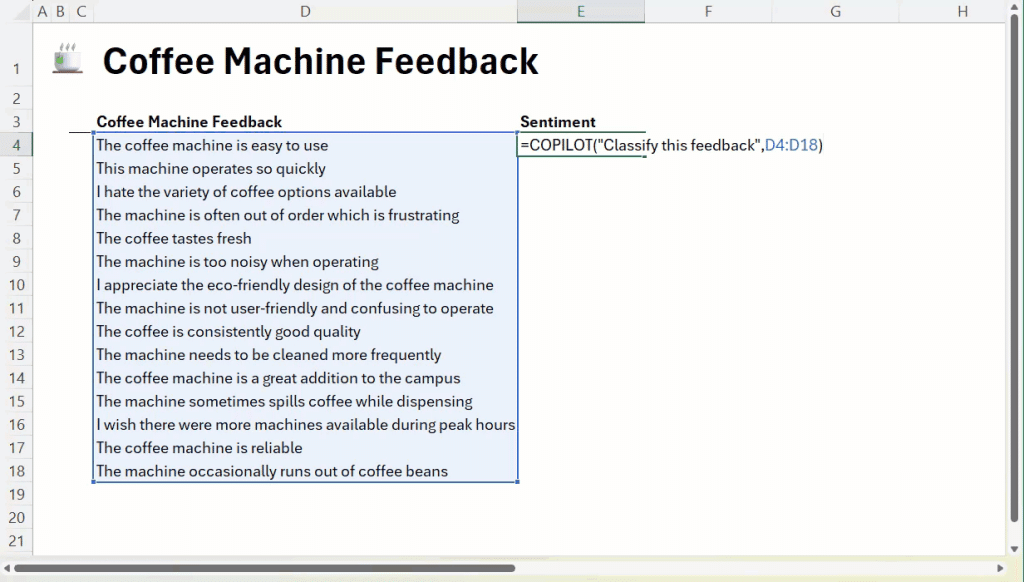
  • Classifying Feedback: text=COPILOT("Classify this feedback", D4:D18)
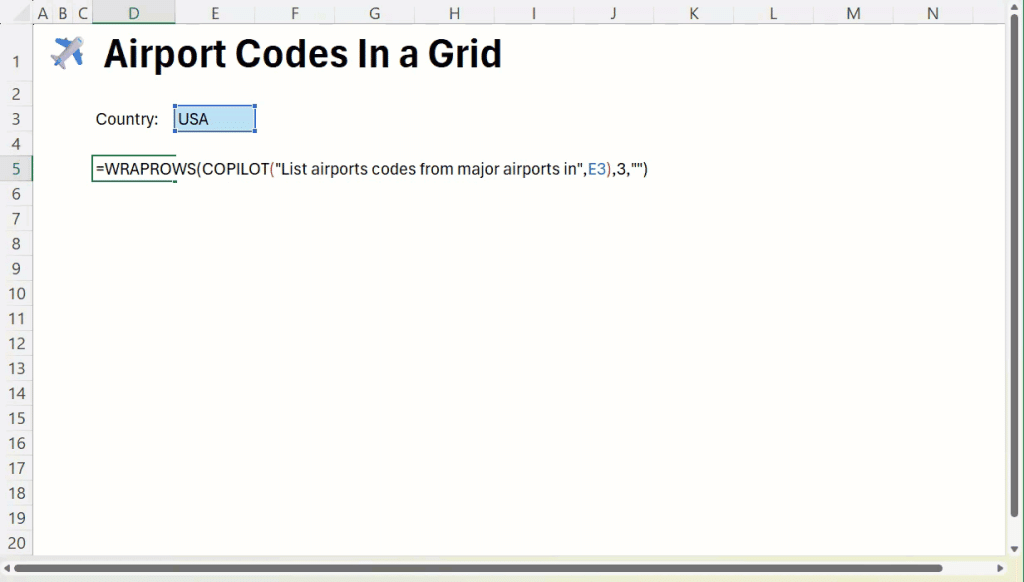
  • Generating Lists: text=COPILOT("Generate airport codes for major US cities")
  • Summarizing Data: text=COPILOT("Summarize", A1:A50)

Technical Insights

  • Auto-Updates & Confidentiality: COPILOT auto-updates with data changes and does not use user-provided data to train the underlying AI models, ensuring confidentiality.
  • Function Call Limits: Users are permitted 100 calls every 10 minutes and 300 per hour. Passing arrays as a single call can help maximize usage efficiency.
  • Integration with Existing Functions: COPILOT results can be used as inputs to other formulas, which dramatically expands analytic capabilities within the spreadsheet.
  • No External Data Access Yet: COPILOT only uses data from within the workbook; support for live web data and internal business docs is planned for future updates.
  • Optional Implementation: The function is opt-in and only exists in your sheet if you choose to use it.

Availability & Rollout

  • Beta Channel Users: Available for Microsoft 365 Copilot license holders running Windows Excel version 2509+ or Mac version 16.101+.
  • Excel for Web: Rolling out soon via the Frontier program.
  • Comparison to ChatGPT Integration: Unlike external AI chat tools, COPILOT offers native, auto-refreshing analysis—closing the workflow gap for Excel users who previously relied on copy-paste between apps.

Use Case Scenarios

  • Brainstorming: Quickly generate SEO keywords, rewrite messaging, or ideate product features.
  • Classification & Tagging: Categorize support tickets, survey responses, or feedback at scale—no need for external tagging tools.
  • Reporting & Summarization: Turn complex datasets into digestible narratives for stakeholders.
  • Automation: Build lists, tables, and project plans with a single prompt, instantly populating the grid.

Tips for Using COPILOT

  • Prompt Engineering: Clarity matters—give explicit instructions, specify ranges, and set desired output formats (e.g., tables, lists).
  • Directives: Use action-oriented instructions (“summarize”, “categorize”) for better results.
  • Validation: Always review AI-generated outputs, especially for business-critical tasks.
  • Usage Strategy: Maximize calls by referencing arrays versus individual cells.

Conclusion

The COPILOT function marks a pivotal moment for Excel, embedding advanced AI directly into the most widely used analytics platform in business. With the ability to generate, analyze, and summarize data natively, Excel is transforming how users interact with their data—making workflows smarter and more efficient. The native integration bridges the gap between spreadsheet and AI, and signals a future where generative models become default companions in business analytics.


Check out the Technical details. Feel free to check out our GitHub Page for Tutorials, Codes and Notebooks. Also, feel free to follow us on Twitter and don’t forget to join our 100k+ ML SubReddit and Subscribe to our Newsletter.


Michal Sutter is a data science professional with a Master of Science in Data Science from the University of Padova. With a solid foundation in statistical analysis, machine learning, and data engineering, Michal excels at transforming complex datasets into actionable insights.


Previous articleSignal and Noise: Unlocking Reliable LLM Evaluation for Better AI Decisions


Credit: Source link

ShareTweetSendSharePin

Related Posts

Warzone Is Adding A Button To Hide All The Goofy Skins
AI & Technology

Warzone Is Adding A Button To Hide All The Goofy Skins

September 24, 2026
How These AI Glasses Compare
AI & Technology

How These AI Glasses Compare

September 24, 2026
Nintendo Wins .5 Million From Lawsuit Over Pirated Switch Games
AI & Technology

Nintendo Wins $4.5 Million From Lawsuit Over Pirated Switch Games

September 24, 2026
Congressman Calls for National Data Center Strategy
AI & Technology

Congressman Calls for National Data Center Strategy

September 24, 2026
Next Post
ZTO Express: Both Earnings Miss And Regulatory Tailwinds Are Key Considerations (NYSE:ZTO)

ZTO Express: Both Earnings Miss And Regulatory Tailwinds Are Key Considerations (NYSE:ZTO)

Leave a Reply Cancel reply

Your email address will not be published. Required fields are marked *

Search

No Result
View All Result
Opus 5.5, GPT-6 Sol & Luna TESTED on Creative Ideas

Opus 5.5, GPT-6 Sol & Luna TESTED on Creative Ideas

September 24, 2026
Congo is running short of health workers as Ebola remains out of control, WHO says – AP News

Congo is running short of health workers as Ebola remains out of control, WHO says – AP News

September 24, 2026
Helicopter helps extinguish boardwalk fire in Florida

Helicopter helps extinguish boardwalk fire in Florida

September 21, 2026

About

Learn more

Our Services

Legal

Privacy Policy

Terms of Use

Bloggers

Learn more

Article Links

Contact

Advertise

Ask us anything

©2020- TradePoint.io - All rights reserved!

Tradepoint.io, being just a publishing and technology platform, is not a registered broker-dealer or investment adviser. So we do not provide investment advice. Rather, brokerage services are provided to clients of Tradepoint.io by independent SEC-registered broker-dealers and members of FINRA/SIPC. Every form of investing carries some risk and past performance is not a guarantee of future results. “Tradepoint.io“, “Instant Investing” and “My Trading Tools” are registered trademarks of Apperbuild, LLC.

This website is operated by Apperbuild, LLC. We have no link to any brokerage firm and we do not provide investment advice. Every information and resource we provide is solely for the education of our readers. © 2020 Apperbuild, LLC. All rights reserved.

No Result
View All Result
  • Main
  • AI & Technology
  • Stock Charts
  • Market & News
  • Business
  • Finance Tips
  • Trade Tube
  • Blog
  • Shop

© 2023 - TradePoint.io - All Rights Reserved!