• bitcoinBitcoin(BTC)$84,336.00-0.01%
  • ethereumEthereum(ETH)$2,683.16-0.37%
  • tetherTether(USDT)$1.00-0.01%
  • binancecoinBNB(BNB)$777.180.57%
  • rippleXRP(XRP)$1.51-1.10%
  • usd-coinUSDC(USDC)$1.00-0.01%
  • solanaSolana(SOL)$121.780.46%
  • tronTRON(TRX)$0.333290-0.27%
  • zcashZcash(ZEC)$1,589.01-3.84%
  • Figure HelocFigure Heloc(FIGR_HELOC)$1.06-0.38%
  • HyperliquidHyperliquid(HYPE)$91.52-0.88%
  • dogecoinDogecoin(DOGE)$0.096238-0.36%
  • chainlinkChainlink(LINK)$13.98-1.08%
  • moneroMonero(XMR)$548.54-1.87%
  • whitebitWhiteBIT Coin(WBT)$84.11-0.01%
  • USDSUSDS(USDS)$1.00-0.02%
  • cardanoCardano(ADA)$0.253462-0.05%
  • RainRain(RAIN)$0.012732-1.18%
  • leo-tokenLEO Token(LEO)$9.050.91%
  • stellarStellar(XLM)$0.215304-0.55%
  • nearNEAR Protocol(NEAR)$5.387.86%
  • bitcoin-cashBitcoin Cash(BCH)$331.79-1.07%
  • uniswapUniswap(UNI)$9.64-0.46%
  • litecoinLitecoin(LTC)$71.12-2.04%
  • CantonCanton(CC)$0.135395-0.06%
  • suiSui(SUI)$1.268.25%
  • Ethena USDeEthena USDe(USDE)$1.000.01%
  • avalanche-2Avalanche(AVAX)$10.83-0.35%
  • daiDai(DAI)$1.000.01%
  • the-open-networkGram (prev. Toncoin)(GRAM)$1.631.90%
  • USD1USD1(USD1)$1.00-0.01%
  • quant-networkQuant(QNT)$289.6990.35%
  • hedera-hashgraphHedera(HBAR)$0.0954151.96%
  • BittensorBittensor(TAO)$318.95-0.51%
  • shiba-inuShiba Inu(SHIB)$0.000006-0.66%
  • crypto-com-chainCronos(CRO)$0.066567-1.95%
  • BitwayBitway(BTW)$1.2122.38%
  • Global DollarGlobal Dollar(USDG)$1.00-0.01%
  • paypal-usdPayPal USD(PYUSD)$1.00-0.01%
  • OndoOndo(ONDO)$0.565.27%
  • EthenaEthena(ENA)$0.269391-0.14%
  • tether-goldTether Gold(XAUT)$4,260.55-0.46%
  • MemeCoreMemeCore(M)$1.16-5.06%
  • okbOKB(OKB)$120.900.03%
  • Ripple USDRipple USD(RLUSD)$1.000.00%
  • Circle USYCCircle USYC(USYC)$1.140.00%
  • Pump.funPump.fun(PUMP)$0.00511717.40%
  • aaveAave(AAVE)$154.40-0.57%
  • BlackRock USD Institutional Digital Liquidity FundBlackRock USD Institutional Digital Liquidity Fund(BUIDL)$1.000.00%
  • Ondo US Dollar YieldOndo US Dollar Yield(USDY)$1.150.11%
TradePoint.io
  • Main
  • AI & Technology
  • Stock Charts
  • Market & News
  • Business
  • Finance Tips
  • Trade Tube
  • Blog
  • Shop
No Result
View All Result
TradePoint.io
No Result
View All Result

Getting Started with Google Colab: A Beginner’s Guide to Free Cloud Computing

February 24, 2025
in AI & Technology
Reading Time: 6 mins read
A A
Getting Started with Google Colab: A Beginner’s Guide to Free Cloud Computing
ShareShareShareShareShare

In today’s data-driven world, having access to powerful computing resources is essential for developers, data scientists, and students alike. Enter Google Colab – a game-changing platform that provides free access to cloud computing resources, including GPU support, without requiring any local setup. Whether you’re a beginner taking your first steps in Python programming or an experienced data scientist working on complex machine learning models, Google Colab offers an accessible, collaborative environment that’s transforming how we code.

What is Google Colab?

Google Colab, short for Colaboratory, is a cloud-based Jupyter notebook environment that runs entirely in your browser. It’s a free service provided by Google that allows you to write and execute Python code, create detailed documentation, and share your work with others seamlessly. Think of it as a Google Docs for programming – but with far more powerful features under the hood.

YOU MAY ALSO LIKE

Bill Gates Says It’s ‘Completely Irresponsible’ For AI To Not Have Safeguards

Should You Ditch Your Tablet For A Foldable Phone?

Why Use Google Colab?

Google Colab stands out from other development environments for several compelling reasons. First and foremost, it’s completely free to use, requiring only a Google account. But the benefits go far beyond cost savings:

The platform provides free access to high-performance GPUs and TPUs, making it ideal for machine learning and deep learning projects that would otherwise require expensive hardware. You can write and execute code directly in your browser, eliminating the need for complex local setups or worrying about system compatibility.

The integration with Google Drive means your work is automatically saved and easily accessible from any device. Plus, the collaborative features make it simple to share notebooks with colleagues or classmates, enabling real-time cooperation on projects.

Getting Started

Getting started with Google Colab is remarkably straightforward. Simply navigate to colab.research.google.com and sign in with your Google account. Once logged in, you’ll be greeted with a clean, intuitive interface that should feel familiar if you’ve ever used Google Docs.

1. Open Colab Notebook

Once open, you will see a popup which should look like this:

Here is what all the different sections mean:

  • Examples: This section contains a number of Jupyter notebooks of various examples.
  • Recent: This section contains the recently opened Jupyter notebooks.
  • Google Drive: This section contains the Jupyter notebooks in your google drive.
  • Github: Through this section, you can add a Jupyter notebook from your GitHub after connecting your Colab with GitHub.
  • Upload: Upload a notebook from your local directory.

2. Create a new notebook

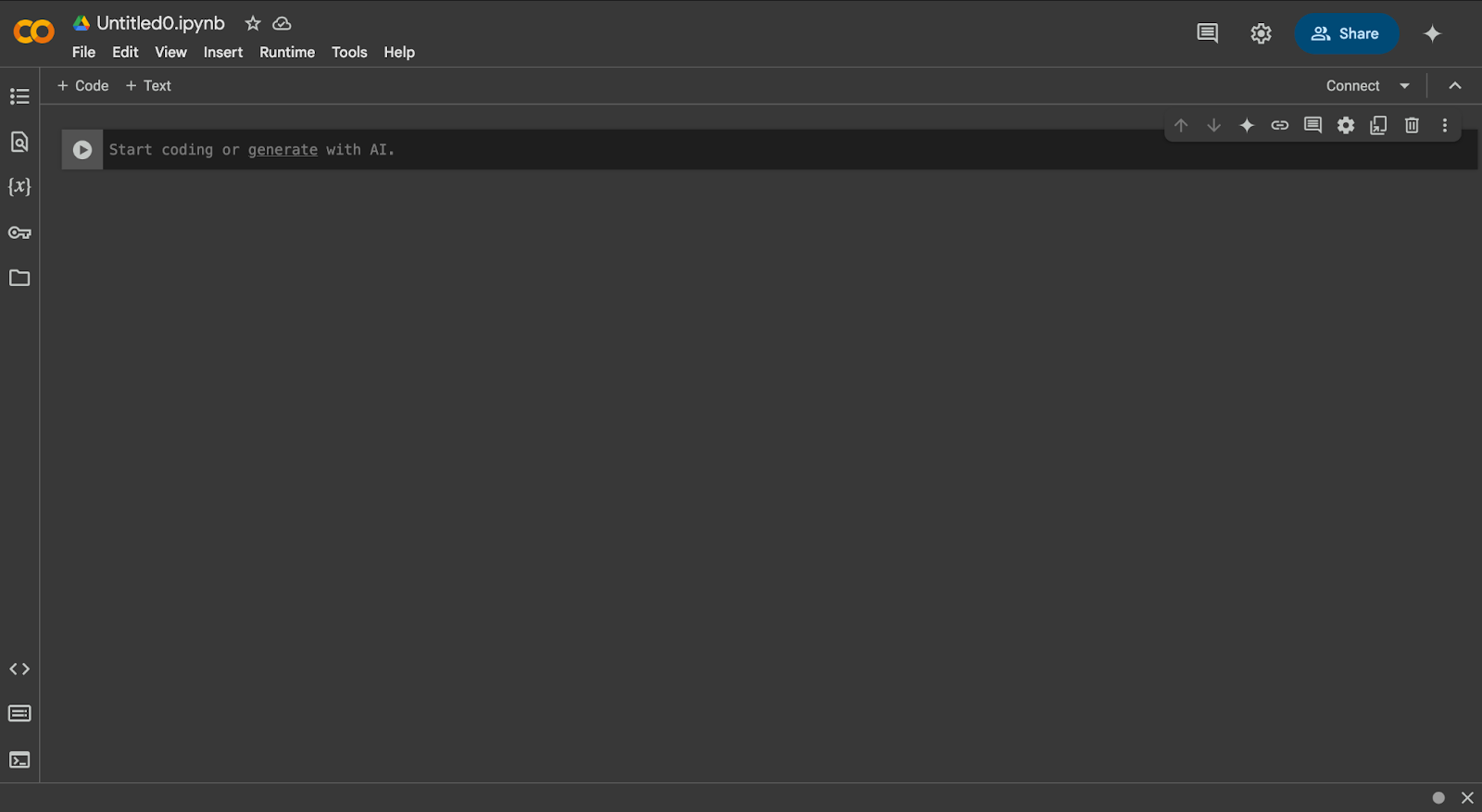
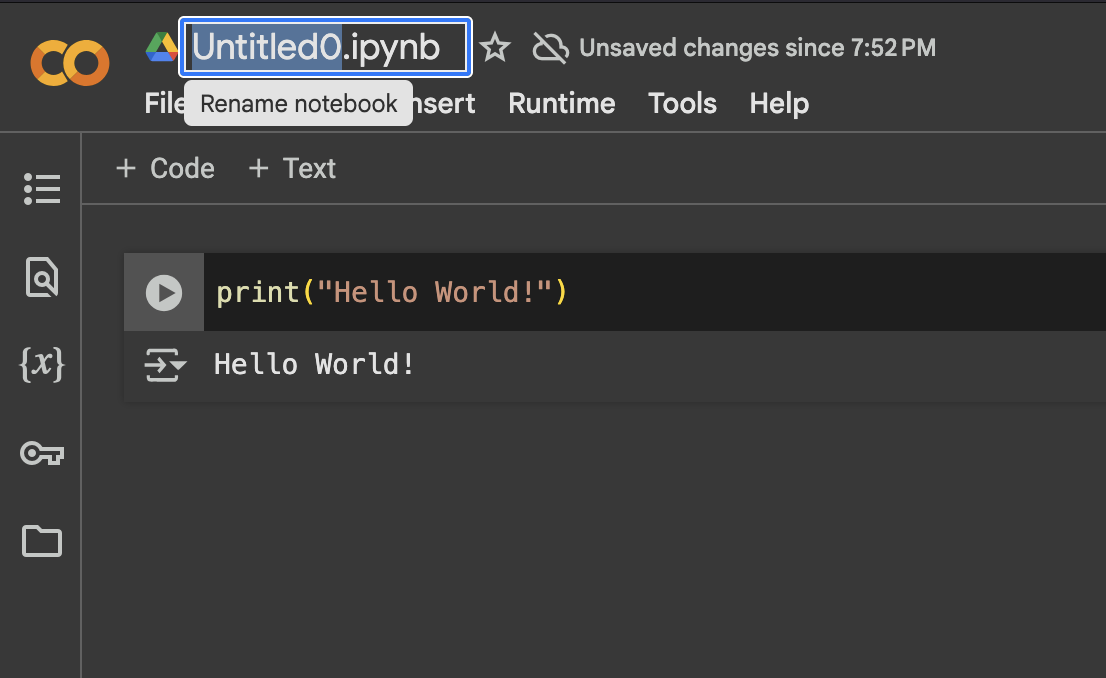
You can create a new notebook through the blue highlighted button that says “New notebook” at the left bottom of the image. Once created, a notebook named “Untitled0.ipynb” will open where you can start writing your code:
3. Changing Run-Time

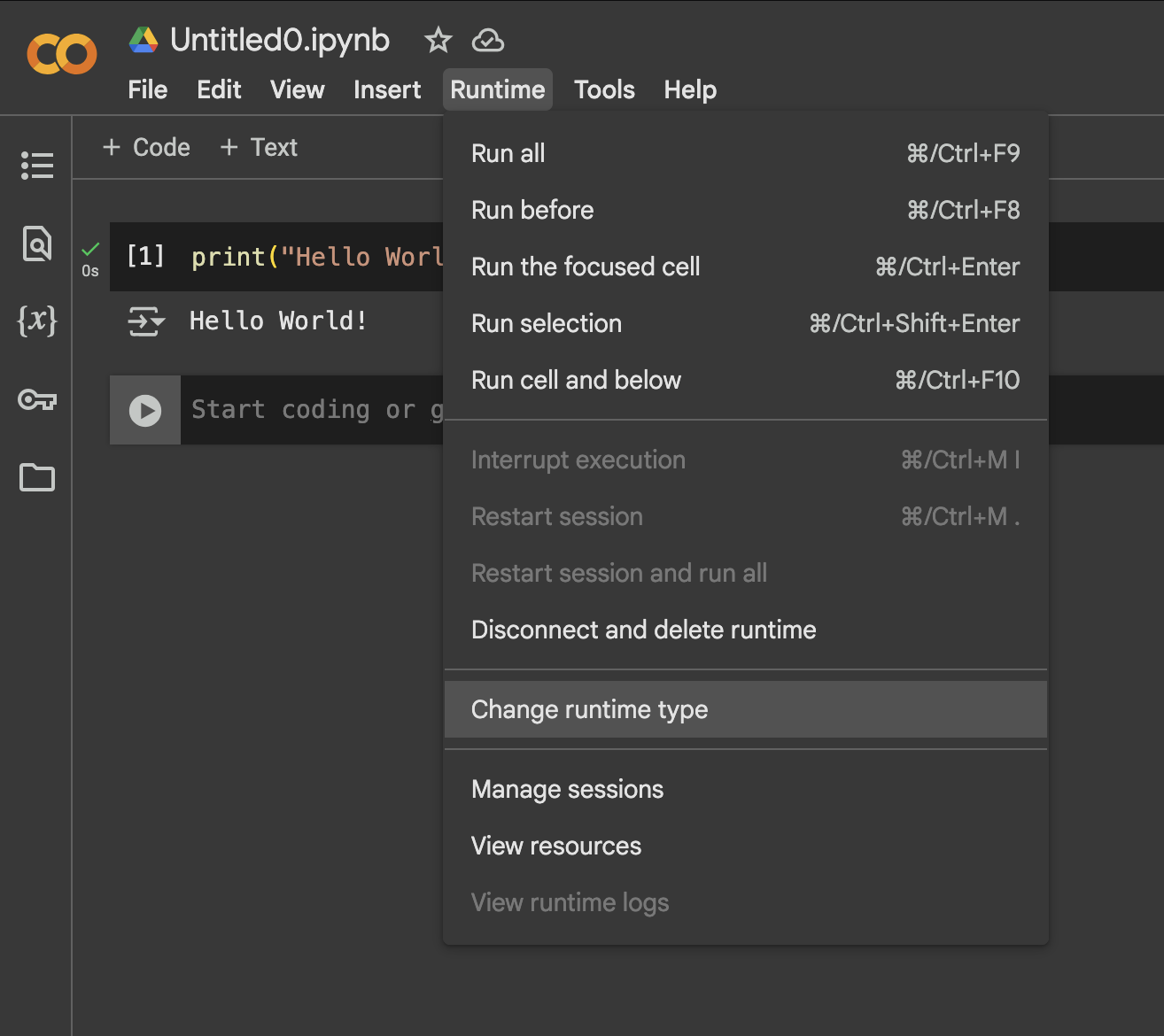
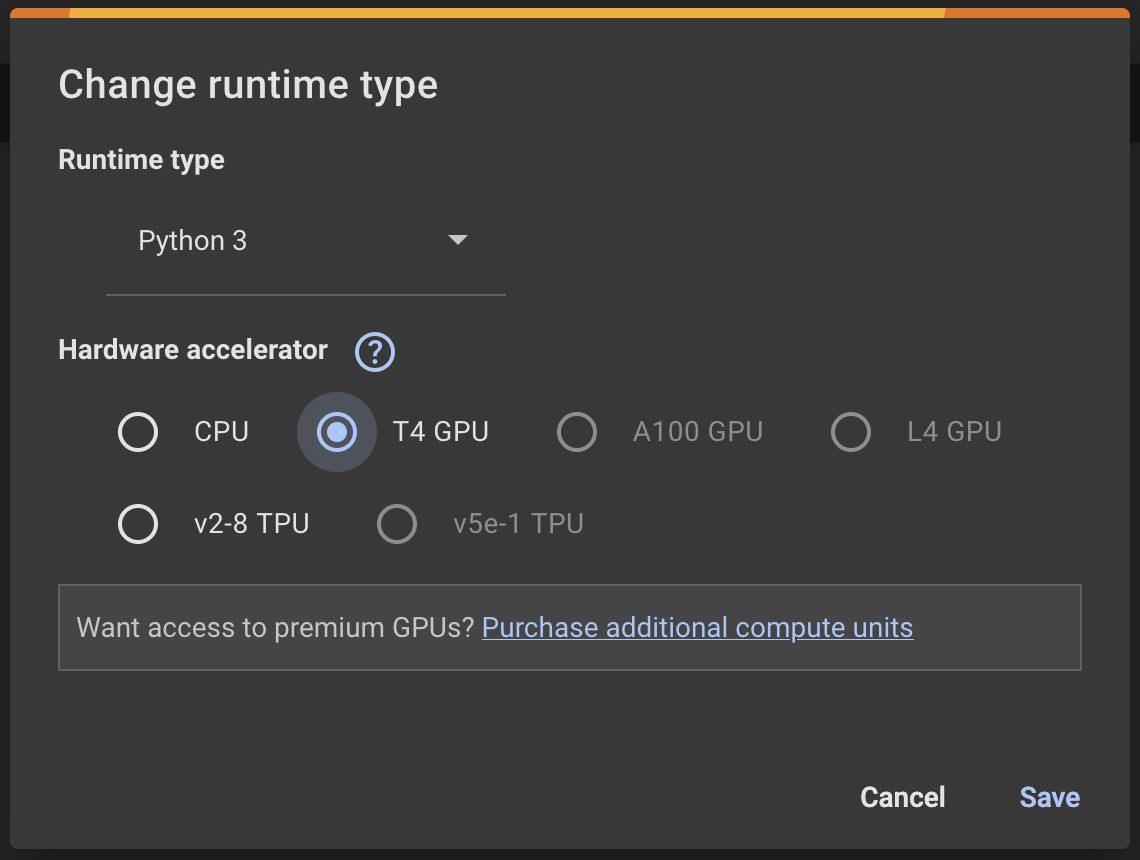
When working on deep-learning projects, you will need to change from CPU to GPU. To do this, click Runtime → Change runtime type, then select T4 GPU. Then click Save.
4. Run Python on Your Notebook

To execute Python code, click the ‘run’ button to the left of the cell. This is the circle with the triangle inside. Alternatively, you may select the cell you want to run and press “Shift + Enter”, this will start the cell.
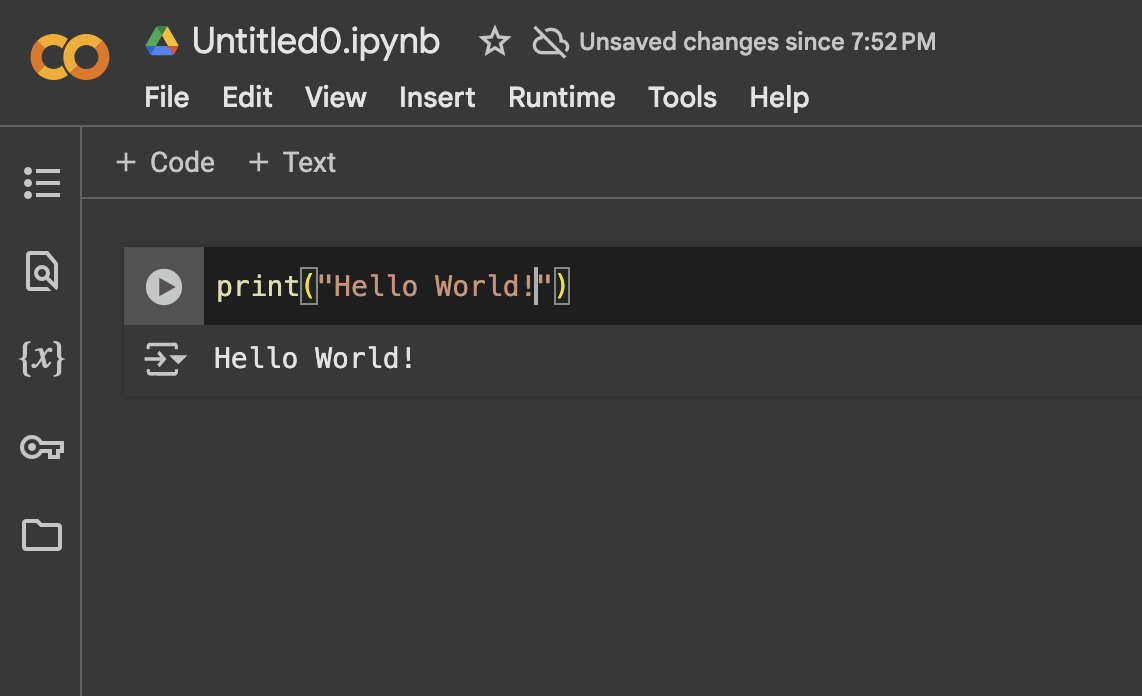
To change the title of your Google Colab notebook, just click on the title and rename as you wish.
5. Mounting Google Drive

More often than not, you would need to work with your own data that is uploaded on your drive. You can access that data in your notebook by mounting your google drive. Here is how to do it:

Run the code cell, this will show a popup to connect your google drive. Follow it to grant specific access permissions:

Once mounted, you can access the files uploaded in your drive.

6. Accessing local files:

Alternatively, you can access and upload local files from your system using this code:

7. Download your notebook

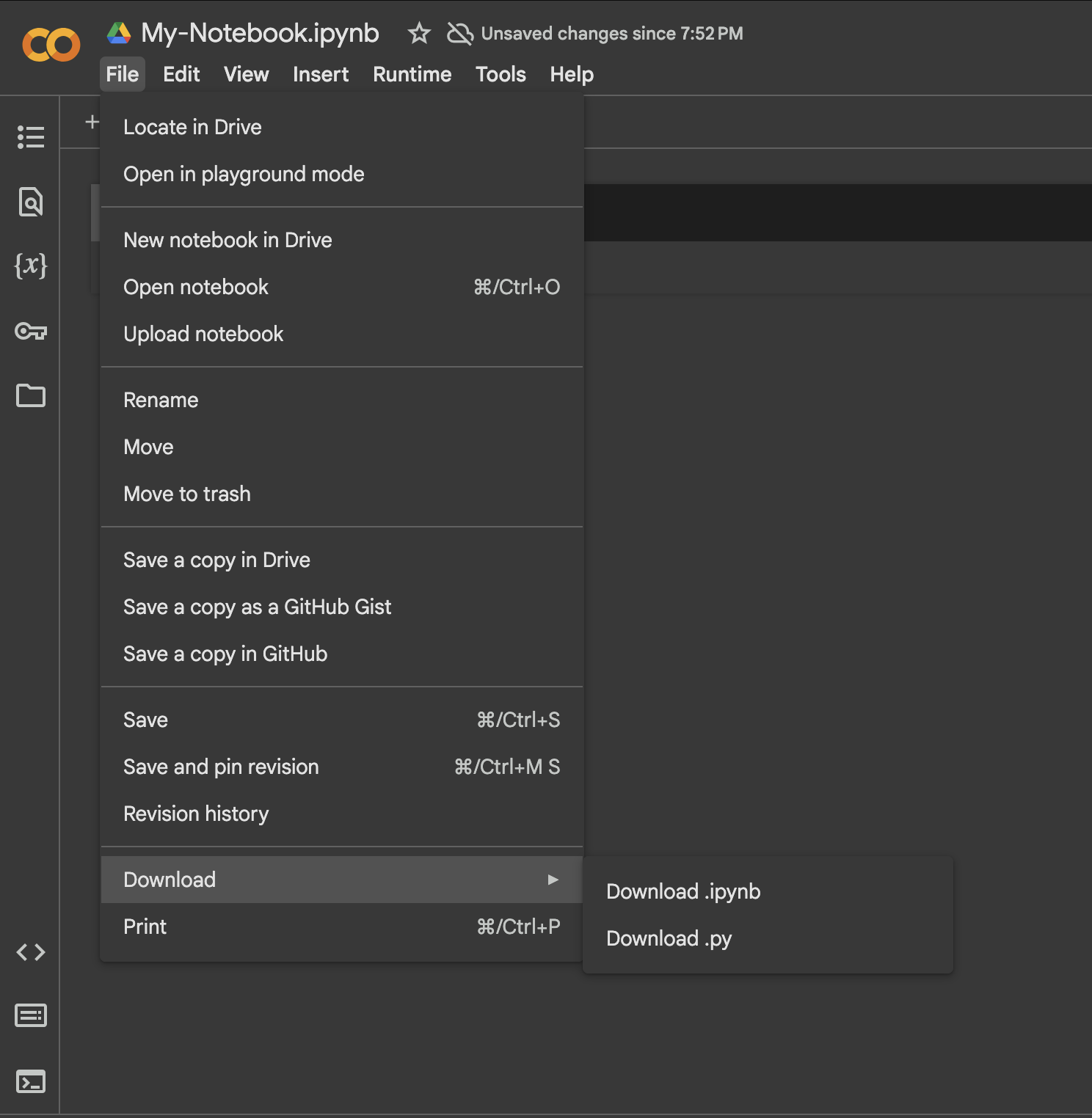
To save a copy of your notebook on your local computer. You can navigate to File → Download and pick the appropriate extension.
Conclusion

The tutorial walks us through key functionality including how to mount Google Drive for accessing data, upload local files, and download notebooks in various formats. We learned that Colab’s integration with Google’s ecosystem makes it particularly valuable for collaboration and automatic saving of work. While the platform does have some limitations regarding session duration and resource usage, its combination of free GPU access, seamless collaboration features, and browser-based accessibility makes it an invaluable tool for developers, data scientists, and students alike.


Nikhil is an intern consultant at Marktechpost. He is pursuing an integrated dual degree in Materials at the Indian Institute of Technology, Kharagpur. Nikhil is an AI/ML enthusiast who is always researching applications in fields like biomaterials and biomedical science. With a strong background in Material Science, he is exploring new advancements and creating opportunities to contribute.

🚨 Recommended Open-Source AI Platform: ‘IntellAgent is a An Open-Source Multi-Agent Framework to Evaluate Complex Conversational AI System’ (Promoted)

Credit: Source link

ShareTweetSendSharePin

Related Posts

Bill Gates Says It’s ‘Completely Irresponsible’ For AI To Not Have Safeguards
AI & Technology

Bill Gates Says It’s ‘Completely Irresponsible’ For AI To Not Have Safeguards

September 27, 2026
Should You Ditch Your Tablet For A Foldable Phone?
AI & Technology

Should You Ditch Your Tablet For A Foldable Phone?

September 27, 2026
Why The iPhone Duo Could Be Beneficial For Samsung’s Galaxy Z Fold 8
AI & Technology

Why The iPhone Duo Could Be Beneficial For Samsung’s Galaxy Z Fold 8

September 27, 2026
How To Improve Your Router’s Security In 10 Minutes
AI & Technology

How To Improve Your Router’s Security In 10 Minutes

September 27, 2026
Next Post
NFL’s Saints leadership accused of helping Catholic church during abuse scandal

NFL's Saints leadership accused of helping Catholic church during abuse scandal

Leave a Reply Cancel reply

Your email address will not be published. Required fields are marked *

Search

No Result
View All Result
Thousands in Gary, Indiana still without power

Thousands in Gary, Indiana still without power

September 24, 2026
Two giant pandas arrive in Atlanta from China after Xi-Trump summit – The Guardian

Two giant pandas arrive in Atlanta from China after Xi-Trump summit – The Guardian

September 27, 2026
Americans are drinking less since the pandemic began, but one group bucks the trend – washingtonpost.com

Americans are drinking less since the pandemic began, but one group bucks the trend – washingtonpost.com

September 23, 2026

About

Learn more

Our Services

Legal

Privacy Policy

Terms of Use

Bloggers

Learn more

Article Links

Contact

Advertise

Ask us anything

©2020- TradePoint.io - All rights reserved!

Tradepoint.io, being just a publishing and technology platform, is not a registered broker-dealer or investment adviser. So we do not provide investment advice. Rather, brokerage services are provided to clients of Tradepoint.io by independent SEC-registered broker-dealers and members of FINRA/SIPC. Every form of investing carries some risk and past performance is not a guarantee of future results. “Tradepoint.io“, “Instant Investing” and “My Trading Tools” are registered trademarks of Apperbuild, LLC.

This website is operated by Apperbuild, LLC. We have no link to any brokerage firm and we do not provide investment advice. Every information and resource we provide is solely for the education of our readers. © 2020 Apperbuild, LLC. All rights reserved.

No Result
View All Result
  • Main
  • AI & Technology
  • Stock Charts
  • Market & News
  • Business
  • Finance Tips
  • Trade Tube
  • Blog
  • Shop

© 2023 - TradePoint.io - All Rights Reserved!