



• bitcoinBitcoin(BTC)$79,801.000.16%
  • ethereumEthereum(ETH)$2,492.491.42%
  • tetherTether(USDT)$1.00-0.02%
  • binancecoinBNB(BNB)$751.33-1.76%
  • rippleXRP(XRP)$1.420.15%
  • usd-coinUSDC(USDC)$1.00-0.01%
  • solanaSolana(SOL)$106.303.29%
  • tronTRON(TRX)$0.3351040.56%
  • Figure HelocFigure Heloc(FIGR_HELOC)$1.061.52%
  • zcashZcash(ZEC)$1,187.6116.78%
  • HyperliquidHyperliquid(HYPE)$88.834.01%
  • dogecoinDogecoin(DOGE)$0.0895772.27%
  • RainRain(RAIN)$0.0169543.30%
  • moneroMonero(XMR)$530.51-2.21%
  • USDSUSDS(USDS)$1.00-0.01%
  • chainlinkChainlink(LINK)$12.293.55%
  • whitebitWhiteBIT Coin(WBT)$73.520.45%
  • leo-tokenLEO Token(LEO)$9.330.74%
  • cardanoCardano(ADA)$0.2189051.33%
  • stellarStellar(XLM)$0.1858181.12%
  • bitcoin-cashBitcoin Cash(BCH)$258.313.37%
  • daiDai(DAI)$1.000.03%
  • uniswapUniswap(UNI)$7.0112.98%
  • Ethena USDeEthena USDe(USDE)$1.00-0.01%
  • CantonCanton(CC)$0.1096110.04%
  • USD1USD1(USD1)$1.00-0.01%
  • litecoinLitecoin(LTC)$54.240.85%
  • the-open-networkGram (prev. Toncoin)(GRAM)$1.42-0.27%
  • hedera-hashgraphHedera(HBAR)$0.080845-0.21%
  • avalanche-2Avalanche(AVAX)$7.661.77%
  • Global DollarGlobal Dollar(USDG)$1.00-0.01%
  • suiSui(SUI)$0.800.14%
  • shiba-inuShiba Inu(SHIB)$0.000005-1.15%
  • nearNEAR Protocol(NEAR)$2.429.31%
  • paypal-usdPayPal USD(PYUSD)$1.00-0.01%
  • BlackRock USD Institutional Digital Liquidity FundBlackRock USD Institutional Digital Liquidity Fund(BUIDL)$1.000.00%
  • crypto-com-chainCronos(CRO)$0.0571321.28%
  • tether-goldTether Gold(XAUT)$4,420.19-0.13%
  • Circle USYCCircle USYC(USYC)$1.140.00%
  • MemeCoreMemeCore(M)$1.131.31%
  • Ripple USDRipple USD(RLUSD)$1.000.00%
  • okbOKB(OKB)$113.33-1.14%
  • BittensorBittensor(TAO)$244.593.53%
  • Ondo US Dollar YieldOndo US Dollar Yield(USDY)$1.14-0.01%
  • AsterAster(ASTER)$0.78-3.24%
  • aaveAave(AAVE)$135.273.98%
  • mantleMantle(MNT)$0.603.91%
  • pax-goldPAX Gold(PAXG)$4,426.03-0.17%
  • OndoOndo(ONDO)$0.3791192.42%
  • World Liberty FinancialWorld Liberty Financial(WLFI)$0.056570-0.34%
TradePoint.io
  • Main
  • AI & Technology
  • Stock Charts
  • Market & News
  • Business
  • Finance Tips
  • Trade Tube
  • Blog
  • Shop
No Result
View All Result
TradePoint.io
No Result
View All Result

Don’t Get Rid Of Your Old Phone, Turn It Into A Security Camera

September 6, 2026
in AI & Technology
Reading Time: 4 mins read
A A
Don’t Get Rid Of Your Old Phone, Turn It Into A Security Camera
ShareShareShareShareShare

Dig out that dusty phone from your junk drawer.


Nemar74/Getty Images

Your phone is more versatile than you think — even that old one that’s been gathering dust for a few years in your drawer. With just a few tweaks and the right apps, you can pretty much give your old phone a new lease on life. One of the interesting things you can do with your old phone is to turn it into a fully functional security camera.

YOU MAY ALSO LIKE

What Is Model Routing? How AI Systems Choose the Right Model for Every Request – Unite.AI

UC Berkeley Researchers Release CUA-Lite, an Open Platform Unifying Sandboxes, Data, Evaluation and RL for Computer-Use Agents

Turning your old phone into a security camera is much easier than it sounds; in fact, you can get it done in under five minutes. Repurposing your old phone or tablet in this way saves you the money you’d spend on actual security cameras and saves you the hassle of recycling or selling these older devices. There are no special skills needed, and best of all, you don’t need to wire anything (except your phone’s charger). All you’ll need to get started is a few minutes of free time, your old phone(s), a stable internet connection (Wi-Fi is better, but mobile data works too) and the AlfredCamera app; it works on both iOS and Android.

How to turn your old phone into a security camera

First, download the AlfredCamera app on your main phone and the old phone. There are other apps that can do this, but we’re using AlfredCamera because it’s free, cross-platform and easy to set up.

On your main phone: Open the app, sign up, then in the “Prepare another device as your camera screen,” select Mobile Device. 
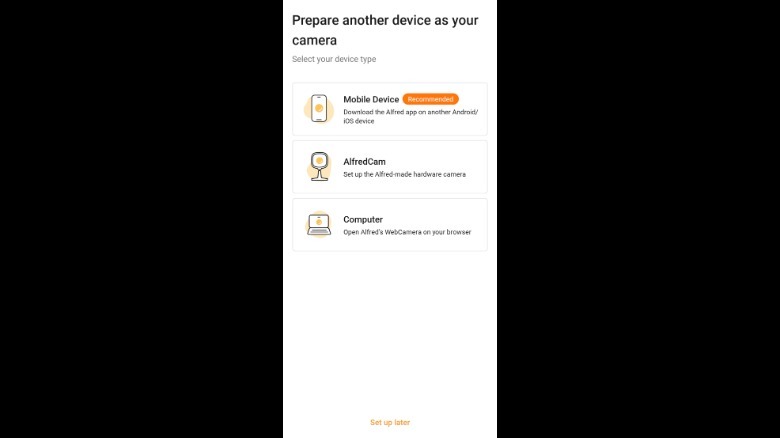
AlfredCamera: Home Security camera device setup pageScreenshot by Isaac Egbon (AlfredCamera: Home Security)

Here, you’ll be given two options on how you want to connect your old phone: Log into the same account on your old phone or scan a QR code to pair both devices. Now, grab your old phone, open the app, then pair both devices using your preferred method. And just like that, your old phone is now a security camera. Lastly, make sure your main phone is set to Viewer in the top left corner while your old phone is set to Camera.
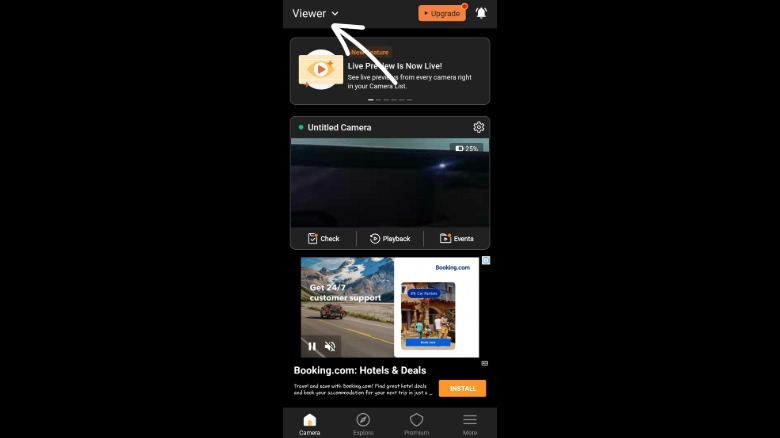
screenshot of AlfredCamera: Home Security camera pageScreenshot by Isaac Egbon (AlfredCamera: Home Security)

AlfredCamera doesn’t stop at live video; the free plan includes a full-volume siren alarm, a low-light mode for nighttime viewing, two-way talk and the ability to switch cameras or rotate orientation, all from your main phone. Premium unlocks more: The Standard plan starts at $5.99/month and allows you to add up to four cameras (up from two in the free plan), HD streaming, an eight-hour recording loop, 14-day cloud storage and person/vehicle/pet detection. Premium Plus ($7.99/month) removes the camera limit and adds full HD, unlimited recording and 30-day cloud storage.

Getting the most out of your DIY security camera
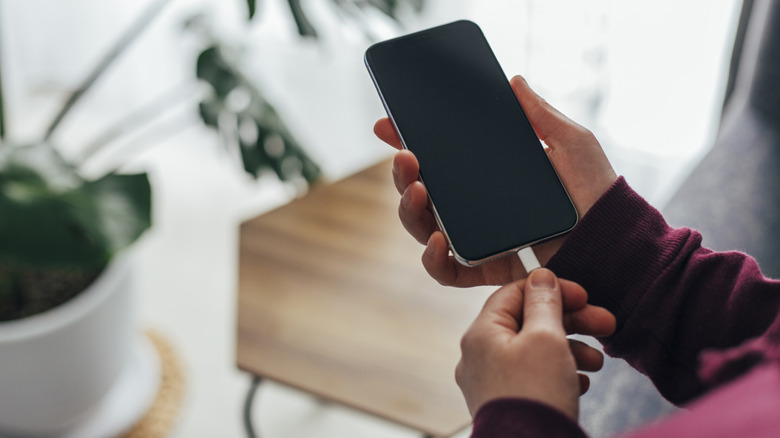

Person plugging an iPhone in.
Hsyncoban/Getty Images

If there’s one thing that’s common on most old phones, it’s probably bad battery life. So, if you can, position your new security camera near an outlet and leave it plugged in at all times. If that doesn’t work well with the angle you want, a long charging cable can bridge the gap. A phone stand is also a good addition, so you can get more flexibility on where and how you angle the camera.

If you don’t have any important information on your old phone, you should factory reset it. Although this isn’t necessary, a factory reset not only frees up the phone’s storage for recordings, but it also clears out any old accounts, saved passwords or personal data still sitting on the device, which matters since this phone will now be running around the clock, connected to your Wi-Fi.

Next, check your old phone’s battery optimization settings and disable it for the AlfredCamera app. This step prevents Android or iOS from closing the app when it’s running in the background and keeps the app running 24/7. Lastly, if you’re placing the phone in a place that’s exposed to the elements, consider weather-proofing it with a clear, waterproof phone case, or better yet, mount it just inside a window instead of directly outside.

Credit: Source link

ShareTweetSendSharePin

Related Posts

What Is Model Routing? How AI Systems Choose the Right Model for Every Request – Unite.AI
AI & Technology

What Is Model Routing? How AI Systems Choose the Right Model for Every Request – Unite.AI

September 6, 2026
UC Berkeley Researchers Release CUA-Lite, an Open Platform Unifying Sandboxes, Data, Evaluation and RL for Computer-Use Agents
AI & Technology

UC Berkeley Researchers Release CUA-Lite, an Open Platform Unifying Sandboxes, Data, Evaluation and RL for Computer-Use Agents

September 6, 2026
Perplexity Details Its GPU Embedding Stack: How Ivy, Tulip and ROSE Serve pplx-embed
AI & Technology

Perplexity Details Its GPU Embedding Stack: How Ivy, Tulip and ROSE Serve pplx-embed

September 6, 2026
Is It Safe To Leave Your Phone’s Bluetooth Running All The Time?
AI & Technology

Is It Safe To Leave Your Phone’s Bluetooth Running All The Time?

September 5, 2026
Next Post
L.A. ‘graffiti towers’ to be cleaned in 90 days

L.A. 'graffiti towers' to be cleaned in 90 days

Leave a Reply Cancel reply

Your email address will not be published. Required fields are marked *

Search

No Result
View All Result
Trump pushes elections bill 

Trump pushes elections bill 

September 4, 2026
Why the US Military Is Betting on Portable Nuclear

Why the US Military Is Betting on Portable Nuclear

September 3, 2026
12 indicted in  million Nike shoe thefts

12 indicted in $2 million Nike shoe thefts

September 5, 2026

About

Learn more

Our Services

Legal

Privacy Policy

Terms of Use

Bloggers

Learn more

Article Links

Contact

Advertise

Ask us anything

©2020- TradePoint.io - All rights reserved!

Tradepoint.io, being just a publishing and technology platform, is not a registered broker-dealer or investment adviser. So we do not provide investment advice. Rather, brokerage services are provided to clients of Tradepoint.io by independent SEC-registered broker-dealers and members of FINRA/SIPC. Every form of investing carries some risk and past performance is not a guarantee of future results. “Tradepoint.io“, “Instant Investing” and “My Trading Tools” are registered trademarks of Apperbuild, LLC.

This website is operated by Apperbuild, LLC. We have no link to any brokerage firm and we do not provide investment advice. Every information and resource we provide is solely for the education of our readers. © 2020 Apperbuild, LLC. All rights reserved.

No Result
View All Result
  • Main
  • AI & Technology
  • Stock Charts
  • Market & News
  • Business
  • Finance Tips
  • Trade Tube
  • Blog
  • Shop

© 2023 - TradePoint.io - All Rights Reserved!