
In this advanced Roboflow Supervision tutorial, we build a complete object detection pipeline with the Supervision library. We begin by setting up real-time object tracking using ByteTracker, adding detection smoothing, and defining polygon zones to monitor specific regions in a video stream. As we process the frames, we annotate them with bounding boxes, object IDs, and speed data, enabling us to track and analyze object behavior over time. Our goal is to showcase how we can combine detection, tracking, zone-based analytics, and visual annotation into a seamless and intelligent video analysis workflow. Check out the Full Codes here.
!pip install supervision ultralytics opencv-python
!pip install --upgrade supervision


import cv2
import numpy as np
import supervision as sv
from ultralytics import YOLO
import matplotlib.pyplot as plt
from collections import defaultdict


model = YOLO('yolov8n.pt')
We start by installing the necessary packages, including Supervision, Ultralytics, and OpenCV. After ensuring we have the latest version of Supervision, we import all required libraries. We then initialize the YOLOv8n model, which serves as the core detector in our pipeline. Check out the Full Codes here.
try:
   tracker = sv.ByteTrack()
except AttributeError:
   try:
       tracker = sv.ByteTracker()
   except AttributeError:
       print("Using basic tracking - install latest supervision for advanced tracking")
       tracker = None


try:
   smoother = sv.DetectionsSmoother(length=5)
except AttributeError:
   smoother = None
   print("DetectionsSmoother not available in this version")


try:
   box_annotator = sv.BoundingBoxAnnotator(thickness=2)
   label_annotator = sv.LabelAnnotator()
   if hasattr(sv, 'TraceAnnotator'):
       trace_annotator = sv.TraceAnnotator(thickness=2, trace_length=30)
   else:
       trace_annotator = None
except AttributeError:
   try:
       box_annotator = sv.BoxAnnotator(thickness=2)
       label_annotator = sv.LabelAnnotator()
       trace_annotator = None
   except AttributeError:
       print("Using basic annotators - some features may be limited")
       box_annotator = None
       label_annotator = None
       trace_annotator = None


def create_zones(frame_shape):
   h, w = frame_shape[:2]

   try:
       entry_zone = sv.PolygonZone(
           polygon=np.array([[0, h//3], [w//3, h//3], [w//3, 2*h//3], [0, 2*h//3]]),
           frame_resolution_wh=(w, h)
       )

       exit_zone = sv.PolygonZone(
           polygon=np.array([[2*w//3, h//3], [w, h//3], [w, 2*h//3], [2*w//3, 2*h//3]]),
           frame_resolution_wh=(w, h)
       )
   except TypeError:
       entry_zone = sv.PolygonZone(
           polygon=np.array([[0, h//3], [w//3, h//3], [w//3, 2*h//3], [0, 2*h//3]])
       )
       exit_zone = sv.PolygonZone(
           polygon=np.array([[2*w//3, h//3], [w, h//3], [w, 2*h//3], [2*w//3, 2*h//3]])
       )

   return entry_zone, exit_zone
We set up essential components from the Supervision library, including object tracking with ByteTrack, optional smoothing using DetectionsSmoother, and flexible annotators for bounding boxes, labels, and traces. To ensure compatibility across versions, we use try-except blocks to fall back to alternative classes or basic functionality when needed. Additionally, we define dynamic polygon zones within the frame to monitor specific regions like entry and exit areas, enabling advanced spatial analytics. Check out the Full Codes here.
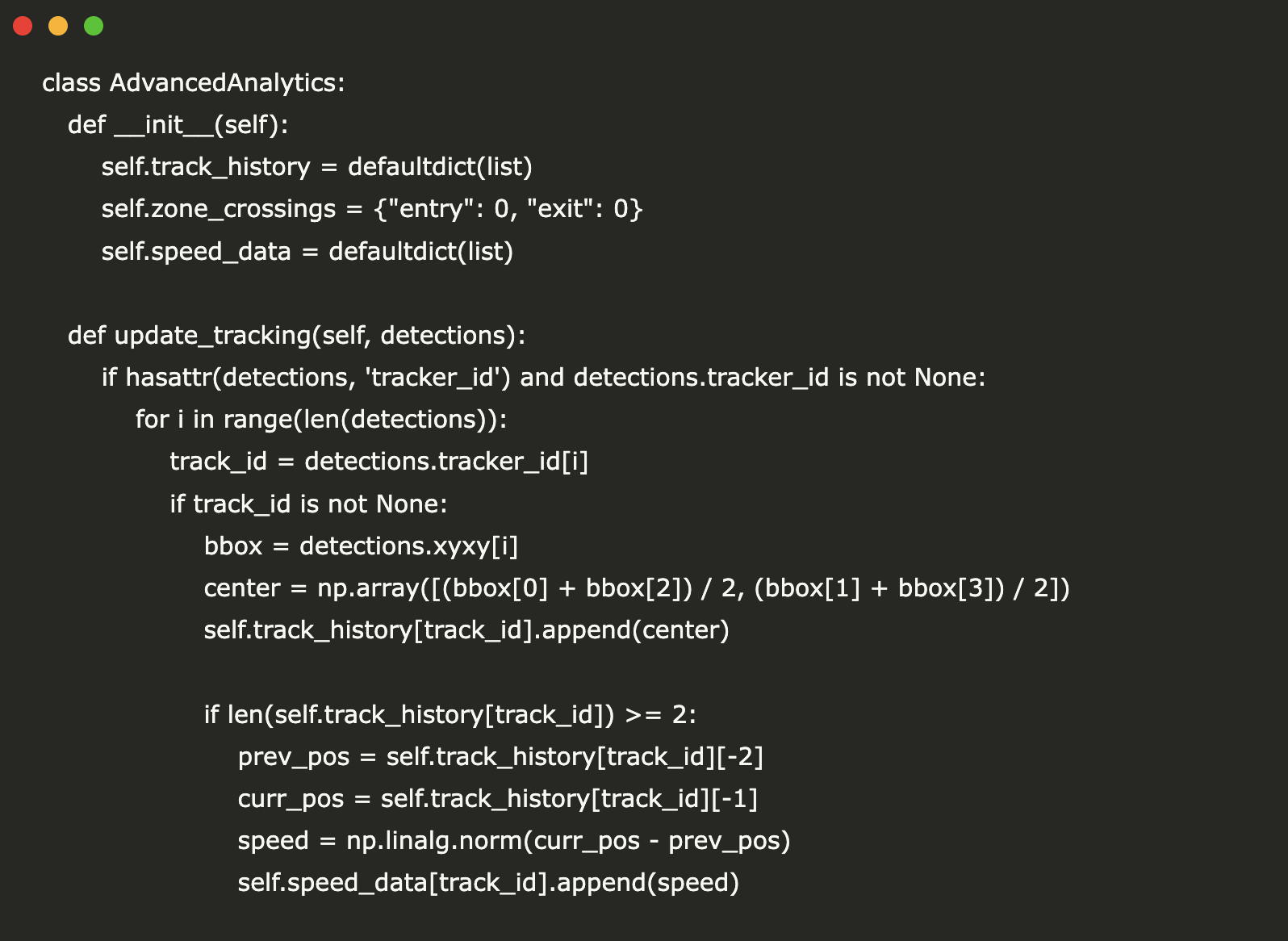
class AdvancedAnalytics:
   def __init__(self):
       self.track_history = defaultdict(list)
       self.zone_crossings = {"entry": 0, "exit": 0}
       self.speed_data = defaultdict(list)

   def update_tracking(self, detections):
       if hasattr(detections, 'tracker_id') and detections.tracker_id is not None:
           for i in range(len(detections)):
               track_id = detections.tracker_id[i]
               if track_id is not None:
                   bbox = detections.xyxy[i]
                   center = np.array([(bbox[0] + bbox[2]) / 2, (bbox[1] + bbox[3]) / 2])
                   self.track_history[track_id].append(center)

                   if len(self.track_history[track_id]) >= 2:
                       prev_pos = self.track_history[track_id][-2]
                       curr_pos = self.track_history[track_id][-1]
                       speed = np.linalg.norm(curr_pos - prev_pos)
                       self.speed_data[track_id].append(speed)

   def get_statistics(self):
       total_tracks = len(self.track_history)
       avg_speed = np.mean([np.mean(speeds) for speeds in self.speed_data.values() if speeds])
       return {
           "total_objects": total_tracks,
           "zone_entries": self.zone_crossings["entry"],
           "zone_exits": self.zone_crossings["exit"],
           "avg_speed": avg_speed if not np.isnan(avg_speed) else 0
       }


def process_video(source=0, max_frames=300):
   """
   Process video source with advanced supervision features
   source: video path or 0 for webcam
   max_frames: limit processing for demo
   """
   cap = cv2.VideoCapture(source)
   analytics = AdvancedAnalytics()

   ret, frame = cap.read()
   if not ret:
       print("Failed to read video source")
       return

   entry_zone, exit_zone = create_zones(frame.shape)

   try:
       entry_zone_annotator = sv.PolygonZoneAnnotator(
           zone=entry_zone,
           color=sv.Color.GREEN,
           thickness=2
       )
       exit_zone_annotator = sv.PolygonZoneAnnotator(
           zone=exit_zone,
           color=sv.Color.RED,
           thickness=2
       )
   except (AttributeError, TypeError):
       entry_zone_annotator = sv.PolygonZoneAnnotator(zone=entry_zone)
       exit_zone_annotator = sv.PolygonZoneAnnotator(zone=exit_zone)

   frame_count = 0
   results_frames = []

   cap.set(cv2.CAP_PROP_POS_FRAMES, 0)

   while ret and frame_count < max_frames:
       ret, frame = cap.read()
       if not ret:
           break

       results = model(frame, verbose=False)[0]
       detections = sv.Detections.from_ultralytics(results)

       detections = detections[detections.class_id == 0]

       if tracker is not None:
           detections = tracker.update_with_detections(detections)

       if smoother is not None:
           detections = smoother.update_with_detections(detections)

       analytics.update_tracking(detections)

       entry_zone.trigger(detections)
       exit_zone.trigger(detections)

       labels = []
       for i in range(len(detections)):
           confidence = detections.confidence[i] if detections.confidence is not None else 0.0

           if hasattr(detections, 'tracker_id') and detections.tracker_id is not None:
               track_id = detections.tracker_id[i]
               if track_id is not None:
                   speed = analytics.speed_data[track_id][-1] if analytics.speed_data[track_id] else 0
                   label = f"ID:{track_id} | Conf:{confidence:.2f} | Speed:{speed:.1f}"
               else:
                   label = f"Conf:{confidence:.2f}"
           else:
               label = f"Conf:{confidence:.2f}"
           labels.append(label)

       annotated_frame = frame.copy()

       annotated_frame = entry_zone_annotator.annotate(annotated_frame)
       annotated_frame = exit_zone_annotator.annotate(annotated_frame)

       if trace_annotator is not None:
           annotated_frame = trace_annotator.annotate(annotated_frame, detections)

       if box_annotator is not None:
           annotated_frame = box_annotator.annotate(annotated_frame, detections)
       else:
           for i in range(len(detections)):
               bbox = detections.xyxy[i].astype(int)
               cv2.rectangle(annotated_frame, (bbox[0], bbox[1]), (bbox[2], bbox[3]), (0, 255, 0), 2)

       if label_annotator is not None:
           annotated_frame = label_annotator.annotate(annotated_frame, detections, labels)
       else:
           for i, label in enumerate(labels):
               if i < len(detections):
                   bbox = detections.xyxy[i].astype(int)
                   cv2.putText(annotated_frame, label, (bbox[0], bbox[1]-10),
                              cv2.FONT_HERSHEY_SIMPLEX, 0.5, (255, 255, 255), 2)

       stats = analytics.get_statistics()
       y_offset = 30
       for key, value in stats.items():
           text = f"{key.replace('_', ' ').title()}: {value:.1f}"
           cv2.putText(annotated_frame, text, (10, y_offset),
                      cv2.FONT_HERSHEY_SIMPLEX, 0.7, (255, 255, 255), 2)
           y_offset += 30

       if frame_count % 30 == 0:
           results_frames.append(cv2.cvtColor(annotated_frame, cv2.COLOR_BGR2RGB))

       frame_count += 1

       if frame_count % 50 == 0:
           print(f"Processed {frame_count} frames...")

   cap.release()

   if results_frames:
       fig, axes = plt.subplots(2, 2, figsize=(15, 10))
       axes = axes.flatten()

       for i, (ax, frame) in enumerate(zip(axes, results_frames[:4])):
           ax.imshow(frame)
           ax.set_title(f"Frame {i*30}")
           ax.axis('off')

       plt.tight_layout()
       plt.show()

   final_stats = analytics.get_statistics()
   print("\n=== FINAL ANALYTICS ===")
   for key, value in final_stats.items():
       print(f"{key.replace('_', ' ').title()}: {value:.2f}")

   return analytics


print("Starting advanced supervision demo...")
print("Features: Object detection, tracking, zones, speed analysis, smoothing")
We define the AdvancedAnalytics class to track object movement, calculate speed, and count zone crossings, enabling rich real-time video insights. Inside the process_video function, we read each frame from the video source and run it through our detection, tracking, and smoothing pipeline. We annotate frames with bounding boxes, labels, zone overlays, and live statistics, giving us a powerful, flexible system for object monitoring and spatial analytics. Throughout the loop, we also collect data for visualization and print final statistics, showcasing the effectiveness of Roboflow Supervision’s end-to-end capabilities. Check out the Full Codes here.
def create_demo_video():
   """Create a simple demo video with moving objects"""
   fourcc = cv2.VideoWriter_fourcc(*'mp4v')
   out = cv2.VideoWriter('demo.mp4', fourcc, 20.0, (640, 480))

   for i in range(100):
       frame = np.zeros((480, 640, 3), dtype=np.uint8)

       x1 = int(50 + i * 2)
       y1 = 200
       x2 = int(100 + i * 1.5)
       y2 = 250

       cv2.rectangle(frame, (x1, y1), (x1+50, y1+50), (0, 255, 0), -1)
       cv2.rectangle(frame, (x2, y2), (x2+50, y2+50), (255, 0, 0), -1)

       out.write(frame)

   out.release()
   return 'demo.mp4'


demo_video = create_demo_video()
analytics = process_video(demo_video, max_frames=100)


print("\nTutorial completed! Key features demonstrated:")
print("✓ YOLO integration with Supervision")
print("✓ Multi-object tracking with ByteTracker")
print("✓ Detection smoothing")
print("✓ Polygon zones for area monitoring")
print("✓ Advanced annotations (boxes, labels, traces)")
print("✓ Real-time analytics and statistics")
print("✓ Speed calculation and tracking history")
To test our full pipeline, we generate a synthetic demo video with two moving rectangles simulating tracked objects. This allows us to validate detection, tracking, zone monitoring, and speed analysis without needing a real-world input. We then run the process_video function on the generated clip. At the end, we print out a summary of all key features we’ve implemented, showcasing the power of Roboflow Supervision for real-time visual analytics.
In conclusion, we have successfully implemented a full pipeline that brings together object detection, tracking, zone monitoring, and real-time analytics. We demonstrate how to visualize key insights like object speed, zone crossings, and tracking history with annotated video frames. This setup empowers us to go beyond basic detection and build a smart surveillance or analytics system using open-source tools. Whether for research or production use, we now have a powerful foundation to expand upon with even more advanced capabilities.
Check out the Full Codes here. Feel free to check out our GitHub Page for Tutorials, Codes and Notebooks. Also, feel free to follow us on Twitter and don’t forget to join our 100k+ ML SubReddit and Subscribe to our Newsletter.
Asif Razzaq is the CEO of Marktechpost Media Inc.. As a visionary entrepreneur and engineer, Asif is committed to harnessing the potential of Artificial Intelligence for social good. His most recent endeavor is the launch of an Artificial Intelligence Media Platform, Marktechpost, which stands out for its in-depth coverage of machine learning and deep learning news that is both technically sound and easily understandable by a wide audience. The platform boasts of over 2 million monthly views, illustrating its popularity among audiences.

Credit: Source link