























• bitcoinBitcoin(BTC)$80,132.00-0.04%
  • ethereumEthereum(ETH)$2,284.76-0.58%
  • tetherTether(USDT)$1.00-0.02%
  • binancecoinBNB(BNB)$641.99-0.07%
  • rippleXRP(XRP)$1.39-0.04%
  • usd-coinUSDC(USDC)$1.000.03%
  • solanaSolana(SOL)$89.151.09%
  • tronTRON(TRX)$0.3495370.24%
  • Figure HelocFigure Heloc(FIGR_HELOC)$1.00-1.66%
  • dogecoinDogecoin(DOGE)$0.107740-1.15%
  • whitebitWhiteBIT Coin(WBT)$59.020.70%
  • USDSUSDS(USDS)$1.000.00%
  • HyperliquidHyperliquid(HYPE)$42.841.28%
  • cardanoCardano(ADA)$0.2672141.28%
  • zcashZcash(ZEC)$581.942.10%
  • leo-tokenLEO Token(LEO)$10.380.30%
  • bitcoin-cashBitcoin Cash(BCH)$451.02-0.28%
  • moneroMonero(XMR)$399.20-3.10%
  • chainlinkChainlink(LINK)$10.021.56%
  • the-open-networkToncoin(TON)$2.617.44%
  • CantonCanton(CC)$0.145353-0.91%
  • stellarStellar(XLM)$0.1605120.70%
  • MemeCoreMemeCore(M)$3.700.31%
  • litecoinLitecoin(LTC)$57.251.32%
  • USD1USD1(USD1)$1.00-0.01%
  • daiDai(DAI)$1.00-0.04%
  • avalanche-2Avalanche(AVAX)$9.702.50%
  • suiSui(SUI)$1.013.46%
  • hedera-hashgraphHedera(HBAR)$0.0918711.77%
  • Ethena USDeEthena USDe(USDE)$1.00-0.01%
  • shiba-inuShiba Inu(SHIB)$0.0000061.32%
  • RainRain(RAIN)$0.0075200.27%
  • paypal-usdPayPal USD(PYUSD)$1.000.02%
  • crypto-com-chainCronos(CRO)$0.069921-0.26%
  • Circle USYCCircle USYC(USYC)$1.120.00%
  • BittensorBittensor(TAO)$311.531.62%
  • tether-goldTether Gold(XAUT)$4,706.61-0.85%
  • Global DollarGlobal Dollar(USDG)$1.00-0.03%
  • BlackRock USD Institutional Digital Liquidity FundBlackRock USD Institutional Digital Liquidity Fund(BUIDL)$1.000.00%
  • World Liberty FinancialWorld Liberty Financial(WLFI)$0.0748073.16%
  • uniswapUniswap(UNI)$3.594.78%
  • polkadotPolkadot(DOT)$1.331.94%
  • pax-goldPAX Gold(PAXG)$4,709.56-0.93%
  • mantleMantle(MNT)$0.670.77%
  • nearNEAR Protocol(NEAR)$1.565.76%
  • OndoOndo(ONDO)$0.41627114.79%
  • SkySky(SKY)$0.0802690.60%
  • okbOKB(OKB)$85.66-0.16%
  • pepePepe(PEPE)$0.0000042.18%
  • Falcon USDFalcon USD(USDF)$1.000.00%
TradePoint.io
  • Main
  • AI & Technology
  • Stock Charts
  • Market & News
  • Business
  • Finance Tips
  • Trade Tube
  • Blog
  • Shop
No Result
View All Result
TradePoint.io
No Result
View All Result

Apple Watch Compatibility Gives Vloggers Remote Control

May 8, 2026
in AI & Technology
Reading Time: 4 mins read
A A
Apple Watch Compatibility Gives Vloggers Remote Control
ShareShareShareShareShare

We may receive a commission on purchases made from links.

There are several reasons that droves of creators have adopted the Blackmagic Camera app in place of the iPhone’s native camera. For one, it offers options demanded by pros like full manual control, ProRes video capture and scopes for monitoring video. Most importantly though, it’s totally free, unlike rival camera apps from VSCO, Adobe and others.

YOU MAY ALSO LIKE

Google’s New Wearable Doesn’t Have A Screen

Anthropic Introduces Natural Language Autoencoders That Convert Claude’s Internal Activations Directly into Human-Readable Text Explanations

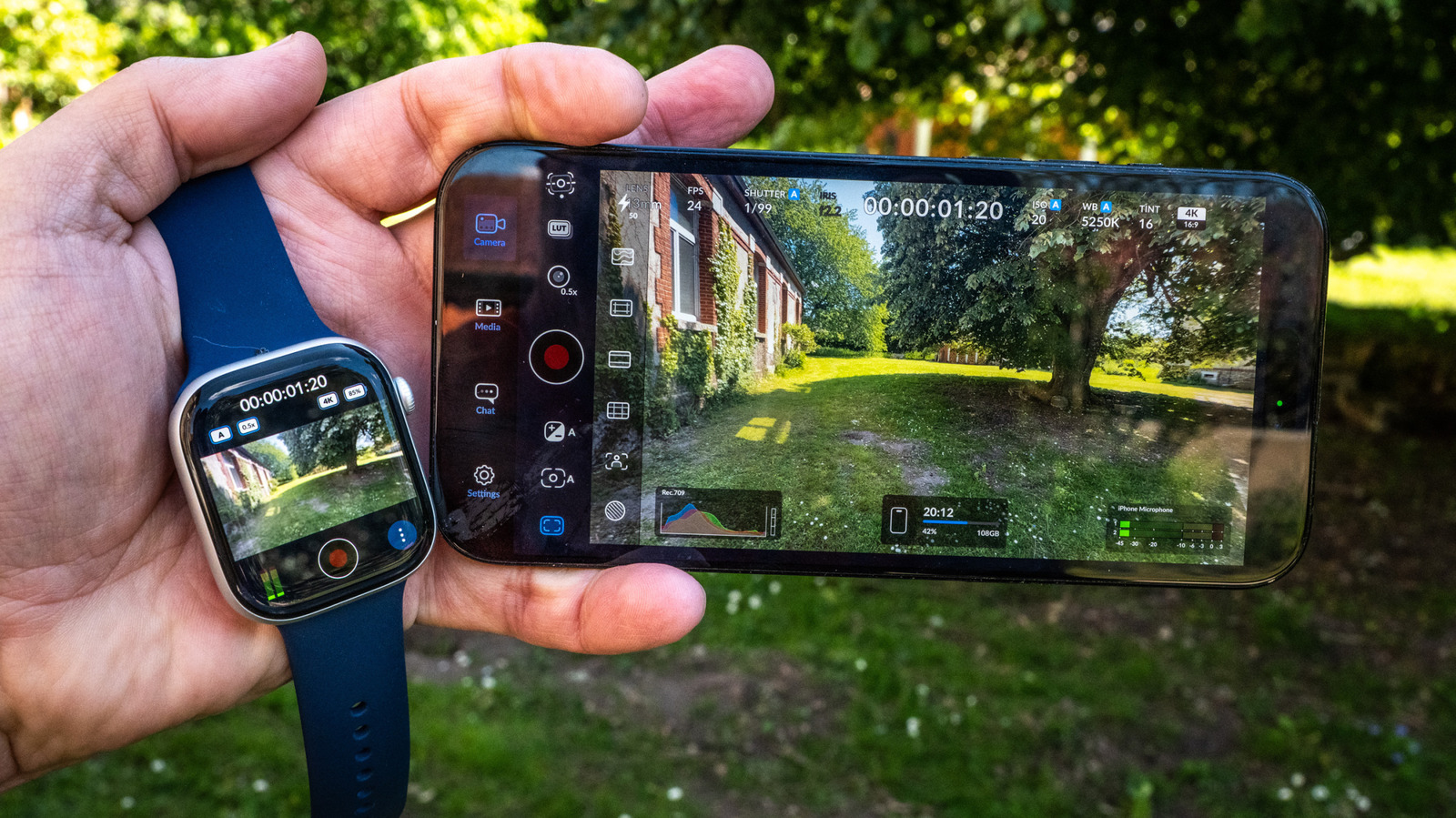
Since iPhone creators don’t usually have a camera crew, Blackmagic Design is offering some help with its latest version 3.3 update. You can now control the app from your wrist thanks to a new Apple Watch app that lets you do things like monitor video, start and stop recording and apply LUTs. To check out the new features, I took a fresh look at Blackmagic’s app, and it’s now incredibly impressive.

Why use the app? The native iPhone camera is powerful enough for most users, but lacks features needed for more creative work. It offers no way to make manual adjustments for shutter speed and white balance, for one, and has limited video format options. Plus, the built-in app lacks scopes, LUTs and other pro-level features.

Blackmagic Camera gives you all of those things and more with a simple and elegant interface. The main camera screen lets you choose key settings like shutter, ISO and white balance. Simply tapping on each one lets you change them manually. You can also easily adjust focal length, fps, exposure compensation, autofocus and LUTs (film looks).

Steve Dent for Engadget

Another key feature is digital stabilization available in three modes: Standard, Cinematic and Extreme. The first two smooth out normal shaking, while the latter corrects extreme shakiness when running, for instance (albeit with a noticeable crop). Note that stabilization is applied to video after it’s recorded, so you won’t see the results during shooting.

You’ll need to dive into another page of settings for things like the video codecs (10-bit ProRes, H.264 or H.265), bitrate, resolution, color space and more. Along with standard 16:9 4K video, the app supports open-gate capture if you want to output both vertical and horizontal video.

It’s possible to shoot ProRes RAW video with Blackmagic Camera on an iPhone 17 Pro or Pro Max, but you’ll need to connect a fast USB-C external SSD like this MagSafe-compatible model. Fortunately, stabilization is now supported for ProRes RAW capture (iOS 26.1 and above), something that was missing in previous versions of the app.

There’s a nice array of scopes for monitoring, including false color, grids, zebras and focus peaking, along with histograms and stereo audio meters. You also get a vertical frame guide that helps when shooting for both vertical and horizontal platforms. “Slate” is another handy feature, letting you note the project name, lens data and other production info.

Blackmagic Camera video frame with Vintage LUT and vignette added in postSteve Dent for Engadget

With the latest iOS 26.4 installed on both my iPhone 16 Pro Max and Watch, I put the Blackmagic Camera app through its paces. Video quality is already excellent on that handset, but having granular control over shutter speed and white balance settings let me get creative by controlling motion blur, while creating a filmic “look” using LUTs. The ability to capture 10-bit ProRes 422 log video was very helpful when color grading in post-production.

To test the Apple Watch remote control feature, I installed the Blackmagic Camera 3.3 update and it automatically detected my Watch 10 and installed the companion app. Then, I mounted my iPhone on a tripod and opened the Blackmagic Camera app on both devices.

For maximum quality, I used the main iPhone camera rather than the selfie cam. I was able to get a full view of myself right on my wrist, which was nice considering that I couldn’t see the iPhone’s display. The tiny Watch screen doesn’t show a lot of detail, but it’s good enough to use for video selfies or vlogging.

Above the display, the Watch app shows the LUT used, autofocus setting, lens (which can be toggled with the Digital Crown), resolution and battery level. Below, you have audio levels, the record button and additional settings. The latter lets you toggle key functions like autofocus, auto exposure, auto white balance, stabilization and the iPhone’s light.
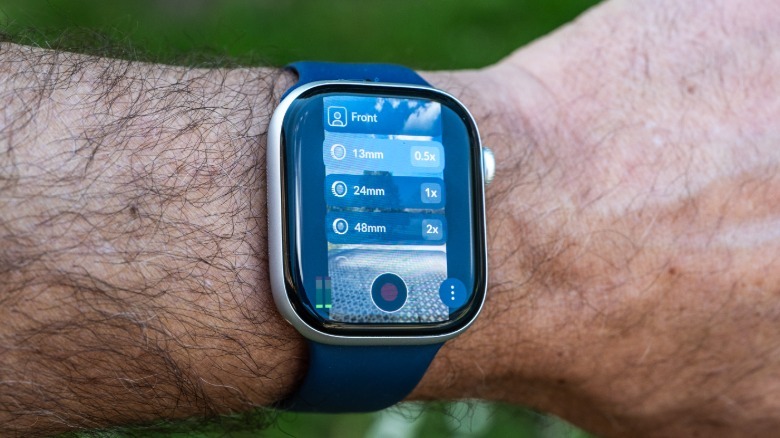
Blackmagic Camera app shown on the Apple WatchSteve Dent for Engadget

With everything set, I was able to trigger recording directly from my Watch. The view is nearly instantaneous, and though it occasionally lagged and froze, a quick tap on the Watch screen woke it up. I’d recommend setting up your Watch so that the screen doesn’t dim too quickly to avoid such lag.

Aside from the Watch feature, Blackmagic Camera 3.3 offers a few other notable functions. One of the best is aimed at live streamers, offering full iPhone 17 Pro or Pro Max control from Blackmagic’s ATEM Mini switcher via the $420 Blackmagic Camera ProDock. You can also manually focus your iPhone using Blackmagic’s Focus and Zoom demand controls and, as mentioned, it now supports stabilization for ProRes RAW on iPhone 17 Pro models.

All of that makes the Blackmagic Camera 3.3 a highly versatile app for iPhone creators, particularly those working alone who need more control and are willing to spend a bit of time learning its features. And as I detailed in my guide to smartphone photography, most third-party iPhone apps require a purchase or subscription, but Blackmagic Camera is completely free.

Credit: Source link

ShareTweetSendSharePin

Related Posts

Google’s New Wearable Doesn’t Have A Screen
AI & Technology

Google’s New Wearable Doesn’t Have A Screen

May 8, 2026
Anthropic Introduces Natural Language Autoencoders That Convert Claude’s Internal Activations Directly into Human-Readable Text Explanations
AI & Technology

Anthropic Introduces Natural Language Autoencoders That Convert Claude’s Internal Activations Directly into Human-Readable Text Explanations

May 8, 2026
OpenAI Releases Three Realtime Audio Models: GPT-Realtime-2, GPT-Realtime-Translate, and GPT-Realtime-Whisper in the Realtime API
AI & Technology

OpenAI Releases Three Realtime Audio Models: GPT-Realtime-2, GPT-Realtime-Translate, and GPT-Realtime-Whisper in the Realtime API

May 8, 2026
Nvidia Backs DeepInfra in 7 Million Raise
AI & Technology

Nvidia Backs DeepInfra in $107 Million Raise

May 8, 2026
Next Post
Backlash from Democrats over GOP request for taxpayer money for White House ballroom

Backlash from Democrats over GOP request for taxpayer money for White House ballroom

Leave a Reply Cancel reply

Your email address will not be published. Required fields are marked *

Search

No Result
View All Result
What to know about the US military presence in Europe as Trump seeks drawdown of thousands of troops – AP News

What to know about the US military presence in Europe as Trump seeks drawdown of thousands of troops – AP News

May 5, 2026
8.2M containers sold at Target, Walmart and more are recalled due to risk of serious injury

8.2M containers sold at Target, Walmart and more are recalled due to risk of serious injury

May 5, 2026
3 New California Burlington stores opening in May 2026

3 New California Burlington stores opening in May 2026

May 5, 2026

About

Learn more

Our Services

Legal

Privacy Policy

Terms of Use

Bloggers

Learn more

Article Links

Contact

Advertise

Ask us anything

©2020- TradePoint.io - All rights reserved!

Tradepoint.io, being just a publishing and technology platform, is not a registered broker-dealer or investment adviser. So we do not provide investment advice. Rather, brokerage services are provided to clients of Tradepoint.io by independent SEC-registered broker-dealers and members of FINRA/SIPC. Every form of investing carries some risk and past performance is not a guarantee of future results. “Tradepoint.io“, “Instant Investing” and “My Trading Tools” are registered trademarks of Apperbuild, LLC.

This website is operated by Apperbuild, LLC. We have no link to any brokerage firm and we do not provide investment advice. Every information and resource we provide is solely for the education of our readers. © 2020 Apperbuild, LLC. All rights reserved.

No Result
View All Result
  • Main
  • AI & Technology
  • Stock Charts
  • Market & News
  • Business
  • Finance Tips
  • Trade Tube
  • Blog
  • Shop

© 2023 - TradePoint.io - All Rights Reserved!