
• bitcoinBitcoin(BTC)$79,927.00-0.95%
  • ethereumEthereum(ETH)$2,318.51-1.50%
  • tetherTether(USDT)$1.000.00%
  • binancecoinBNB(BNB)$739.46-0.10%
  • rippleXRP(XRP)$1.29-0.79%
  • usd-coinUSDC(USDC)$1.000.01%
  • solanaSolana(SOL)$101.07-0.99%
  • tronTRON(TRX)$0.3300720.31%
  • Figure HelocFigure Heloc(FIGR_HELOC)$1.06-0.70%
  • zcashZcash(ZEC)$1,207.510.24%
  • HyperliquidHyperliquid(HYPE)$76.41-0.11%
  • dogecoinDogecoin(DOGE)$0.076758-1.14%
  • moneroMonero(XMR)$593.79-3.28%
  • USDSUSDS(USDS)$1.00-0.01%
  • whitebitWhiteBIT Coin(WBT)$76.98-1.03%
  • chainlinkChainlink(LINK)$11.40-1.59%
  • leo-tokenLEO Token(LEO)$9.01-0.31%
  • cardanoCardano(ADA)$0.203383-2.28%
  • RainRain(RAIN)$0.0086084.52%
  • nearNEAR Protocol(NEAR)$4.540.95%
  • stellarStellar(XLM)$0.167828-2.20%
  • bitcoin-cashBitcoin Cash(BCH)$278.380.71%
  • daiDai(DAI)$1.000.01%
  • Ethena USDeEthena USDe(USDE)$1.000.02%
  • litecoinLitecoin(LTC)$56.68-0.37%
  • uniswapUniswap(UNI)$6.900.97%
  • CantonCanton(CC)$0.100869-0.24%
  • avalanche-2Avalanche(AVAX)$8.90-1.03%
  • USD1USD1(USD1)$1.000.00%
  • suiSui(SUI)$0.92-2.15%
  • the-open-networkGram (prev. Toncoin)(GRAM)$1.24-0.40%
  • hedera-hashgraphHedera(HBAR)$0.077314-0.60%
  • tether-goldTether Gold(XAUT)$3,992.680.06%
  • Global DollarGlobal Dollar(USDG)$1.000.01%
  • paypal-usdPayPal USD(PYUSD)$1.00-0.01%
  • BittensorBittensor(TAO)$251.790.13%
  • shiba-inuShiba Inu(SHIB)$0.000005-1.95%
  • EthenaEthena(ENA)$0.2053285.59%
  • crypto-com-chainCronos(CRO)$0.054226-2.75%
  • quant-networkQuant(QNT)$188.834.45%
  • BitwayBitway(BTW)$1.65-6.09%
  • Ripple USDRipple USD(RLUSD)$1.000.01%
  • Circle USYCCircle USYC(USYC)$1.140.00%
  • Ondo US Dollar YieldOndo US Dollar Yield(USDY)$1.150.10%
  • okbOKB(OKB)$107.90-0.97%
  • BlackRock USD Institutional Digital Liquidity FundBlackRock USD Institutional Digital Liquidity Fund(BUIDL)$1.000.00%
  • MemeCoreMemeCore(M)$0.955.68%
  • aaveAave(AAVE)$135.15-1.20%
  • OndoOndo(ONDO)$0.406634-1.27%
  • Pump.funPump.fun(PUMP)$0.004237-1.59%
TradePoint.io
  • Main
  • AI & Technology
  • Stock Charts
  • Market & News
  • Business
  • Finance Tips
  • Trade Tube
  • Blog
  • Shop
No Result
View All Result
TradePoint.io
No Result
View All Result

Why Google Chrome Is Always Using So Much RAM

October 25, 2026
in AI & Technology
Reading Time: 5 mins read
A A
Why Google Chrome Is Always Using So Much RAM
ShareShareShareShareShare

Chrome has developed a reputation for being a memory hog, but is it deserved?


Algi Febri Sugita/Shutterstock

If you have spent any time on the internet, you have probably come across the “fact” that Chrome is a RAM hog. However, this isn’t a fact so much as it is an internet meme. It has more to do with jokes about browsing and less to do with actual data, same as the claim that Microsoft Edge is slow and out of date. Both have been repeated so often that they started to feel true.

YOU MAY ALSO LIKE

Nanbeige Releases Nanbeige4.3-33B, a 33B Open Agentic Coding Model

What Does The Bell Icon Mean On Your CarPlay Screen?

This isn’t to say that Chrome doesn’t use as much RAM as it needs; it absolutely does. It just means that RAM usage isn’t that much of an issue in 2026, nor was it that much of an issue back in 2016.

What Chrome is actually doing with your RAM

Websites, and the way we use them, have changed considerably since the early days of the internet. Browsing the web used to be about moving from one text-heavy page to another, with occasional photos or videos sprinkled in. Websites today more closely resemble apps than simple web pages. Each holds more information and allows for a much more versatile browsing experience, while the browser itself is expected to hold multiple tabs at once while also running several extensions in the background.

All of those features together add up, and they are all expected to load instantly and run smoothly. That means the creators of the browser need to make a decision: share memory and processes across tabs to save RAM, or give each tab and site its own process, which costs more memory but keeps things fast and stable. Google Chrome, much like many other browsers out there, chooses the latter. And that’s a good thing.

Why that’s good for you

By giving each website its own dedicated process inside the computer’s memory, Chrome doesn’t just make sure your browsing stays fast and responsive. It also prevents browser-wide crashes. Anyone old enough to remember the early days of web browsing probably remembers the terrible feeling when your browser suddenly disappeared along with all of your work, while you were left staring at a small system message telling you the browser had encountered a problem and had to shut down.

Browsers today avoid this problem by keeping each site in its own process. One crashed site does not bring down the entire browser, along with the 20+ other tabs you had open. This approach also helps with security. Chrome runs each site in a sandboxed process, and the operating system keeps those processes apart, so a malicious page can’t easily peek at what’s happening in your banking or email tab. Some of that extra memory is the price of that wall between your tabs, and it’s a price most people would be glad to pay.

Why RAM isn’t the main factor in browsing
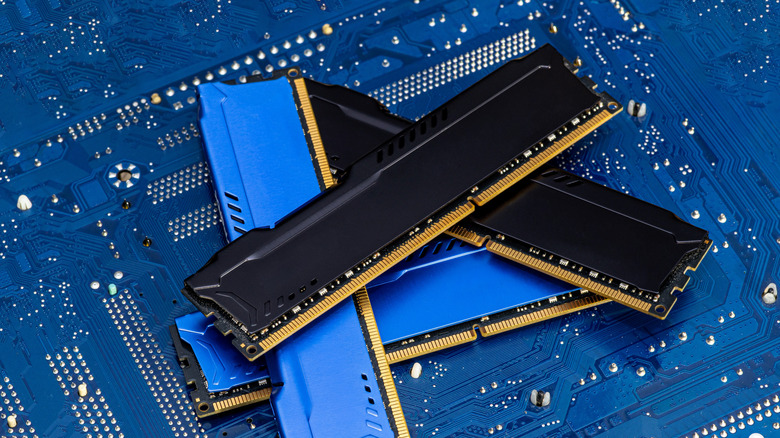

Four DDR memory chips in different colors lying on a blue printed circuit board.
Kinek00/Getty Images

There is a common misconception that RAM usage should be kept as low as possible so the computer runs smoother. In reality, unused RAM is wasted RAM. The whole point of memory is to hold everything you want running fast and smoothly, and a browser that fills it with pages, media and prepared tabs is doing its job. PCMag says 8GB of RAM should be fine for most general-use PCs, several times what a single browser typically needs, so the headroom is there to be used.

High usage isn’t the only warning sign — you could also have a memory leak. A memory leak is when a program grabs memory and never gives it back, so the number keeps climbing for no good reason. Chrome’s built-in Task Manager (Shift + Esc) shows which tab or extension is the culprit.

If you’re still worried, there are some alternatives

Chrome has its own answer built in. Memory Saver puts tabs you haven’t touched in a while to sleep and frees up the memory they were using, then reloads them when you click back. Google has since rolled it out to everyone. You can find it in Chrome’s settings under Performance, and you can add sites that should never be put to sleep, such as the one playing your music.

Other browsers take a different route. Microsoft Edge runs on the same Chromium foundation as Chrome, so it uses a similar process model, but its sleeping tabs and Energy Saver put idle tabs to sleep to cut memory use. Firefox groups tabs into fewer shared processes and unloads tabs when your system runs low on memory. Both are reasonable choices, and neither is a cure. A browser that gives you the same experience for a fraction of the memory would have to give up something on the way.

Chrome shouldn’t feel sluggish

If Chrome feels slow, don’t just look at the memory number. Open the browser’s Task Manager and look for a tab or extension that keeps growing. If nothing does, Chrome is using your RAM the way it’s meant to, and you can leave it alone. If things still feel sluggish, the cause may be somewhere else entirely, such as a nearly full drive or a slow connection, and restarting the browser is a good first step.

Credit: Source link

ShareTweetSendSharePin

Related Posts

Nanbeige Releases Nanbeige4.3-33B, a 33B Open Agentic Coding Model
AI & Technology

Nanbeige Releases Nanbeige4.3-33B, a 33B Open Agentic Coding Model

October 25, 2026
What Does The Bell Icon Mean On Your CarPlay Screen?
AI & Technology

What Does The Bell Icon Mean On Your CarPlay Screen?

October 25, 2026
The Most Unexpected Everyday Tool Can Be Found On Your Phone
AI & Technology

The Most Unexpected Everyday Tool Can Be Found On Your Phone

October 25, 2026
Tesla Unveils Flying Roadster and Glimpse Into Its Future
AI & Technology

Tesla Unveils Flying Roadster and Glimpse Into Its Future

October 25, 2026
Next Post
Divers investigate site of world’s oldest shipwreck

Divers investigate site of world’s oldest shipwreck

Leave a Reply Cancel reply

Your email address will not be published. Required fields are marked *

Search

No Result
View All Result
Walmart Introduces Agent Profiles, Gateway for AI Shopping Agents – Unite.AI

Walmart Introduces Agent Profiles, Gateway for AI Shopping Agents – Unite.AI

October 21, 2026
NVIDIA Details Kazakhstan GPU Deployments and Robotaxi Plans – Unite.AI

NVIDIA Details Kazakhstan GPU Deployments and Robotaxi Plans – Unite.AI

October 23, 2026
Dad Died And Left Me With A Bunch Of Debt

Dad Died And Left Me With A Bunch Of Debt

October 20, 2026

About

Learn more

Our Services

Legal

Privacy Policy

Terms of Use

Bloggers

Learn more

Article Links

Contact

Advertise

Ask us anything

©2020- TradePoint.io - All rights reserved!

Tradepoint.io, being just a publishing and technology platform, is not a registered broker-dealer or investment adviser. So we do not provide investment advice. Rather, brokerage services are provided to clients of Tradepoint.io by independent SEC-registered broker-dealers and members of FINRA/SIPC. Every form of investing carries some risk and past performance is not a guarantee of future results. “Tradepoint.io“, “Instant Investing” and “My Trading Tools” are registered trademarks of Apperbuild, LLC.

This website is operated by Apperbuild, LLC. We have no link to any brokerage firm and we do not provide investment advice. Every information and resource we provide is solely for the education of our readers. © 2020 Apperbuild, LLC. All rights reserved.

No Result
View All Result
  • Main
  • AI & Technology
  • Stock Charts
  • Market & News
  • Business
  • Finance Tips
  • Trade Tube
  • Blog
  • Shop

© 2023 - TradePoint.io - All Rights Reserved!