





• bitcoinBitcoin(BTC)$77,139.000.10%
  • ethereumEthereum(ETH)$2,437.481.00%
  • tetherTether(USDT)$1.000.00%
  • rippleXRP(XRP)$1.503.50%
  • binancecoinBNB(BNB)$694.970.40%
  • usd-coinUSDC(USDC)$1.000.00%
  • solanaSolana(SOL)$95.332.20%
  • tronTRON(TRX)$0.343533-0.10%
  • Figure HelocFigure Heloc(FIGR_HELOC)$1.00-2.40%
  • HyperliquidHyperliquid(HYPE)$79.632.80%
  • dogecoinDogecoin(DOGE)$0.0924242.40%
  • zcashZcash(ZEC)$838.785.90%
  • RainRain(RAIN)$0.013975-1.00%
  • USDSUSDS(USDS)$1.000.00%
  • leo-tokenLEO Token(LEO)$9.490.90%
  • chainlinkChainlink(LINK)$11.46-1.70%
  • whitebitWhiteBIT Coin(WBT)$72.120.40%
  • cardanoCardano(ADA)$0.2245720.10%
  • moneroMonero(XMR)$414.87-0.90%
  • stellarStellar(XLM)$0.1989211.80%
  • bitcoin-cashBitcoin Cash(BCH)$273.52-1.60%
  • CantonCanton(CC)$0.1190281.90%
  • daiDai(DAI)$1.000.00%
  • the-open-networkGram (prev. Toncoin)(GRAM)$1.515.40%
  • Ethena USDeEthena USDe(USDE)$1.000.00%
  • litecoinLitecoin(LTC)$52.020.10%
  • USD1USD1(USD1)$1.000.00%
  • hedera-hashgraphHedera(HBAR)$0.0794703.80%
  • Global DollarGlobal Dollar(USDG)$1.000.00%
  • suiSui(SUI)$0.820.40%
  • avalanche-2Avalanche(AVAX)$7.551.10%
  • shiba-inuShiba Inu(SHIB)$0.0000050.40%
  • Circle USYCCircle USYC(USYC)$1.140.00%
  • paypal-usdPayPal USD(PYUSD)$1.000.00%
  • uniswapUniswap(UNI)$4.557.40%
  • crypto-com-chainCronos(CRO)$0.058205-2.10%
  • tether-goldTether Gold(XAUT)$4,593.140.40%
  • BlackRock USD Institutional Digital Liquidity FundBlackRock USD Institutional Digital Liquidity Fund(BUIDL)$1.000.00%
  • nearNEAR Protocol(NEAR)$1.953.40%
  • MemeCoreMemeCore(M)$1.120.50%
  • okbOKB(OKB)$109.78-0.30%
  • BittensorBittensor(TAO)$232.475.20%
  • aaveAave(AAVE)$139.6813.60%
  • Ondo US Dollar YieldOndo US Dollar Yield(USDY)$1.140.60%
  • Ripple USDRipple USD(RLUSD)$1.000.00%
  • Pump.funPump.fun(PUMP)$0.0051298.50%
  • pax-goldPAX Gold(PAXG)$4,603.340.40%
  • World Liberty FinancialWorld Liberty Financial(WLFI)$0.0591120.10%
  • OndoOndo(ONDO)$0.3844364.70%
  • AsterAster(ASTER)$0.661.40%
TradePoint.io
  • Main
  • AI & Technology
  • Stock Charts
  • Market & News
  • Business
  • Finance Tips
  • Trade Tube
  • Blog
  • Shop
No Result
View All Result
TradePoint.io
No Result
View All Result

The Reasons Siri May Not Work On CarPlay

August 23, 2026
in AI & Technology
Reading Time: 4 mins read
A A
The Reasons Siri May Not Work On CarPlay
ShareShareShareShareShare

Screaming “HEY SIRI!” even louder isn’t fixing the problem, surprisingly.

Andriy Baidak/Shutterstock

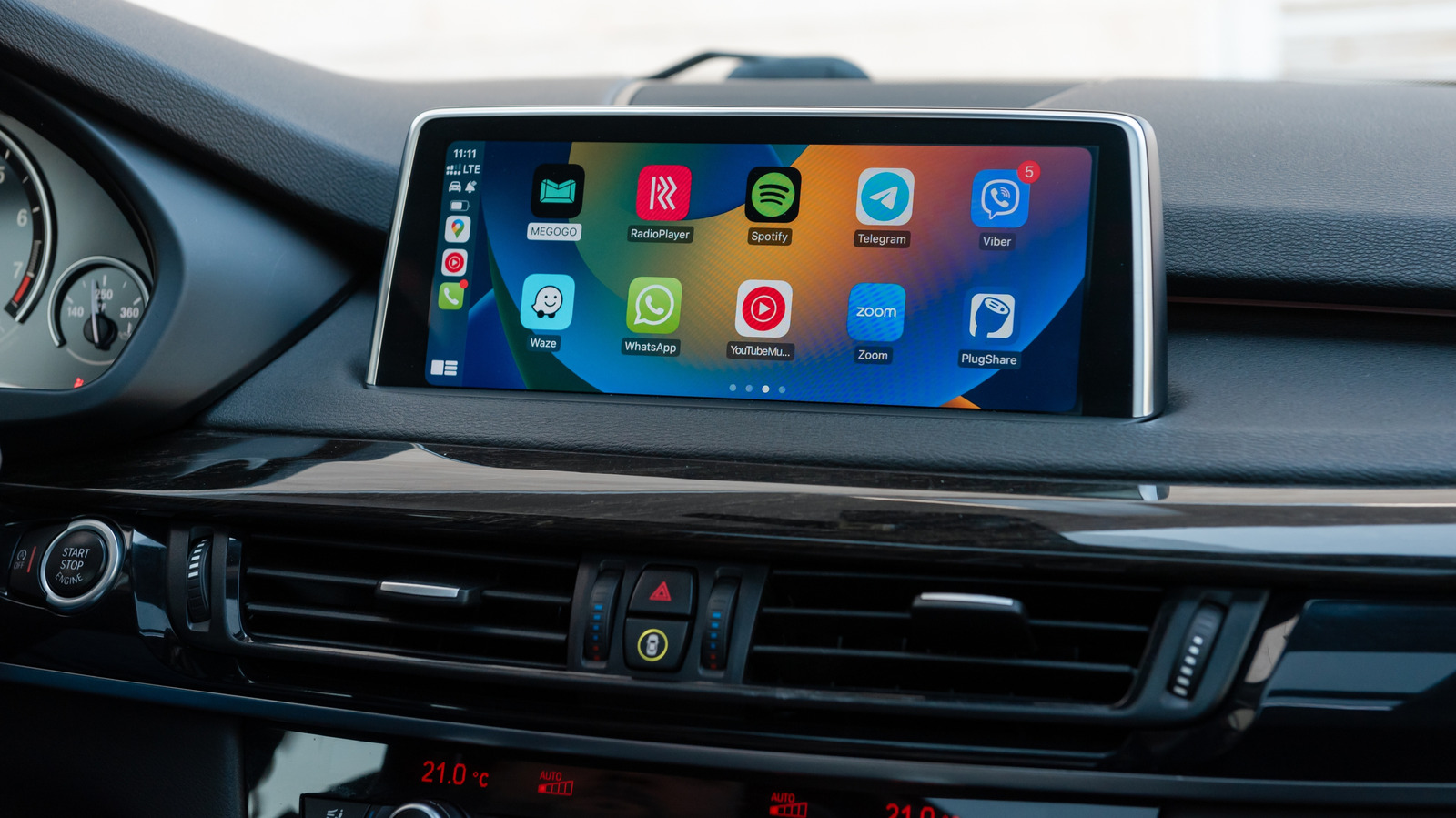
CarPlay is happily running Maps and playing music, and then suddenly, Siri stops listening. Maybe it does hear you but won’t answer. Or it responds in a subdued tone, and you begin to think the voice assistant has made the decision to mumble for the duration of the drive.

YOU MAY ALSO LIKE

These Modern Smartwatches Are In Their Last Year Of Updates

Meet FreeToken: An Edge-Native MoE Serving Engine that Runs 753B GLM-5.2 on a Single Workstation GPU

The thing is, Siri itself may not be the problem. A failure can begin with the settings on the iPhone or the CarPlay connection or the car’s infotainment system, and finding out which one is misbehaving can save you from changing a dozen settings that were just fine to begin with.

You can activate Siri in CarPlay by holding the car’s voice-command button or pressing and holding the CarPlay Home button on the display. Some cars also allow you to use “Hey Siri.” If the button wakes Siri but the wake phrase does not, it may be that your car simply doesn’t support voice activation.

Don’t blame CarPlay if Siri doesn’t work on the iPhone

Begin with the phone. It’s the easier suspect to rule out.

Apple keeps Siri’s voice activation controls under Settings > Apple Intelligence & Siri (or Siri) > Talk & Type to Siri. Apple suggests turning “Siri” or “Hey Siri” off and on, and then repeating the voice-recognition setup if it’s not working.

There are a couple of not-so-obvious settings that can cause problems as well. Siri can be disabled when the iPhone is locked, which is quite a pain when the phone remains untouched in a pocket, bag or cupholder for an entire drive. CarPlay can also be turned off under Settings > Screen Time > Content & Privacy Restrictions > Allowed Apps.

Then there’s connectivity. CarPlay can stay fully visible on the dashboard while Siri struggles to respond to requests because Siri needs an internet connection. Apple also says that some VPN profiles may prevent Siri from working, but doesn’t detail which VPN configurations are likely to cause this issue.

The check is simple: just disconnect CarPlay and test Siri on the iPhone. If Siri still doesn’t listen or respond, it’s likely that poking around the car’s infotainment menus won’t work a miracle.

When Siri is working on the phone but not in the car

Steering wheel voice-command button. Andri wahyudi/Shutterstock

If Siri suddenly remembers how to do its job as soon as the phone leaves CarPlay, the connection becomes highly suspect.

For wired and wireless CarPlay, the potential connection problems are a little different. If you’re using wired CarPlay, Apple suggests using a different USB cable or a compatible USB port. Wireless CarPlay requires both Bluetooth and Wi-Fi, with Auto-Join turned on for the CarPlay network, so either connection can cause odd behavior even if the CarPlay interface appears to be working normally.

Apple’s troubleshooting list includes restarting the iPhone and the vehicle, forgetting the car under Settings > General > CarPlay and pairing it again. The company also suggests checking with the vehicle manufacturer for infotainment firmware updates (because restarting the car isn’t enough anymore).

If the entire CarPlay connection is acting up rather than Siri alone, broader CarPlay connection problems such as cables, pairing and vehicle compatibility are worth checking before spending another afternoon buried in Siri settings.

One issue that can be confused with a broken Siri is volume. If Siri hears your command and responds but you can barely hear the response, adjust the car’s volume while Siri is speaking or while you’re holding the button to activate it. If Siri is not talking at all, then there is a Prefer Spoken Responses option you can enable in Settings > Apple Intelligence & Siri > Siri Responses.

Credit: Source link

ShareTweetSendSharePin

Related Posts

These Modern Smartwatches Are In Their Last Year Of Updates
AI & Technology

These Modern Smartwatches Are In Their Last Year Of Updates

August 23, 2026
Meet FreeToken: An Edge-Native MoE Serving Engine that Runs 753B GLM-5.2 on a Single Workstation GPU
AI & Technology

Meet FreeToken: An Edge-Native MoE Serving Engine that Runs 753B GLM-5.2 on a Single Workstation GPU

August 23, 2026
Building an End-to-End Document Intelligence Pipeline with deepDoctection
AI & Technology

Building an End-to-End Document Intelligence Pipeline with deepDoctection

August 23, 2026
The Developer’s Guide to NeMo Guardrails for Enterprise AI Safety
AI & Technology

The Developer’s Guide to NeMo Guardrails for Enterprise AI Safety

August 22, 2026
Next Post
Minnesota man fatally stabs his wife and daughter with a screwdriver

Minnesota man fatally stabs his wife and daughter with a screwdriver

Leave a Reply Cancel reply

Your email address will not be published. Required fields are marked *

Search

No Result
View All Result
Why Treasury Buybacks Matter Right Now

Why Treasury Buybacks Matter Right Now

August 21, 2026
Samsung Is Holding Another Galaxy Event On August 27

Samsung Is Holding Another Galaxy Event On August 27

August 20, 2026
Buc-ee’s chain draws outcry in Ohio after suing mini-mart over beaver logo

Buc-ee’s chain draws outcry in Ohio after suing mini-mart over beaver logo

August 23, 2026

About

Learn more

Our Services

Legal

Privacy Policy

Terms of Use

Bloggers

Learn more

Article Links

Contact

Advertise

Ask us anything

©2020- TradePoint.io - All rights reserved!

Tradepoint.io, being just a publishing and technology platform, is not a registered broker-dealer or investment adviser. So we do not provide investment advice. Rather, brokerage services are provided to clients of Tradepoint.io by independent SEC-registered broker-dealers and members of FINRA/SIPC. Every form of investing carries some risk and past performance is not a guarantee of future results. “Tradepoint.io“, “Instant Investing” and “My Trading Tools” are registered trademarks of Apperbuild, LLC.

This website is operated by Apperbuild, LLC. We have no link to any brokerage firm and we do not provide investment advice. Every information and resource we provide is solely for the education of our readers. © 2020 Apperbuild, LLC. All rights reserved.

No Result
View All Result
  • Main
  • AI & Technology
  • Stock Charts
  • Market & News
  • Business
  • Finance Tips
  • Trade Tube
  • Blog
  • Shop

© 2023 - TradePoint.io - All Rights Reserved!