
• bitcoinBitcoin(BTC)$64,803.00-0.10%
  • ethereumEthereum(ETH)$1,905.80-0.40%
  • tetherTether(USDT)$1.000.00%
  • binancecoinBNB(BNB)$602.990.40%
  • usd-coinUSDC(USDC)$1.000.00%
  • rippleXRP(XRP)$1.03-0.90%
  • solanaSolana(SOL)$76.280.40%
  • tronTRON(TRX)$0.3302030.30%
  • Figure HelocFigure Heloc(FIGR_HELOC)$1.00-2.70%
  • HyperliquidHyperliquid(HYPE)$53.88-2.10%
  • dogecoinDogecoin(DOGE)$0.069376-1.60%
  • USDSUSDS(USDS)$1.000.00%
  • RainRain(RAIN)$0.012570-0.80%
  • leo-tokenLEO Token(LEO)$9.710.00%
  • zcashZcash(ZEC)$508.400.60%
  • moneroMonero(XMR)$394.724.10%
  • cardanoCardano(ADA)$0.195243-2.00%
  • whitebitWhiteBIT Coin(WBT)$56.06-0.20%
  • chainlinkChainlink(LINK)$8.17-1.40%
  • stellarStellar(XLM)$0.162897-1.20%
  • daiDai(DAI)$1.000.00%
  • bitcoin-cashBitcoin Cash(BCH)$214.51-0.40%
  • CantonCanton(CC)$0.1020756.10%
  • USD1USD1(USD1)$1.000.00%
  • Ethena USDeEthena USDe(USDE)$1.000.00%
  • the-open-networkGram (prev. Toncoin)(GRAM)$1.32-3.30%
  • litecoinLitecoin(LTC)$45.39-1.20%
  • Global DollarGlobal Dollar(USDG)$1.000.00%
  • Circle USYCCircle USYC(USYC)$1.130.20%
  • hedera-hashgraphHedera(HBAR)$0.068548-0.60%
  • paypal-usdPayPal USD(PYUSD)$1.000.00%
  • suiSui(SUI)$0.69-0.50%
  • avalanche-2Avalanche(AVAX)$6.43-0.70%
  • BlackRock USD Institutional Digital Liquidity FundBlackRock USD Institutional Digital Liquidity Fund(BUIDL)$1.000.00%
  • shiba-inuShiba Inu(SHIB)$0.000005-0.30%
  • tether-goldTether Gold(XAUT)$4,315.81-0.30%
  • uniswapUniswap(UNI)$4.00-0.30%
  • crypto-com-chainCronos(CRO)$0.048093-2.70%
  • Ondo US Dollar YieldOndo US Dollar Yield(USDY)$1.14-0.10%
  • nearNEAR Protocol(NEAR)$1.61-1.10%
  • okbOKB(OKB)$93.160.30%
  • BittensorBittensor(TAO)$203.111.60%
  • pax-goldPAX Gold(PAXG)$4,329.58-0.20%
  • OndoOndo(ONDO)$0.348207-1.20%
  • World Liberty FinancialWorld Liberty Financial(WLFI)$0.0532203.30%
  • AsterAster(ASTER)$0.621.50%
  • HTX DAOHTX DAO(HTX)$0.0000020.10%
  • Ripple USDRipple USD(RLUSD)$1.000.00%
  • usddUSDD(USDD)$1.000.00%
  • MemeCoreMemeCore(M)$1.10-3.60%
TradePoint.io
  • Main
  • AI & Technology
  • Stock Charts
  • Market & News
  • Business
  • Finance Tips
  • Trade Tube
  • Blog
  • Shop
No Result
View All Result
TradePoint.io
No Result
View All Result

How To Use ChatGPT’s New, More Natural Voice Mode For Conversations

August 9, 2026
in AI & Technology
Reading Time: 5 mins read
A A
How To Use ChatGPT’s New, More Natural Voice Mode For Conversations
ShareShareShareShareShare

Talking to ChatGPT just got a lot less awkward.

Adnan Ahmed for Engadget

AI assistants like ChatGPT have been advancing at a steady rate, offering more capabilities, better accuracy and faster responses with each new model. Generative AI is not perfect, and you really shouldn’t see it as an unquestionable source of information, but for those who have embraced the technology, it might be more convenient to switch to voice conversations instead of typing everything out. ChatGPT’s original Voice Mode in 2023 relied on three separate systems to make it work. It would first convert your speech into text, generate an answer using a language model and then use a text-to-speech model to read it aloud.

YOU MAY ALSO LIKE

How To Use Claude’s Voice Mode

Top LLM Observability and Evaluation Platforms in 2026: Langfuse, LangSmith, Braintrust, Arize, and More Compared

The Advanced Voice Mode came after and featured a single multimodal model that improved things considerably. ChatGPT now ships with the GPT-Live model for handling voice conversations, and it is a major step up in terms of how natural the conversations feel. OpenAI calls it a “full-duplex” architecture that allows it to listen and speak at the same time. This is a gripe you might have had with the previous voice model, which could sometimes mistake a brief pause for the end of your turn and start replying before you had actually finished your sentence.

You will now occasionally hear ChatGPT vocalizing short acknowledgements like “mhmm” or “yeah” while you’re speaking, similar to how a person might respond during a real conversation. GPT-Live can also pass on more complex tasks to other capable models, like GPT-5.5, in the background when a question requires reasoning or research.

Starting a conversation with GPT-Live
Changing ChatGPT Voice options Adnan Ahmed for Engadget

The GPT-Live voice model is available through the ChatGPT app on Android and iOS devices and on the web through any browser. ChatGPT Pro, Plus and Go users will have access to the GPT-Live-1 model, while those on the free plan can access the GPT-Live-1 mini model. GPT-Live replaces the previous turn-based Advanced Voice model as the default option. To get started, simply tap the ChatGPT Voice icon, which is represented by a waveform symbol, at the far right of the text box. If this is your first time conversing with ChatGPT using your voice, you might be prompted to grant it access to your device’s microphone.

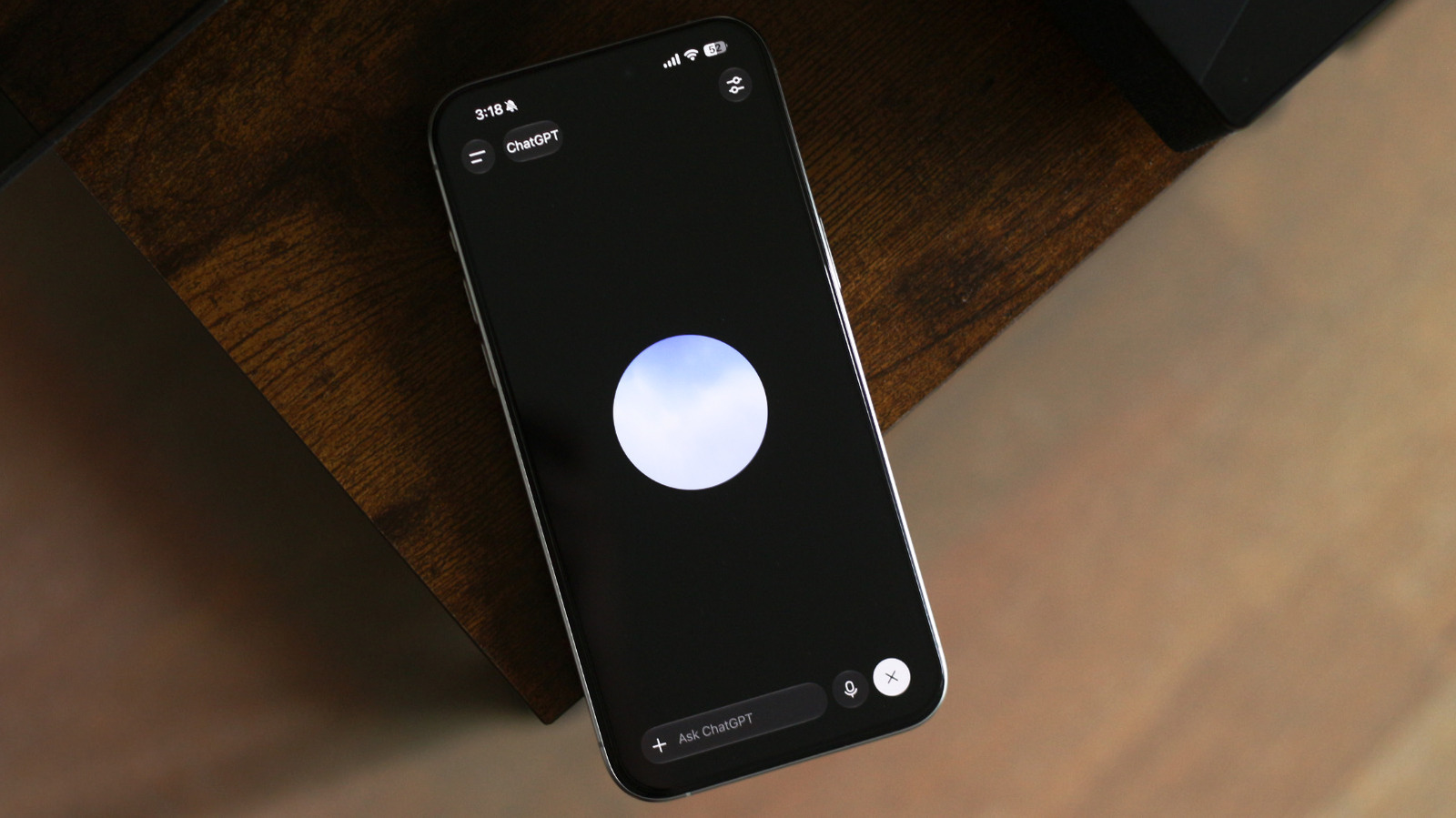
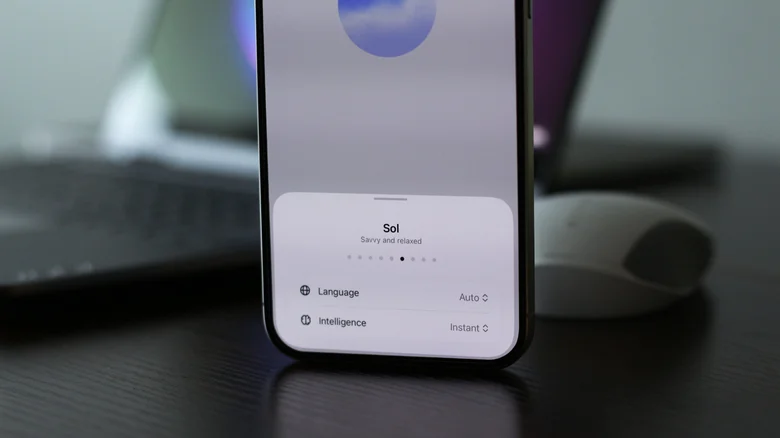
Once you’ve entered voice mode, you’ll see a responsive floating orb on the screen. You can now start talking as you normally would. If you tap on the settings icon at the top-right corner, you can change the intelligence of the voice model. You have three options to choose from: Instant, Medium and High. This customization is not available on the GPT-Live-1 mini model, so currently requires a paid plan. ChatGPT Voice will remain active even if you switch to another app or lock your device. 

While the overall experience is an upgrade over the previous iterations of ChatGPT’s voice mode, GPT-Live currently doesn’t support screen or video sharing. Fortunately, you can revert to the older voice model by heading into ChatGPT’s settings, navigating to Voice and selecting a different model. Here, you can also pick a different voice for ChatGPT, change its language or set ChatGPT Voice to be the default mode when you launch the app.

What GPT-Live excels at

ChatGPT app icon on an iPhone Adnan Ahmed for Engadget

I’m someone who prefers typing things out, so I hadn’t given much thought to the upgraded version of ChatGPT Voice initially. Well, that is until I actually tried having a few long-drawn conversations with it. What impressed me the most wasn’t its intelligence, but how quickly I stopped thinking about the fact that I was conversing with an AI. ChatGPT Voice no longer cuts you off mid-sentence, and you don’t need to awkwardly wait for it to finish speaking before jumping back in. With longer queries, I could almost feel like GPT-Live could anticipate what I was going to say next.

GPT-Live’s responsiveness makes it a great tool for carrying out live translations, too. At any time during your conversation with GPT-Live, you can scroll down to reveal the transcript of everything being said. If you ask ChatGPT a question that it thinks can be answered better with a visual, it will create an interactive widget alongside its spoken response.

GPT-Live’s intelligence level is set to Instant by default, which handles most everyday questions with ease while prioritizing quick responses. It can still offload searches and deeper reasoning to the more capable models in the background while it keeps the conversation flowing. If you do plan on discussing complex topics with GPT-Live more regularly, I found that switching to the Medium and High intelligence levels adds a split second or two of extra thinking time, but the added delay doesn’t take away from how naturally the conversation flows.

Credit: Source link

ShareTweetSendSharePin

Related Posts

How To Use Claude’s Voice Mode
AI & Technology

How To Use Claude’s Voice Mode

August 9, 2026
Top LLM Observability and Evaluation Platforms in 2026: Langfuse, LangSmith, Braintrust, Arize, and More Compared
AI & Technology

Top LLM Observability and Evaluation Platforms in 2026: Langfuse, LangSmith, Braintrust, Arize, and More Compared

August 9, 2026
Here’s How To Format A USB Drive On Windows
AI & Technology

Here’s How To Format A USB Drive On Windows

August 9, 2026
How To Hide And Unhide An App On Your iPhone Or iPad (And Why You May Want To)
AI & Technology

How To Hide And Unhide An App On Your iPhone Or iPad (And Why You May Want To)

August 9, 2026
Next Post
Former NFL star Chris Johnson reveals ALS diagnosis

Former NFL star Chris Johnson reveals ALS diagnosis

Leave a Reply Cancel reply

Your email address will not be published. Required fields are marked *

Search

No Result
View All Result
How These AI Assistants Differ

How These AI Assistants Differ

August 8, 2026
OpenAI vs Claude Polymarket AI Prediciton Battle Week 2

OpenAI vs Claude Polymarket AI Prediciton Battle Week 2

August 5, 2026
Inside the new space shuttle ‘Endeavour’ exhibit at California Science Center

Inside the new space shuttle ‘Endeavour’ exhibit at California Science Center

August 9, 2026

About

Learn more

Our Services

Legal

Privacy Policy

Terms of Use

Bloggers

Learn more

Article Links

Contact

Advertise

Ask us anything

©2020- TradePoint.io - All rights reserved!

Tradepoint.io, being just a publishing and technology platform, is not a registered broker-dealer or investment adviser. So we do not provide investment advice. Rather, brokerage services are provided to clients of Tradepoint.io by independent SEC-registered broker-dealers and members of FINRA/SIPC. Every form of investing carries some risk and past performance is not a guarantee of future results. “Tradepoint.io“, “Instant Investing” and “My Trading Tools” are registered trademarks of Apperbuild, LLC.

This website is operated by Apperbuild, LLC. We have no link to any brokerage firm and we do not provide investment advice. Every information and resource we provide is solely for the education of our readers. © 2020 Apperbuild, LLC. All rights reserved.

No Result
View All Result
  • Main
  • AI & Technology
  • Stock Charts
  • Market & News
  • Business
  • Finance Tips
  • Trade Tube
  • Blog
  • Shop

© 2023 - TradePoint.io - All Rights Reserved!