
• bitcoinBitcoin(BTC)$80,073.000.81%
  • ethereumEthereum(ETH)$2,478.971.39%
  • tetherTether(USDT)$1.000.00%
  • binancecoinBNB(BNB)$777.448.43%
  • rippleXRP(XRP)$1.422.10%
  • usd-coinUSDC(USDC)$1.000.01%
  • solanaSolana(SOL)$104.032.76%
  • tronTRON(TRX)$0.3340710.98%
  • Figure HelocFigure Heloc(FIGR_HELOC)$1.01-2.65%
  • HyperliquidHyperliquid(HYPE)$85.510.64%
  • zcashZcash(ZEC)$1,028.782.64%
  • dogecoinDogecoin(DOGE)$0.0899046.78%
  • RainRain(RAIN)$0.0171163.41%
  • moneroMonero(XMR)$542.444.09%
  • USDSUSDS(USDS)$1.00-0.03%
  • chainlinkChainlink(LINK)$12.053.98%
  • whitebitWhiteBIT Coin(WBT)$73.560.78%
  • leo-tokenLEO Token(LEO)$9.25-0.02%
  • cardanoCardano(ADA)$0.2195483.97%
  • stellarStellar(XLM)$0.1845773.68%
  • bitcoin-cashBitcoin Cash(BCH)$257.182.31%
  • daiDai(DAI)$1.000.00%
  • CantonCanton(CC)$0.1103313.31%
  • Ethena USDeEthena USDe(USDE)$1.000.00%
  • litecoinLitecoin(LTC)$54.859.10%
  • USD1USD1(USD1)$1.00-0.01%
  • uniswapUniswap(UNI)$6.789.72%
  • the-open-networkGram (prev. Toncoin)(GRAM)$1.433.80%
  • hedera-hashgraphHedera(HBAR)$0.0807974.74%
  • suiSui(SUI)$0.807.05%
  • avalanche-2Avalanche(AVAX)$7.593.44%
  • Global DollarGlobal Dollar(USDG)$1.000.00%
  • shiba-inuShiba Inu(SHIB)$0.0000055.75%
  • nearNEAR Protocol(NEAR)$2.2514.14%
  • paypal-usdPayPal USD(PYUSD)$1.00-0.02%
  • BlackRock USD Institutional Digital Liquidity FundBlackRock USD Institutional Digital Liquidity Fund(BUIDL)$1.000.00%
  • crypto-com-chainCronos(CRO)$0.0571162.17%
  • tether-goldTether Gold(XAUT)$4,427.450.27%
  • Circle USYCCircle USYC(USYC)$1.140.00%
  • MemeCoreMemeCore(M)$1.121.44%
  • Ripple USDRipple USD(RLUSD)$1.00-0.01%
  • okbOKB(OKB)$114.145.84%
  • BittensorBittensor(TAO)$235.315.71%
  • Ondo US Dollar YieldOndo US Dollar Yield(USDY)$1.140.42%
  • AsterAster(ASTER)$0.786.19%
  • aaveAave(AAVE)$132.812.01%
  • mantleMantle(MNT)$0.580.87%
  • pax-goldPAX Gold(PAXG)$4,434.880.31%
  • World Liberty FinancialWorld Liberty Financial(WLFI)$0.0573190.65%
  • OndoOndo(ONDO)$0.3692354.57%
TradePoint.io
  • Main
  • AI & Technology
  • Stock Charts
  • Market & News
  • Business
  • Finance Tips
  • Trade Tube
  • Blog
  • Shop
No Result
View All Result
TradePoint.io
No Result
View All Result

Samsung is bringing newer One UI features to older devices

August 15, 2023
in AI & Technology
Reading Time: 3 mins read
A A
Samsung is bringing newer One UI features to older devices
ShareShareShareShareShare

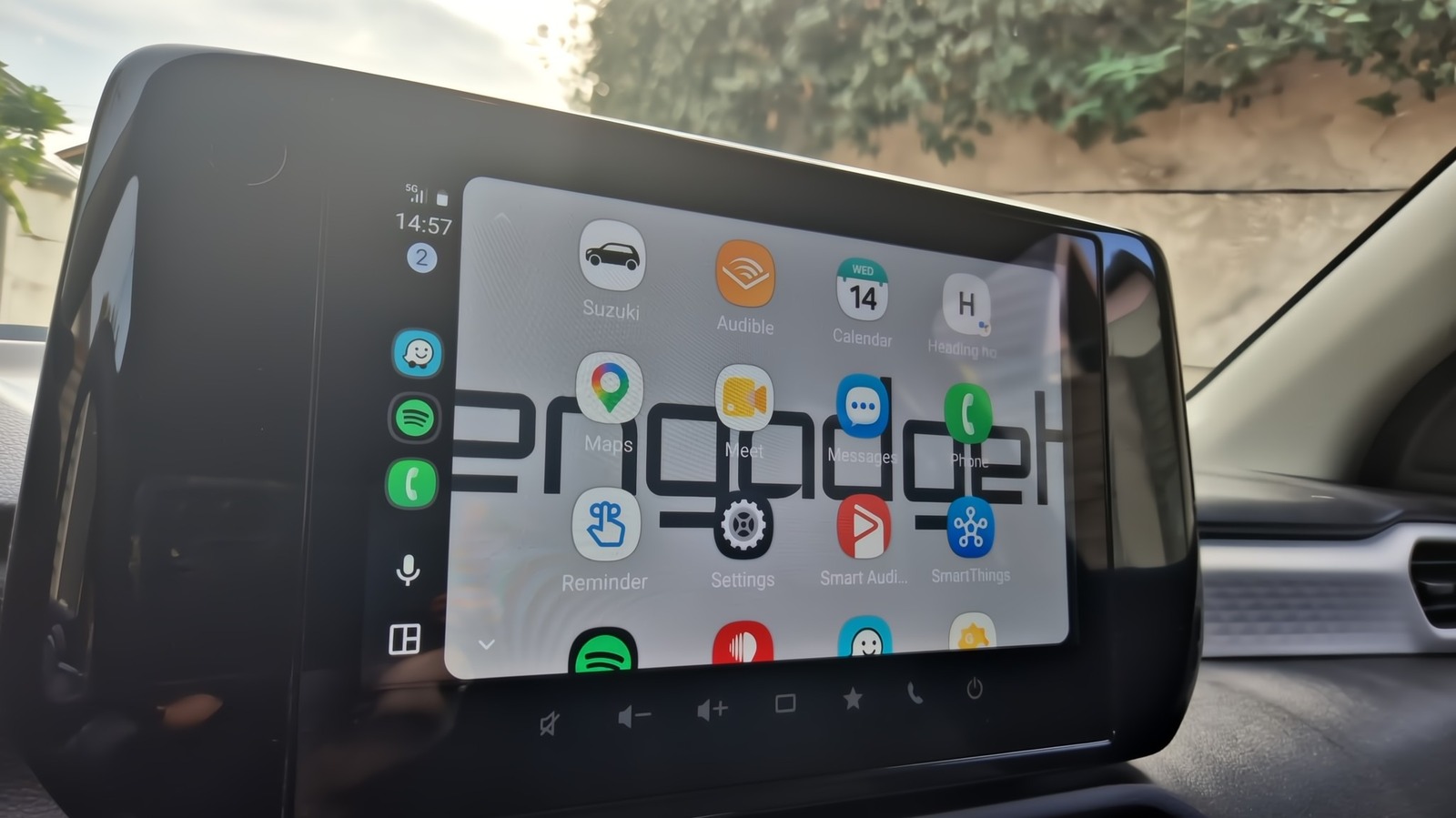
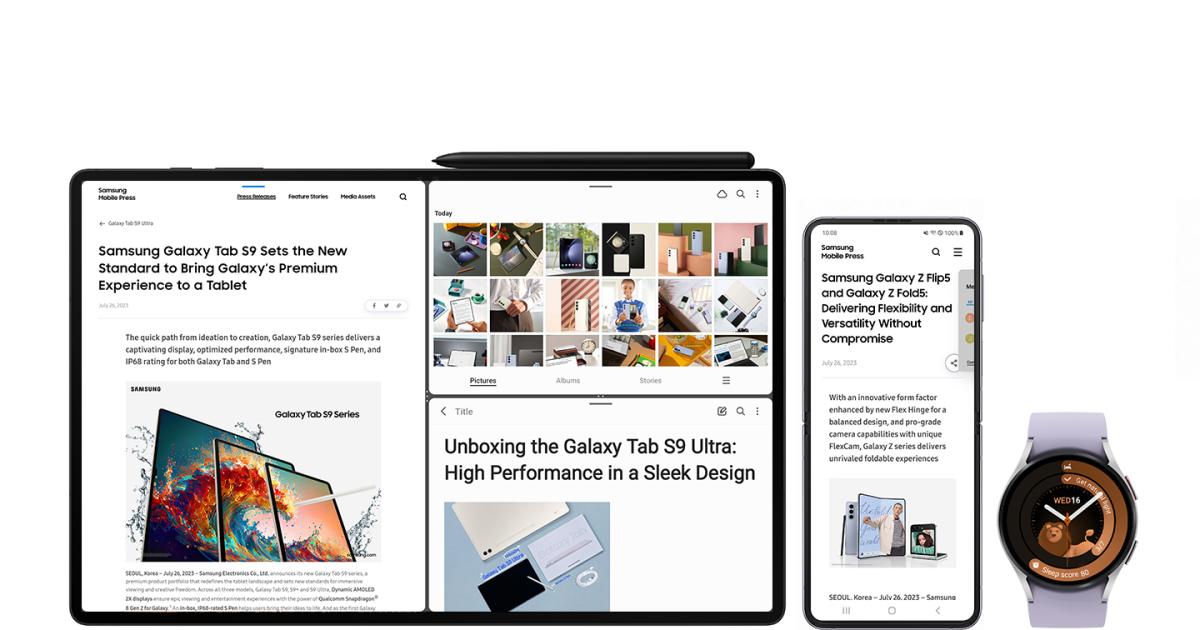
If you have an older Samsung foldable phone, tablet or watch, you may soon see some new features trickling down from the latest devices. The company announced today that the One UI 5.1.1 update — Samsung’s latest custom UI sitting atop Android — will roll out soon, bringing enhancements from the Galaxy Z Fold 5, Z Flip 5, Tab S9 series and Watch 6 series to pre-2023 gear. The features will support most of Samsung’s foldable phones and its recent tablets and smartwatches.

The One UI 5.1.1 update will support a long list of recent Samsung devices, but some may have to wait. It will roll out to Samsung’s stable of foldable phones, scheduled to reach the Galaxy Z Flip 4 and Z Fold 4 “starting this month,” while the Z Fold 3, Z Flip 3, Z Fold 2 and Z Flip will receive it “sequentially” later. Tablet multitasking updates will arrive for the Galaxy Tab S8, Tab S8+, Tab S8 Ultra, Tab S7, Tab S7+, Tab S7 FE, Tab S6 Lite, Tab A8, Tab A7 Lite, Tab Active 3 and Tab Active 4 Pro. Finally, new smartwatch features will support the Galaxy Watch 5, Watch 5 Pro, Watch 4 and Watch 4 Classic.

Samsung’s foldable phone updates in One UI 5.1.1 make it easier to show or hide the Flex Mode Panel (the controls appearing on the bottom half of the screen when the phone is semi-folded). “When folding your phone in Flex Mode, the panel’s icon will float up the screen, allowing you easy access,” the company wrote. “Enjoy a more personalized Flex Mode Panel experience by simply dragging and dropping the icon on the toolbar.” In addition, Samsung says the media play bar button (now including 10-second fast forward and rewind buttons) will be more prominent and simpler to find when the Flex Mode Panel activates. You’ll also be able to press down on the timeline to scrub through media more efficiently.

Cherlynn Low / Engadget

Samsung is tweaking multitasking on recent tablets and foldables, making switching to multi-window from pop-up window modes easier by long-pressing the handle. It also adds two-handed drag and drop, which lets you hold your finger down on a document from one app, use your other hand to open something else and then drag the file onto it for sharing or storage. The company also says the Z Fold 4 and Tab S8’s taskbar will be faster and include more recent apps. “Now, the Taskbar enables lightning-fast task switching with access to up to four recent apps,” Samsung said.

YOU MAY ALSO LIKE

New Twitter Rebrands To Tweet.app After Court’s Double-Edged Ruling

How To Check Your MacBook’s Hard Drive Health

On the smartwatch front, the company is adding sleep-tracking upgrades from the Galaxy Watch 6 to older wearables. The changes include “a more intuitive UI” with the additions of Sleep Score Factors, Sleep Consistency and Sleep Animal Symbols. Sleep Coaching will also be available on the watch without looking at your paired phone. The Galaxy Watch can also automatically adjust SmartThings home devices for a more rest-inducing ambiance at bedtime.
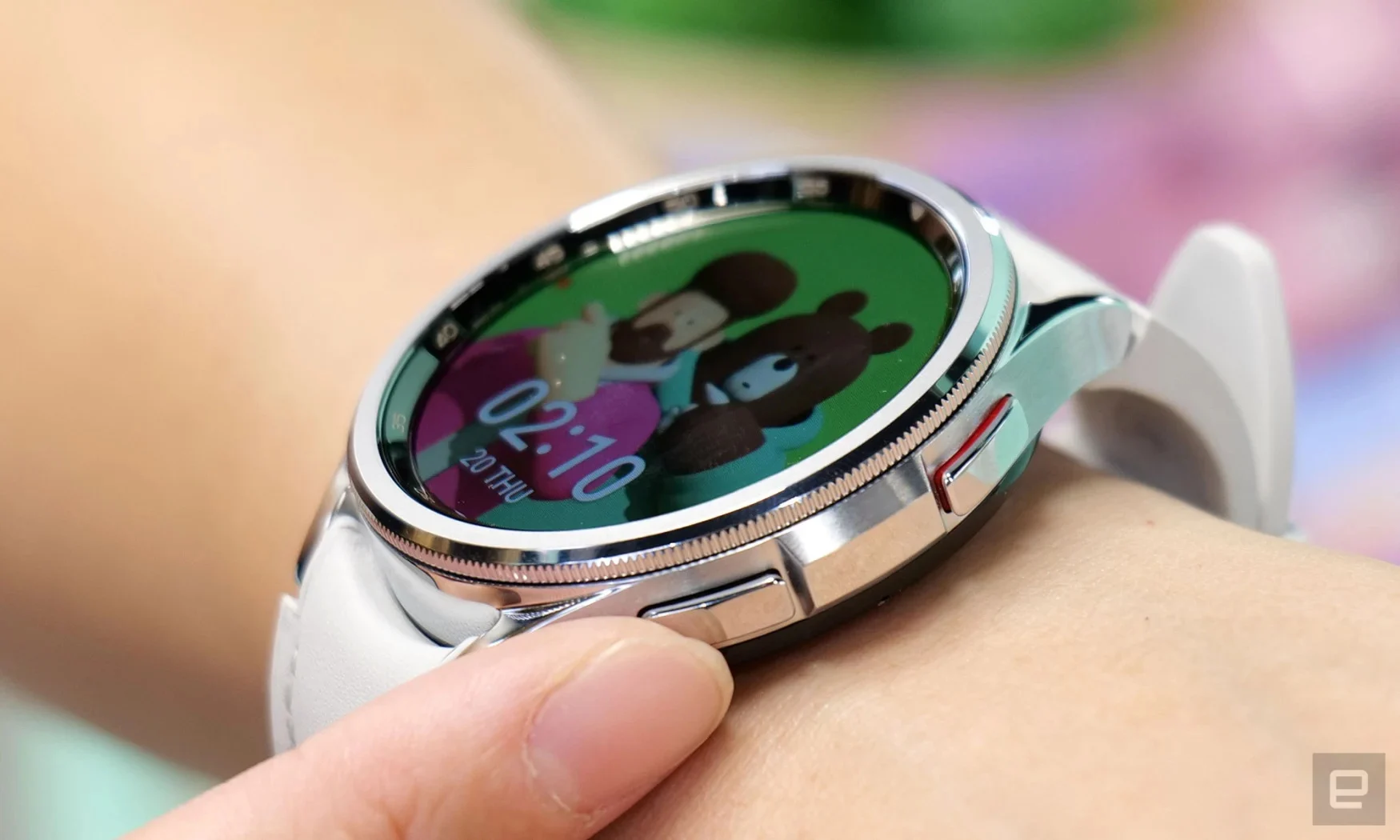
Closeup photo of a Samsung Galaxy Watch 6 smartwatch on a person's wrist. A finger is touching one of the hardware buttons as an image of a man with a teddy bear displays on its screen.

Sam Rutherford / Engadget

Smartwatches will also receive fitness updates. The Watch 6’s Personalized Heart Rate Zone feature trickles down; it analyzes your physical abilities and “defines five optimal running intensity levels to help users set their own goals based on their ability — from burning fat to high intensity workout.” The Galaxy Watch 5 and Watch 4 series will also add Irregular Heart Rhythm Notifications in the update, which could be a lifesaver for some.

Meanwhile, Track Run, which (as its name suggests) records your runs on a track, also makes its way from the Watch 6. The Galaxy Watch 5 Pro will have access to a GPX File Database for downloading map data to your watch. Finally, One UI 5.1.1. lets you control the Flip 4’s camera with a paired Galaxy Watch. A new quick-access button will let you use your watch as a remote shutter, and it also lets you switch camera modes and control zoom levels.

Credit: Source link

ShareTweetSendSharePin

Related Posts

New Twitter Rebrands To Tweet.app After Court’s Double-Edged Ruling
AI & Technology

New Twitter Rebrands To Tweet.app After Court’s Double-Edged Ruling

September 5, 2026
How To Check Your MacBook’s Hard Drive Health
AI & Technology

How To Check Your MacBook’s Hard Drive Health

September 5, 2026
Remote Work As A Worm, Colorful Platformers And Other New Indie Games Worth Checking Out
AI & Technology

Remote Work As A Worm, Colorful Platformers And Other New Indie Games Worth Checking Out

September 5, 2026
OpenAI Plans Misalignment Incident Reporting Framework After Wiki Incident – Unite.AI
AI & Technology

OpenAI Plans Misalignment Incident Reporting Framework After Wiki Incident – Unite.AI

September 5, 2026
Next Post
Take-Two Shares Slump, Another Fortnite Casualty After EA

Take-Two Shares Slump, Another Fortnite Casualty After EA

Leave a Reply Cancel reply

Your email address will not be published. Required fields are marked *

Search

No Result
View All Result
Meta says Muse Spark 1.3 has frontier performance — but its best results come from a model developers can’t broadly use yet

Meta says Muse Spark 1.3 has frontier performance — but its best results come from a model developers can’t broadly use yet

September 3, 2026
Michigan reports two deaths linked to cyclosporiasis outbreak

Michigan reports two deaths linked to cyclosporiasis outbreak

August 30, 2026
The Pros And Cons Of Using A TV As Your Computer Monitor

The Pros And Cons Of Using A TV As Your Computer Monitor

September 1, 2026

About

Learn more

Our Services

Legal

Privacy Policy

Terms of Use

Bloggers

Learn more

Article Links

Contact

Advertise

Ask us anything

©2020- TradePoint.io - All rights reserved!

Tradepoint.io, being just a publishing and technology platform, is not a registered broker-dealer or investment adviser. So we do not provide investment advice. Rather, brokerage services are provided to clients of Tradepoint.io by independent SEC-registered broker-dealers and members of FINRA/SIPC. Every form of investing carries some risk and past performance is not a guarantee of future results. “Tradepoint.io“, “Instant Investing” and “My Trading Tools” are registered trademarks of Apperbuild, LLC.

This website is operated by Apperbuild, LLC. We have no link to any brokerage firm and we do not provide investment advice. Every information and resource we provide is solely for the education of our readers. © 2020 Apperbuild, LLC. All rights reserved.

No Result
View All Result
  • Main
  • AI & Technology
  • Stock Charts
  • Market & News
  • Business
  • Finance Tips
  • Trade Tube
  • Blog
  • Shop

© 2023 - TradePoint.io - All Rights Reserved!