













• bitcoinBitcoin(BTC)$63,282.00-0.20%
  • ethereumEthereum(ETH)$1,784.080.11%
  • tetherTether(USDT)$1.000.01%
  • binancecoinBNB(BNB)$587.760.33%
  • usd-coinUSDC(USDC)$1.000.00%
  • rippleXRP(XRP)$0.98-0.80%
  • solanaSolana(SOL)$74.190.22%
  • tronTRON(TRX)$0.3106070.66%
  • Figure HelocFigure Heloc(FIGR_HELOC)$1.031.94%
  • HyperliquidHyperliquid(HYPE)$68.772.53%
  • zcashZcash(ZEC)$927.49-1.42%
  • dogecoinDogecoin(DOGE)$0.058950-0.45%
  • moneroMonero(XMR)$484.06-3.06%
  • leo-tokenLEO Token(LEO)$9.30-0.01%
  • USDSUSDS(USDS)$1.00-0.01%
  • whitebitWhiteBIT Coin(WBT)$61.23-0.24%
  • chainlinkChainlink(LINK)$9.09-0.55%
  • cardanoCardano(ADA)$0.1537260.65%
  • Ethena USDeEthena USDe(USDE)$1.000.04%
  • stellarStellar(XLM)$0.134536-4.08%
  • daiDai(DAI)$1.000.02%
  • nearNEAR Protocol(NEAR)$3.310.62%
  • bitcoin-cashBitcoin Cash(BCH)$207.52-0.69%
  • litecoinLitecoin(LTC)$43.06-2.23%
  • CantonCanton(CC)$0.082379-0.90%
  • avalanche-2Avalanche(AVAX)$7.070.20%
  • RainRain(RAIN)$0.004407-3.48%
  • uniswapUniswap(UNI)$4.99-4.45%
  • tether-goldTether Gold(XAUT)$3,680.28-1.53%
  • suiSui(SUI)$0.72-0.59%
  • the-open-networkGram (prev. Toncoin)(GRAM)$1.030.40%
  • USD1USD1(USD1)$1.000.01%
  • Ripple USDRipple USD(RLUSD)$1.000.00%
  • Global DollarGlobal Dollar(USDG)$1.000.00%
  • hedera-hashgraphHedera(HBAR)$0.055437-2.45%
  • paypal-usdPayPal USD(PYUSD)$1.00-0.01%
  • Ondo US Dollar YieldOndo US Dollar Yield(USDY)$1.15-0.03%
  • BittensorBittensor(TAO)$194.760.27%
  • shiba-inuShiba Inu(SHIB)$0.0000040.75%
  • quant-networkQuant(QNT)$151.34-1.04%
  • crypto-com-chainCronos(CRO)$0.041508-3.69%
  • Circle USYCCircle USYC(USYC)$1.140.01%
  • Spiko Amundi Overnight Swap Fund (EUR)Spiko Amundi Overnight Swap Fund (EUR)(EURSAFO)$1.120.07%
  • MemeCoreMemeCore(M)$0.85-5.71%
  • okbOKB(OKB)$87.730.79%
  • Falcon USDFalcon USD(USDF)$1.000.03%
  • pax-goldPAX Gold(PAXG)$3,680.27-1.53%
  • United StablesUnited Stables(U)$1.000.02%
  • pepePepe(PEPE)$0.0000041.40%
  • aaveAave(AAVE)$104.17-4.97%
TradePoint.io
  • Main
  • AI & Technology
  • Stock Charts
  • Market & News
  • Business
  • Finance Tips
  • Trade Tube
  • Blog
  • Shop
No Result
View All Result
TradePoint.io
No Result
View All Result

How To Adjust And Turn Off Motion Blur In GTA 6 If It Makes You Feel Sick

November 19, 2026
in AI & Technology
Reading Time: 3 mins read
A A
How To Adjust And Turn Off Motion Blur In GTA 6 If It Makes You Feel Sick
ShareShareShareShareShare

If the blur makes you feel a little nauseous, there are settings to mitigate it.


Rockstar Games

If you’ve been waiting years to play Grand Theft Auto 6, nothing is more disappointing than booting it up and finding it doesn’t look quite as good as you’d hoped—or worse, that it makes you feel sick. There are a number of things that could be causing that, but the good news is that one of the most common culprits is extremely easy to fix. Motion blur is a standard feature in most AAA games these days, but there are good reasons some players want to avoid it.

YOU MAY ALSO LIKE

Anthropic IPO Highlights AI’s Private Market Wealth

Genesis AI Hits $3.5B Valuation in Robotics Bet

For some people, motion blur just doesn’t look good. GTA 6 is the most expensive game ever made, and one reason is its incredibly lifelike graphics. If a layer of motion blur on top of that ruins the illusion, that’s enough of a reason to turn it off. Even worse, motion blur commonly contributes to motion sickness, causing dizziness and nausea in some players. Motion blur is nearly ubiquitous in modern games, but fortunately, there are usually settings to tone it down or turn it off completely.

You can tone down GTA 6’s motion blur from the pause screen
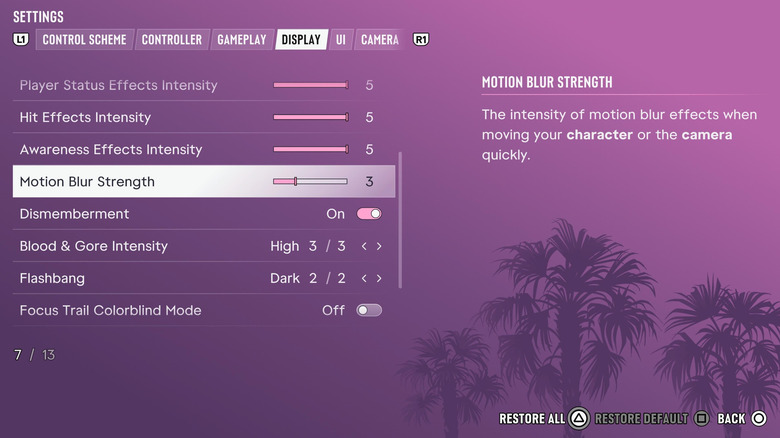

Screenshot of Grand Theft Auto 6 menu showing motion blur settings.
Rockstar Games

It’s easy to adjust or turn off motion blur in GTA 6. Just pause the game and select Settings from the bottom of the main menu. Next, scroll over to the Display tab by pressing the right shoulder button. About halfway down the page, under the visual effects heading, you’ll see a setting called Motion Blur Strength with a slider. By default, it’s set to three out of 10, so you can actually tone down the effect without completely turning it off, or even increase it. You can also just set the strength to zero to turn off motion blur completely.

It’s worth playing with this setting a little bit to find the level that works for you. Especially at lower frame rates, motion blur can help smooth out camera movements that might otherwise be distractingly jittery, so even leaving it at its lowest level can help. Including a slider instead of a simple toggle is a welcome feature in GTA 6, letting you dial it in to your exact needs. 

Since GTA 6 targets 30 fps on consoles, rather than 60 fps, those jarring camera movements may be a bigger deal than they are in other big releases. The best level of motion blur for you will depend more on your TV and personal preference than anything else.

Credit: Source link

ShareTweetSendSharePin

Related Posts

Anthropic IPO Highlights AI’s Private Market Wealth
AI & Technology

Anthropic IPO Highlights AI’s Private Market Wealth

November 19, 2026
Genesis AI Hits .5B Valuation in Robotics Bet
AI & Technology

Genesis AI Hits $3.5B Valuation in Robotics Bet

November 19, 2026
Jensen Huang Says He’s Willing to Come Back as CEO
AI & Technology

Jensen Huang Says He’s Willing to Come Back as CEO

November 19, 2026
Nvidia Names Colette Kress as Interim CEO
AI & Technology

Nvidia Names Colette Kress as Interim CEO

November 19, 2026
Next Post
Warner Music Group Corp. (WMG) Q4 2026 Earnings Call Transcript

Warner Music Group Corp. (WMG) Q4 2026 Earnings Call Transcript

Leave a Reply Cancel reply

Your email address will not be published. Required fields are marked *

Search

No Result
View All Result
AB SKF (publ) (SKFRY) Analyst/Investor Day – Slideshow

AB SKF (publ) (SKFRY) Analyst/Investor Day – Slideshow

November 18, 2026
How To Set Up EV Routing On CarPlay And Android Auto

How To Set Up EV Routing On CarPlay And Android Auto

November 18, 2026
Great Americans: Former NFL star and retired Minnesota Supreme Court Justice Alan Page

Great Americans: Former NFL star and retired Minnesota Supreme Court Justice Alan Page

November 13, 2026

About

Learn more

Our Services

Legal

Privacy Policy

Terms of Use

Bloggers

Learn more

Article Links

Contact

Advertise

Ask us anything

©2020- TradePoint.io - All rights reserved!

Tradepoint.io, being just a publishing and technology platform, is not a registered broker-dealer or investment adviser. So we do not provide investment advice. Rather, brokerage services are provided to clients of Tradepoint.io by independent SEC-registered broker-dealers and members of FINRA/SIPC. Every form of investing carries some risk and past performance is not a guarantee of future results. “Tradepoint.io“, “Instant Investing” and “My Trading Tools” are registered trademarks of Apperbuild, LLC.

This website is operated by Apperbuild, LLC. We have no link to any brokerage firm and we do not provide investment advice. Every information and resource we provide is solely for the education of our readers. © 2020 Apperbuild, LLC. All rights reserved.

No Result
View All Result
  • Main
  • AI & Technology
  • Stock Charts
  • Market & News
  • Business
  • Finance Tips
  • Trade Tube
  • Blog
  • Shop

© 2023 - TradePoint.io - All Rights Reserved!