













• bitcoinBitcoin(BTC)$64,704.000.05%
  • ethereumEthereum(ETH)$1,825.270.38%
  • tetherTether(USDT)$1.00-0.01%
  • binancecoinBNB(BNB)$589.06-0.38%
  • usd-coinUSDC(USDC)$1.000.00%
  • rippleXRP(XRP)$0.960.07%
  • solanaSolana(SOL)$71.03-0.70%
  • tronTRON(TRX)$0.3059680.37%
  • Figure HelocFigure Heloc(FIGR_HELOC)$1.060.00%
  • HyperliquidHyperliquid(HYPE)$66.56-1.31%
  • zcashZcash(ZEC)$888.78-1.59%
  • moneroMonero(XMR)$499.610.06%
  • dogecoinDogecoin(DOGE)$0.0591440.92%
  • leo-tokenLEO Token(LEO)$9.200.54%
  • USDSUSDS(USDS)$1.000.04%
  • whitebitWhiteBIT Coin(WBT)$62.58-0.08%
  • chainlinkChainlink(LINK)$9.17-0.70%
  • cardanoCardano(ADA)$0.152532-0.76%
  • RainRain(RAIN)$0.00701288.90%
  • Ethena USDeEthena USDe(USDE)$1.00-0.02%
  • stellarStellar(XLM)$0.136920-1.64%
  • daiDai(DAI)$1.000.00%
  • bitcoin-cashBitcoin Cash(BCH)$206.34-1.16%
  • nearNEAR Protocol(NEAR)$3.16-0.28%
  • litecoinLitecoin(LTC)$44.62-1.24%
  • CantonCanton(CC)$0.081895-1.55%
  • avalanche-2Avalanche(AVAX)$7.14-0.85%
  • uniswapUniswap(UNI)$5.12-1.28%
  • tether-goldTether Gold(XAUT)$3,842.360.48%
  • USD1USD1(USD1)$1.000.08%
  • the-open-networkGram (prev. Toncoin)(GRAM)$1.050.33%
  • suiSui(SUI)$0.72-0.57%
  • Ripple USDRipple USD(RLUSD)$1.000.01%
  • Global DollarGlobal Dollar(USDG)$1.000.01%
  • hedera-hashgraphHedera(HBAR)$0.057572-0.89%
  • paypal-usdPayPal USD(PYUSD)$1.000.02%
  • Ondo US Dollar YieldOndo US Dollar Yield(USDY)$1.15-0.03%
  • shiba-inuShiba Inu(SHIB)$0.000004-1.53%
  • quant-networkQuant(QNT)$155.480.26%
  • crypto-com-chainCronos(CRO)$0.043230-0.68%
  • BittensorBittensor(TAO)$189.46-1.22%
  • Circle USYCCircle USYC(USYC)$1.140.00%
  • MemeCoreMemeCore(M)$0.863.38%
  • Spiko Amundi Overnight Swap Fund (EUR)Spiko Amundi Overnight Swap Fund (EUR)(EURSAFO)$1.12-0.13%
  • okbOKB(OKB)$85.50-2.57%
  • pax-goldPAX Gold(PAXG)$3,844.380.48%
  • aaveAave(AAVE)$108.040.23%
  • Falcon USDFalcon USD(USDF)$1.000.01%
  • BlackRock USD Institutional Digital Liquidity FundBlackRock USD Institutional Digital Liquidity Fund(BUIDL)$1.000.00%
  • United StablesUnited Stables(U)$1.00-0.02%
TradePoint.io
  • Main
  • AI & Technology
  • Stock Charts
  • Market & News
  • Business
  • Finance Tips
  • Trade Tube
  • Blog
  • Shop
No Result
View All Result
TradePoint.io
No Result
View All Result

Why Microsoft Is Ditching A Few Of Its 365 Companion Apps In 2026

November 16, 2026
in AI & Technology
Reading Time: 5 mins read
A A
Why Microsoft Is Ditching A Few Of Its 365 Companion Apps In 2026
ShareShareShareShareShare

These apps are being shut down after just 14 months.


Microsoft

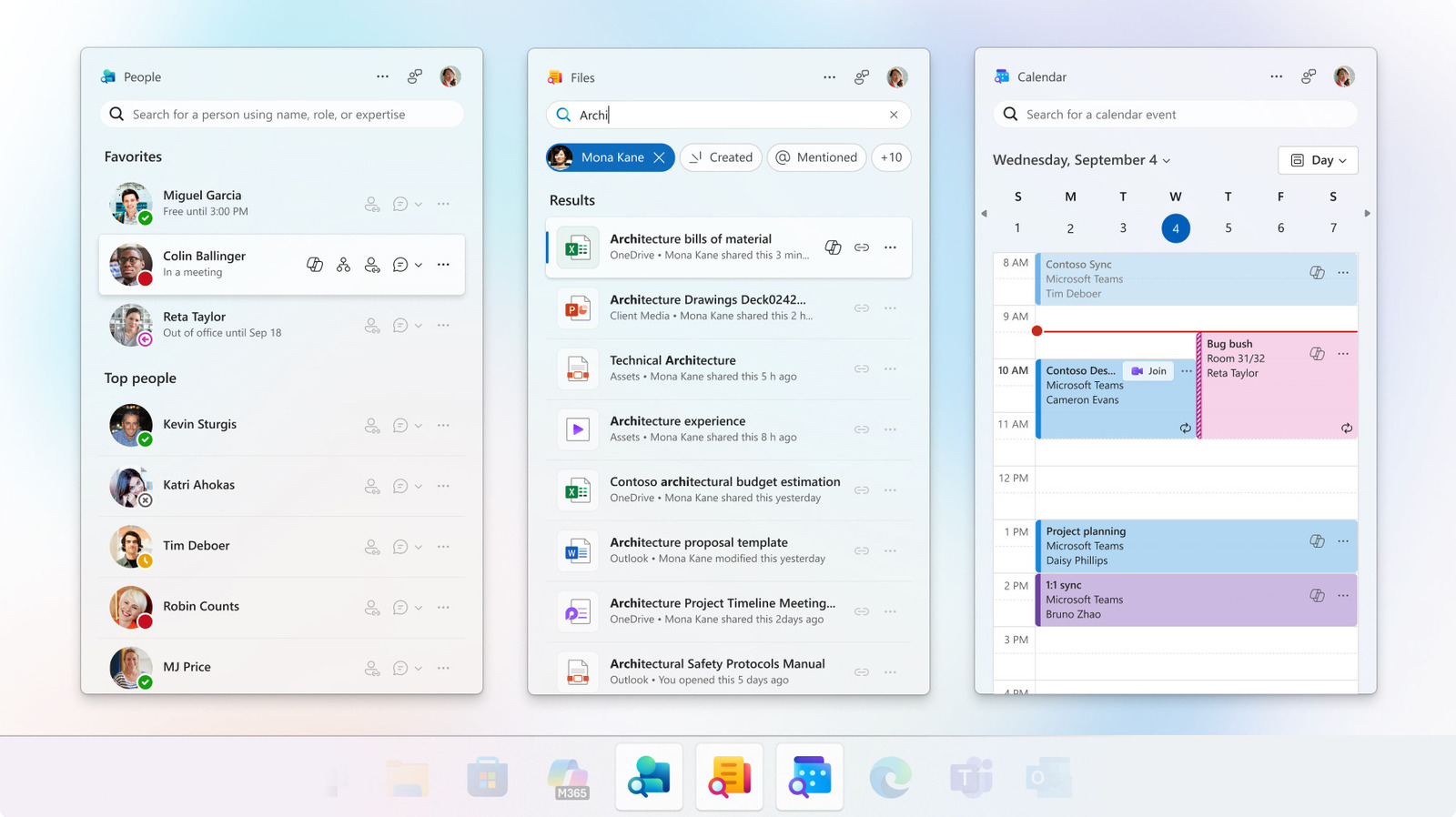
Microsoft is sunsetting three Office taskbar apps just 14 months after their initial release. The People, Files and Calendar Companion apps, which Microsoft designed to increase user productivity and focus, will no longer work as of December 16.

YOU MAY ALSO LIKE

AMD Closes World Labs Acquisition and Names Fei-Fei Li Chief Scientist – Unite.AI

Hands-On (And Off) With Mercedes-Benz’s Upcoming MB.Drive Assist Pro System

These three taskbar tools were primarily for those using Windows 11 on employer-managed devices. These companion apps weren’t added to all versions of Windows, so if you have Windows 11 Home, for example, you likely never had these apps in the first place. Microsoft automatically added the companion apps for those with commercial Microsoft 365 and Office 365 licenses. So if you see these apps on your computer, it’s time to remove them and use existing alternatives instead.

Why People, Files and Calendar are going away
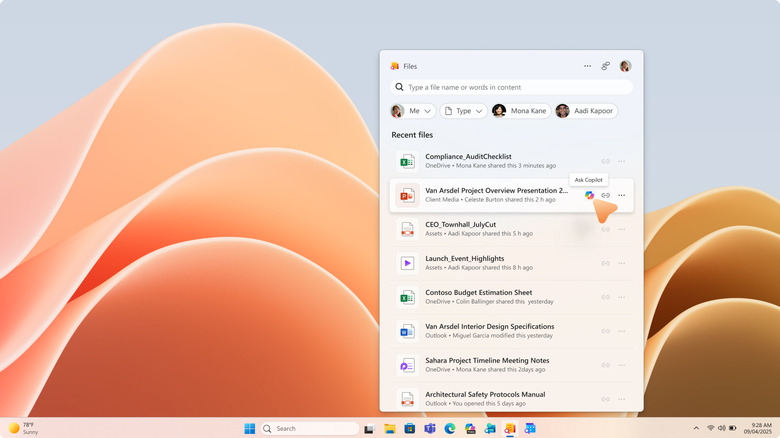

Screen capture of Windows 11 showing Files companion app showing Excel, PowerPoint and other file options.
Microsoft

In its support post announcing the companion app retirement, Microsoft didn’t share why it made this decision. But it’s possible the taskbar apps simply didn’t get enough active users for Microsoft to continue to maintain them. After all, these apps are redundant to existing Windows tools, so some users may have not found them necessary. Others might have seen the apps as another example of Windows bloatware and removed them from company devices.

What the companion apps did
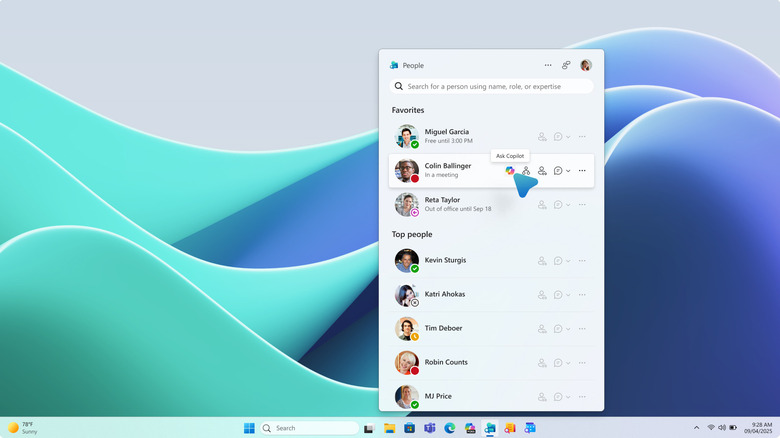

Screen capture showing Windows 11 with People companion app open, with cursor hovering over Ask Copilot button.
Microsoft

The People companion app was for finding people at your company or in your contacts quickly. It let you start Microsoft Teams calls, see shared files, see someone’s spot in the company’s org chart, view online or offline status, share the person’s contact information, see profiles and skills, check whether someone is in a meeting or send someone an email in just a few clicks. You could also “favorite” people, like your boss or immediate team members, so they’re pinned to the top. And of course, Microsoft added a Copilot connection too so you could ask the AI about what projects a specific person at your company is working on.

The Files companion app let you quickly access and create shared links to Microsoft Office files with coworkers. It also let you search for files using keywords and sort by file type, which feels a bit redundant considering the main Windows Search bar has always let users do this.

And lastly, the Calendar companion app was another way to see your Microsoft 365 calendar and join meetings. It let you see and edit calendar events, copy meeting links or search your calendar for a specific event.

Was all of this intended to be Microsoft’s answer to Slack beyond Teams? It’s unclear. These 365 companion apps offer some similar features, but Slack offers more device and platform compatibility than three separate pop-up apps that only work on select Windows devices.

What you can use instead
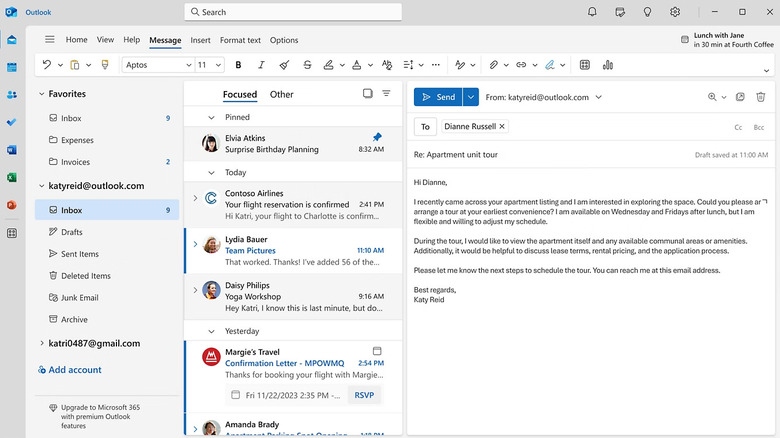

Windows screenshot showing Outlook desktop app open to a new email being composed about an apartment tour.
Microsoft

If you’re looking to stay within the Microsoft ecosystem, the Outlook app for Windows has tabs for Calendar, Contacts and email to replace the Calendar companion app. Teams offers some of these features from People and Calendar as well including instant messaging, calendar viewing and video calls. And instead of using the Files tool, just use the Windows Start Menu search bar or Microsoft OneDrive, which is available as a desktop app or in the web browser. 

Of course, there are also other options for replacing these tools beyond Microsoft’s walled garden. Slack and Google’s Workspace suite are among the most popular for businesses looking to enable remote work productivity across devices, instant messaging, file-sharing, video and audio calls and more.

How to remove the 365 companion apps

If your Windows computer is being managed by your employer, your IT admin will likely remove the retired apps from your device on your behalf. Otherwise, go to Windows Settings > Apps > Installed Apps, then search “Microsoft 365 companions,” click on the three dots and then select “Uninstall” to remove them.

Because these companion apps rely on data from SharePoint Online and Exchange Online, part of the 365 cloud, you don’t have to worry about losing anything when they’re uninstalled. Microsoft’s support page confirms that this data is kept in your Microsoft 365 services files, not within the companion app files.

Removing apps you don’t use, including retired ones, is a best practice for optimizing device security, storage and performance. If you want to take things one step further, there are other things you can do to improve your Windows 11 experience, too.

Credit: Source link

ShareTweetSendSharePin

Related Posts

AMD Closes World Labs Acquisition and Names Fei-Fei Li Chief Scientist – Unite.AI
AI & Technology

AMD Closes World Labs Acquisition and Names Fei-Fei Li Chief Scientist – Unite.AI

November 16, 2026
Hands-On (And Off) With Mercedes-Benz’s Upcoming MB.Drive Assist Pro System
AI & Technology

Hands-On (And Off) With Mercedes-Benz’s Upcoming MB.Drive Assist Pro System

November 16, 2026
Zoox Brings Purpose-Built Robotaxis to Uber Riders in Las Vegas – Unite.AI
AI & Technology

Zoox Brings Purpose-Built Robotaxis to Uber Riders in Las Vegas – Unite.AI

November 16, 2026
Moth’s Tessa Encodes and Recovers 1,568 Values on a 120-Qubit Chip – Unite.AI
AI & Technology

Moth’s Tessa Encodes and Recovers 1,568 Values on a 120-Qubit Chip – Unite.AI

November 16, 2026
Next Post
Nvidia: You Could See An 11.6x Forward P/E Post Q3, A 50% Discount To Nasdaq

Nvidia: You Could See An 11.6x Forward P/E Post Q3, A 50% Discount To Nasdaq

Leave a Reply Cancel reply

Your email address will not be published. Required fields are marked *

Search

No Result
View All Result
Kornacki explains shocking upset in South Carolina

Kornacki explains shocking upset in South Carolina

November 11, 2026
Tight Israeli election leaves no party with a clear majority

Tight Israeli election leaves no party with a clear majority

November 14, 2026
Trump’s travel shake-up with four days until midterms

Trump’s travel shake-up with four days until midterms

November 13, 2026

About

Learn more

Our Services

Legal

Privacy Policy

Terms of Use

Bloggers

Learn more

Article Links

Contact

Advertise

Ask us anything

©2020- TradePoint.io - All rights reserved!

Tradepoint.io, being just a publishing and technology platform, is not a registered broker-dealer or investment adviser. So we do not provide investment advice. Rather, brokerage services are provided to clients of Tradepoint.io by independent SEC-registered broker-dealers and members of FINRA/SIPC. Every form of investing carries some risk and past performance is not a guarantee of future results. “Tradepoint.io“, “Instant Investing” and “My Trading Tools” are registered trademarks of Apperbuild, LLC.

This website is operated by Apperbuild, LLC. We have no link to any brokerage firm and we do not provide investment advice. Every information and resource we provide is solely for the education of our readers. © 2020 Apperbuild, LLC. All rights reserved.

No Result
View All Result
  • Main
  • AI & Technology
  • Stock Charts
  • Market & News
  • Business
  • Finance Tips
  • Trade Tube
  • Blog
  • Shop

© 2023 - TradePoint.io - All Rights Reserved!