














• bitcoinBitcoin(BTC)$75,280.000.78%
  • ethereumEthereum(ETH)$2,132.380.37%
  • tetherTether(USDT)$1.00-0.01%
  • binancecoinBNB(BNB)$689.900.84%
  • usd-coinUSDC(USDC)$1.000.00%
  • rippleXRP(XRP)$1.10-1.25%
  • solanaSolana(SOL)$86.580.16%
  • tronTRON(TRX)$0.317455-0.51%
  • Figure HelocFigure Heloc(FIGR_HELOC)$1.040.00%
  • zcashZcash(ZEC)$1,159.80-4.10%
  • HyperliquidHyperliquid(HYPE)$75.050.82%
  • moneroMonero(XMR)$582.87-2.63%
  • dogecoinDogecoin(DOGE)$0.0699511.50%
  • USDSUSDS(USDS)$1.00-0.01%
  • whitebitWhiteBIT Coin(WBT)$72.540.60%
  • leo-tokenLEO Token(LEO)$9.29-0.14%
  • chainlinkChainlink(LINK)$10.642.29%
  • cardanoCardano(ADA)$0.1770461.08%
  • stellarStellar(XLM)$0.1473010.55%
  • Ethena USDeEthena USDe(USDE)$1.000.00%
  • bitcoin-cashBitcoin Cash(BCH)$238.44-0.04%
  • nearNEAR Protocol(NEAR)$3.621.11%
  • daiDai(DAI)$1.00-0.02%
  • uniswapUniswap(UNI)$6.972.91%
  • litecoinLitecoin(LTC)$51.332.49%
  • avalanche-2Avalanche(AVAX)$8.638.86%
  • CantonCanton(CC)$0.0913931.20%
  • suiSui(SUI)$0.842.81%
  • tether-goldTether Gold(XAUT)$4,116.731.69%
  • USD1USD1(USD1)$1.00-0.02%
  • RainRain(RAIN)$0.004541-6.81%
  • hedera-hashgraphHedera(HBAR)$0.0667101.88%
  • the-open-networkGram (prev. Toncoin)(GRAM)$1.031.41%
  • quant-networkQuant(QNT)$194.69-0.27%
  • paypal-usdPayPal USD(PYUSD)$1.000.00%
  • Global DollarGlobal Dollar(USDG)$1.000.00%
  • Ripple USDRipple USD(RLUSD)$1.00-0.01%
  • BittensorBittensor(TAO)$222.662.94%
  • shiba-inuShiba Inu(SHIB)$0.0000041.39%
  • crypto-com-chainCronos(CRO)$0.0478120.65%
  • Ondo US Dollar YieldOndo US Dollar Yield(USDY)$1.150.00%
  • pepePepe(PEPE)$0.0000053.58%
  • Circle USYCCircle USYC(USYC)$1.140.00%
  • EthenaEthena(ENA)$0.1531363.13%
  • aaveAave(AAVE)$131.414.29%
  • okbOKB(OKB)$96.57-3.13%
  • Spiko Amundi Overnight Swap Fund (EUR)Spiko Amundi Overnight Swap Fund (EUR)(EURSAFO)$1.140.66%
  • pax-goldPAX Gold(PAXG)$4,120.841.74%
  • Falcon USDFalcon USD(USDF)$0.99-0.06%
  • OndoOndo(ONDO)$0.3726226.01%
TradePoint.io
  • Main
  • AI & Technology
  • Stock Charts
  • Market & News
  • Business
  • Finance Tips
  • Trade Tube
  • Blog
  • Shop
No Result
View All Result
TradePoint.io
No Result
View All Result

What The Tiny Blue Dot On Your Android Phone Is Telling You

November 9, 2026
in AI & Technology
Reading Time: 5 mins read
A A
What The Tiny Blue Dot On Your Android Phone Is Telling You
ShareShareShareShareShare

An app just checked your location.


Gabriela Vatu for Engadget

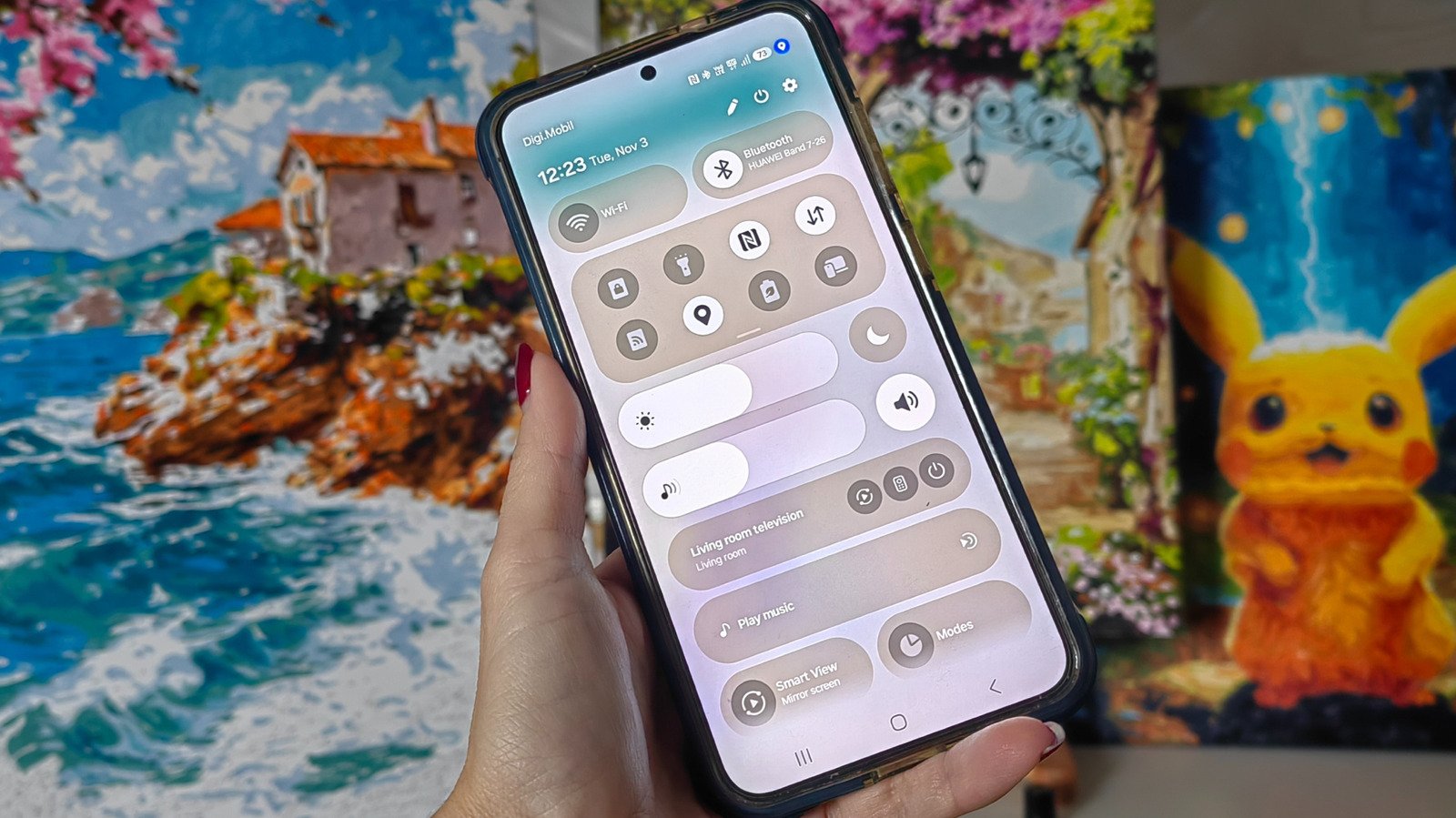
You’re scrolling through your phone when you spot it: a small blue dot sitting quietly near your battery icon. It wasn’t there a minute ago, and now it’s gone again just as fast. If you’ve wondered if it’s a glitch, don’t worry — we all have. It’s not a notification you missed or even a problem or a bug. The blue dot is actually one of Android’s built-in security features designed to keep you informed about what’s happening on your device in real time. More specifically, it tells you when an app is accessing your location data.

YOU MAY ALSO LIKE

OpenAI Deploys Control Room to Cut Off Research Model Output – Unite.AI

YouTube Will Once Again Be Part Of Billboard Chart Calculations In 2027

Rather than burying this information in a settings menu you’d have to dig through, Android makes it easy to see right alongside all your other notification icons. The blue dot matters more than it might seem because location data is some of the most sensitive information your phone collects. It can reveal where you live, work, buy your groceries and spend your free time. Apps access this data for legitimate reasons, like turn-by-turn directions for your driving companion or local weather. But if you see the dot flashing on and off when you haven’t opened a navigation app, you may want to do a bit of sleuthing.

What does the blue dot actually mean on Android?
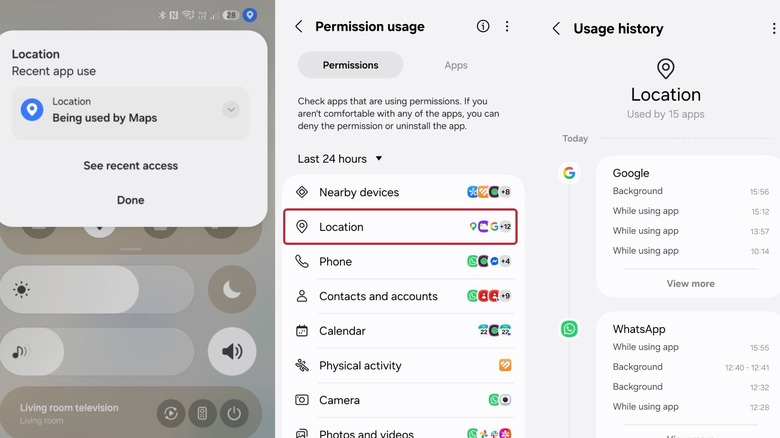

Three screenshots of Android phone settings regarding location tracking.
Screenshot by Gabriela Vatu for Engadget

The blue dot is Android’s visual indicator that an app is actively tracking your device’s location. It typically pops up in the top-right corner of your screen beside other status icons like Wi-Fi, battery and signal bars. When it shows up, an app on your phone is pulling location data through GPS, Wi-Fi signals or nearby cellular towers to figure out where you are.

This indicator is part of a broader push from Google to make privacy more transparent. A tiny green dot, for instance, indicates some app has accessed your camera or your microphone. Older Android versions kept location permissions tucked away in settings menus where most people rarely checked them, but the current system switches things around to make such sensitive information easier to find. Android’s developer documentation shows the indicator is tied to active app behavior on Android 17 and newer, with the location dot reflecting usage that’s either currently running or occurred within the last 10 seconds, specifically for apps operating in the foreground.

Basically, the dot isn’t meant to track every historical instance of location access, but rather to flag what’s happening right now or what just happened moments ago. If you spot the dot while you’re using a maps app, that’s perfectly expected. If it pops up when you haven’t touched an app or website that should need your location, it’s time to dig more.

Swiping down from the top of your screen and tapping the indicator typically reveals which app triggered it, giving you an immediate answer without having to guess.

One small mention here — older One UI versions on Samsung phones only displayed a location pin icon in the status bar. Starting with One UI 9, however, the brand adopted the same blue pin the Pixel gets.

How to manage location permissions and app access
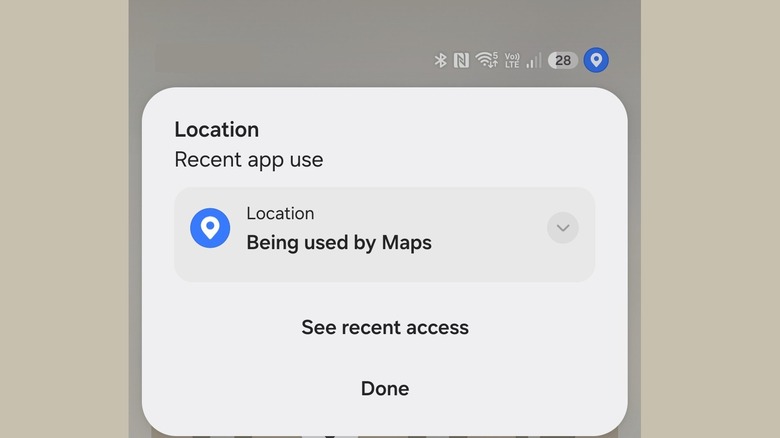

An image of an Android phone with the blue dot showing in the corner.
Screenshot by Gabriela Vatu for Engadget

Noticing the indicator is the first step; knowing how to act on it is what actually protects your privacy. Android makes it pretty straightforward to review and adjust which apps can access your location.

If you “catch” the notification, it will tell you which apps are using your location right that instant. If you tap on See recent access and then choose Location, you’ll get a much more extensive usage history, telling you what time your location was checked and whether this was done when you were using the app or while working in the background. Tapping on any of the entries will take you directly to that app’s location permission settings so you can choose in which circumstances, if at all, you want to allow it to check up on you. Alternatively, you could take the long way and go to Settings > Security and privacy (or Privacy Controls) > Privacy > Permissions used in last 24 hours > Location.

For apps that genuinely need location to function well, like weather services or navigation tools, setting permissions to “allow only while using the app” seems reasonable as you’ll still get accurate directions or local forecasts. The app won’t be able to track your movements once you close it, and that’s reassuring.

Credit: Source link

ShareTweetSendSharePin

Related Posts

OpenAI Deploys Control Room to Cut Off Research Model Output – Unite.AI
AI & Technology

OpenAI Deploys Control Room to Cut Off Research Model Output – Unite.AI

November 9, 2026
YouTube Will Once Again Be Part Of Billboard Chart Calculations In 2027
AI & Technology

YouTube Will Once Again Be Part Of Billboard Chart Calculations In 2027

November 9, 2026
ByteDance Seed Introduces Seedream 5.5 for Multi-Round Image Editing – Unite.AI
AI & Technology

ByteDance Seed Introduces Seedream 5.5 for Multi-Round Image Editing – Unite.AI

November 9, 2026
How To Use Your iPhone To Take The Best Picture Of The Moon
AI & Technology

How To Use Your iPhone To Take The Best Picture Of The Moon

November 9, 2026
Next Post
Former Prince Andrew called to testify as witness in London civil trial

Former Prince Andrew called to testify as witness in London civil trial

Leave a Reply Cancel reply

Your email address will not be published. Required fields are marked *

Search

No Result
View All Result
Piece of Learjet tail found miles from site of deadly crash

Piece of Learjet tail found miles from site of deadly crash

November 9, 2026
Why does Alaska’s Senate race vote count take so long?

Why does Alaska’s Senate race vote count take so long?

November 9, 2026
El Pollo Loco Holdings, Inc. (LOCO) Q3 2026 Earnings Call Transcript

El Pollo Loco Holdings, Inc. (LOCO) Q3 2026 Earnings Call Transcript

November 6, 2026

About

Learn more

Our Services

Legal

Privacy Policy

Terms of Use

Bloggers

Learn more

Article Links

Contact

Advertise

Ask us anything

©2020- TradePoint.io - All rights reserved!

Tradepoint.io, being just a publishing and technology platform, is not a registered broker-dealer or investment adviser. So we do not provide investment advice. Rather, brokerage services are provided to clients of Tradepoint.io by independent SEC-registered broker-dealers and members of FINRA/SIPC. Every form of investing carries some risk and past performance is not a guarantee of future results. “Tradepoint.io“, “Instant Investing” and “My Trading Tools” are registered trademarks of Apperbuild, LLC.

This website is operated by Apperbuild, LLC. We have no link to any brokerage firm and we do not provide investment advice. Every information and resource we provide is solely for the education of our readers. © 2020 Apperbuild, LLC. All rights reserved.

No Result
View All Result
  • Main
  • AI & Technology
  • Stock Charts
  • Market & News
  • Business
  • Finance Tips
  • Trade Tube
  • Blog
  • Shop

© 2023 - TradePoint.io - All Rights Reserved!