

















• bitcoinBitcoin(BTC)$77,096.00-0.87%
  • ethereumEthereum(ETH)$2,266.57-0.70%
  • tetherTether(USDT)$1.00-0.03%
  • binancecoinBNB(BNB)$697.65-0.83%
  • rippleXRP(XRP)$1.260.60%
  • usd-coinUSDC(USDC)$1.00-0.02%
  • solanaSolana(SOL)$92.44-1.45%
  • tronTRON(TRX)$0.3227052.04%
  • Figure HelocFigure Heloc(FIGR_HELOC)$1.030.00%
  • HyperliquidHyperliquid(HYPE)$84.21-1.71%
  • zcashZcash(ZEC)$1,174.24-5.60%
  • moneroMonero(XMR)$623.072.24%
  • dogecoinDogecoin(DOGE)$0.074487-1.03%
  • USDSUSDS(USDS)$1.00-0.03%
  • whitebitWhiteBIT Coin(WBT)$74.10-0.89%
  • chainlinkChainlink(LINK)$11.15-1.06%
  • leo-tokenLEO Token(LEO)$9.27-1.32%
  • cardanoCardano(ADA)$0.189270-0.69%
  • stellarStellar(XLM)$0.162972-2.45%
  • bitcoin-cashBitcoin Cash(BCH)$276.80-0.02%
  • nearNEAR Protocol(NEAR)$3.85-6.45%
  • daiDai(DAI)$1.000.02%
  • Ethena USDeEthena USDe(USDE)$1.000.03%
  • RainRain(RAIN)$0.006229-0.32%
  • uniswapUniswap(UNI)$7.201.08%
  • litecoinLitecoin(LTC)$54.32-1.00%
  • CantonCanton(CC)$0.0972652.25%
  • USD1USD1(USD1)$1.000.03%
  • avalanche-2Avalanche(AVAX)$8.51-0.35%
  • suiSui(SUI)$0.88-0.09%
  • the-open-networkGram (prev. Toncoin)(GRAM)$1.15-3.56%
  • tether-goldTether Gold(XAUT)$3,895.640.01%
  • hedera-hashgraphHedera(HBAR)$0.069926-1.10%
  • quant-networkQuant(QNT)$197.07-1.16%
  • Global DollarGlobal Dollar(USDG)$1.00-0.01%
  • shiba-inuShiba Inu(SHIB)$0.000005-0.86%
  • paypal-usdPayPal USD(PYUSD)$1.00-0.02%
  • BittensorBittensor(TAO)$224.22-2.10%
  • Ripple USDRipple USD(RLUSD)$1.00-0.01%
  • crypto-com-chainCronos(CRO)$0.050191-1.09%
  • Ondo US Dollar YieldOndo US Dollar Yield(USDY)$1.150.07%
  • EthenaEthena(ENA)$0.171062-4.10%
  • okbOKB(OKB)$108.75-3.05%
  • Circle USYCCircle USYC(USYC)$1.140.01%
  • BlackRock USD Institutional Digital Liquidity FundBlackRock USD Institutional Digital Liquidity Fund(BUIDL)$1.000.00%
  • pepePepe(PEPE)$0.000005-1.11%
  • aaveAave(AAVE)$128.02-2.40%
  • MemeCoreMemeCore(M)$0.84-0.09%
  • Pump.funPump.fun(PUMP)$0.0041411.38%
  • OndoOndo(ONDO)$0.387028-1.44%
TradePoint.io
  • Main
  • AI & Technology
  • Stock Charts
  • Market & News
  • Business
  • Finance Tips
  • Trade Tube
  • Blog
  • Shop
No Result
View All Result
TradePoint.io
No Result
View All Result

How To Use Your Phone’s Camera To Translate Anything

November 2, 2026
in AI & Technology
Reading Time: 4 mins read
A A
How To Use Your Phone’s Camera To Translate Anything
ShareShareShareShareShare

Our phones have the ability to make sense of other languages (and it requires minimal effort on our part).


Kitzcorner/Getty Images

If you’re a frequent traveler, you may frequently encounter signage or other text in foreign languages. That’s all well and good if you have enough knowledge to piece together a translation, but if you can’t even understand the alphabet in question, you’re faced with a much bigger challenge.

YOU MAY ALSO LIKE

Pudu Robotics Unveils TOMO S Mowers With Self-Sharpening Blades – Unite.AI

Apple Watch Audio Intelligence Enters Developer Beta Testing – Unite.AI

The good news is that your phone’s camera can recognize and translate just about any text in seconds, even if the language uses an entirely different script. While a translation app may seem like the obvious choice for this task, it’s actually not always your best bet. Depending on the languages involved and the context, you may sometimes need more than one tool. Luckily, your phone’s camera is all you need to translate pretty much anything in the real world.

The simplest way to translate text with your phone’s camera
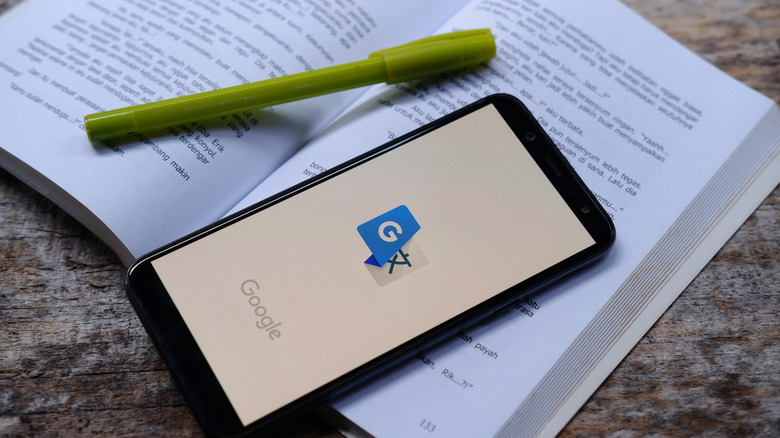

Google Translate logo on phone placed on book
Poetra.RH/Shutterstock

For over a decade now, the Google Translate app has offered a dedicated camera mode. Simply install the app from the Google Play Store on Android or the App Store on iOS, open it, and tap the Camera icon located at the bottom of your screen. This will open up a viewfinder, allowing you to point your phone’s camera at anything in the real world.

You can select any two of Google Translate’s hundreds of languages for the translation. The default “Detect language” option in the source field is handy if you’ve come across a language you cannot identify. The app translates text in real time, so you don’t even need to capture an image. You may also want to download frequently-used languages within Google Translate. This allows you to translate text offline — handy if you’re preparing for an upcoming trip.

You can also use Google Lens on Android, which many phones include out of the box these days. This eliminates the need for a dedicated translation app. On Google Pixel phones, Lens is available as a shortcut within the search bar on the home screen. Otherwise, you can find it as an icon in the app drawer. Recent iOS versions also have a translation feature baked into the camera app through the Live Text feature. To access it, open the Camera app on your iPhone and point the device at any text you come across. You should see a yellow frame appear around the text and a grid icon towards the bottom of the viewfinder. Tap this icon and select Translate.

AI apps can translate text too, and often do a better job
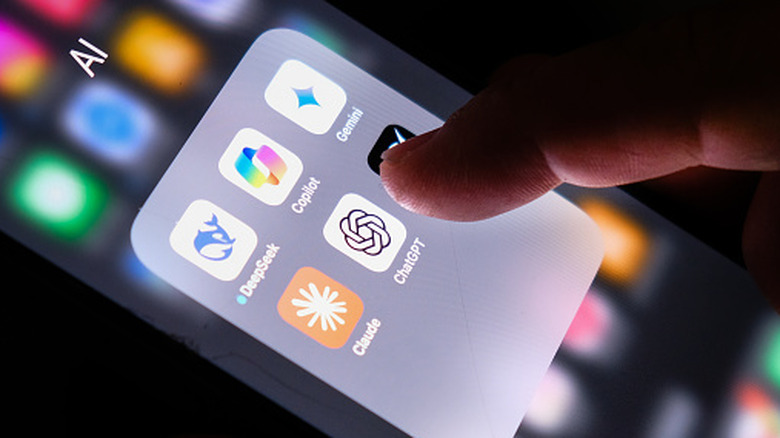

Person interacting with an AI apps folder on an iPhone
Alexsl/Getty Images

While Google Translate has served me well, it can fall short of expectations. While traveling in Vietnam, for instance, I found that the app struggled to identify diacritics in printed text through my phone’s camera. This was a major problem because a word can have two completely different meanings depending on whether the letters have the correct diacritics. In my experience, another area where Google Translate stumbles is restaurant menus. Menus often use informal shorthand or a single word, meaning the app may lack enough context for an accurate translation.

The solution I’ve found is to translate via an AI app. These apps often cannot translate in real time and require an internet connection, but I’ve found that the output quality is far and away better than Google Translate. Modern AI models understand context, so sending a picture of a menu will typically yield food-related translations. Even if your image is blurry or difficult to read, the AI model often understands the intended meaning based on the surrounding text instead of replying with gibberish.

You can use any AI app such as ChatGPT, Gemini, and Claude. You’ll need to upload a picture of the text you need translated and type a short instruction, such as “Translate to English,” before sending the message. The AI will reply with the translated text, but cannot overlay the translation over your image as Google Translate does. The other downside to this method is that it’s much more expensive — ChatGPT’s free tier limits you to a few image uploads every day, and even then, processing can take a few seconds. Still, I often use it as a last resort whenever traditional translation methods fail me.

Credit: Source link

ShareTweetSendSharePin

Related Posts

Pudu Robotics Unveils TOMO S Mowers With Self-Sharpening Blades – Unite.AI
AI & Technology

Pudu Robotics Unveils TOMO S Mowers With Self-Sharpening Blades – Unite.AI

November 3, 2026
Apple Watch Audio Intelligence Enters Developer Beta Testing – Unite.AI
AI & Technology

Apple Watch Audio Intelligence Enters Developer Beta Testing – Unite.AI

November 3, 2026
Microsoft Turns to Bond Market as AI Spending Grows
AI & Technology

Microsoft Turns to Bond Market as AI Spending Grows

November 3, 2026
Driverless Trucks Can Double Profits, Says Aurora CEO
AI & Technology

Driverless Trucks Can Double Profits, Says Aurora CEO

November 3, 2026
Next Post
Wife’s Mom Maxed Out A Credit Card In Her Name

Wife's Mom Maxed Out A Credit Card In Her Name

Leave a Reply Cancel reply

Your email address will not be published. Required fields are marked *

Search

No Result
View All Result
Ken Griffin on record-breaking donation to Carnegie Mellon University

Ken Griffin on record-breaking donation to Carnegie Mellon University

November 1, 2026
Firefighters battle Bouquet fire in Southern California

Firefighters battle Bouquet fire in Southern California

November 1, 2026
Hotel roof ripped off by Hurricane Isaias winds

Hotel roof ripped off by Hurricane Isaias winds

October 28, 2026

About

Learn more

Our Services

Legal

Privacy Policy

Terms of Use

Bloggers

Learn more

Article Links

Contact

Advertise

Ask us anything

©2020- TradePoint.io - All rights reserved!

Tradepoint.io, being just a publishing and technology platform, is not a registered broker-dealer or investment adviser. So we do not provide investment advice. Rather, brokerage services are provided to clients of Tradepoint.io by independent SEC-registered broker-dealers and members of FINRA/SIPC. Every form of investing carries some risk and past performance is not a guarantee of future results. “Tradepoint.io“, “Instant Investing” and “My Trading Tools” are registered trademarks of Apperbuild, LLC.

This website is operated by Apperbuild, LLC. We have no link to any brokerage firm and we do not provide investment advice. Every information and resource we provide is solely for the education of our readers. © 2020 Apperbuild, LLC. All rights reserved.

No Result
View All Result
  • Main
  • AI & Technology
  • Stock Charts
  • Market & News
  • Business
  • Finance Tips
  • Trade Tube
  • Blog
  • Shop

© 2023 - TradePoint.io - All Rights Reserved!