
• bitcoinBitcoin(BTC)$78,650.00-0.65%
  • ethereumEthereum(ETH)$2,496.060.08%
  • tetherTether(USDT)$1.00-0.02%
  • binancecoinBNB(BNB)$753.171.79%
  • rippleXRP(XRP)$1.432.68%
  • usd-coinUSDC(USDC)$1.000.00%
  • solanaSolana(SOL)$104.020.18%
  • tronTRON(TRX)$0.3389491.51%
  • Figure HelocFigure Heloc(FIGR_HELOC)$1.050.00%
  • zcashZcash(ZEC)$1,179.581.67%
  • HyperliquidHyperliquid(HYPE)$84.23-1.01%
  • dogecoinDogecoin(DOGE)$0.0903690.53%
  • RainRain(RAIN)$0.0166722.12%
  • USDSUSDS(USDS)$1.000.00%
  • whitebitWhiteBIT Coin(WBT)$81.5511.61%
  • chainlinkChainlink(LINK)$12.70-0.83%
  • moneroMonero(XMR)$503.14-1.92%
  • leo-tokenLEO Token(LEO)$9.200.11%
  • cardanoCardano(ADA)$0.2249651.92%
  • stellarStellar(XLM)$0.189852-0.34%
  • bitcoin-cashBitcoin Cash(BCH)$258.01-0.95%
  • daiDai(DAI)$1.000.00%
  • Ethena USDeEthena USDe(USDE)$1.00-0.01%
  • uniswapUniswap(UNI)$6.87-0.07%
  • CantonCanton(CC)$0.1078051.91%
  • USD1USD1(USD1)$1.00-0.01%
  • litecoinLitecoin(LTC)$54.38-1.59%
  • the-open-networkGram (prev. Toncoin)(GRAM)$1.410.80%
  • hedera-hashgraphHedera(HBAR)$0.079851-3.03%
  • avalanche-2Avalanche(AVAX)$8.04-0.66%
  • suiSui(SUI)$0.820.26%
  • Global DollarGlobal Dollar(USDG)$1.00-0.01%
  • shiba-inuShiba Inu(SHIB)$0.000005-0.26%
  • nearNEAR Protocol(NEAR)$2.372.74%
  • crypto-com-chainCronos(CRO)$0.0600154.95%
  • paypal-usdPayPal USD(PYUSD)$1.000.00%
  • BlackRock USD Institutional Digital Liquidity FundBlackRock USD Institutional Digital Liquidity Fund(BUIDL)$1.000.00%
  • MemeCoreMemeCore(M)$1.196.03%
  • tether-goldTether Gold(XAUT)$4,385.81-0.46%
  • Circle USYCCircle USYC(USYC)$1.140.01%
  • BittensorBittensor(TAO)$262.431.46%
  • Ripple USDRipple USD(RLUSD)$1.000.00%
  • okbOKB(OKB)$114.13-0.77%
  • Ondo US Dollar YieldOndo US Dollar Yield(USDY)$1.14-0.16%
  • mantleMantle(MNT)$0.642.92%
  • polkadotPolkadot(DOT)$1.2412.96%
  • AsterAster(ASTER)$0.76-1.64%
  • aaveAave(AAVE)$129.88-1.72%
  • pax-goldPAX Gold(PAXG)$4,387.18-0.47%
  • OndoOndo(ONDO)$0.378758-1.96%
TradePoint.io
  • Main
  • AI & Technology
  • Stock Charts
  • Market & News
  • Business
  • Finance Tips
  • Trade Tube
  • Blog
  • Shop
No Result
View All Result
TradePoint.io
No Result
View All Result

What Is The Purpose Of LiDAR On Your iPhone And How Do You Use It?

September 8, 2026
in AI & Technology
Reading Time: 5 mins read
A A
What Is The Purpose Of LiDAR On Your iPhone And How Do You Use It?
ShareShareShareShareShare

The LiDAR sensor on certain iPhone models is easy to miss, but it has some cool uses.


Apple

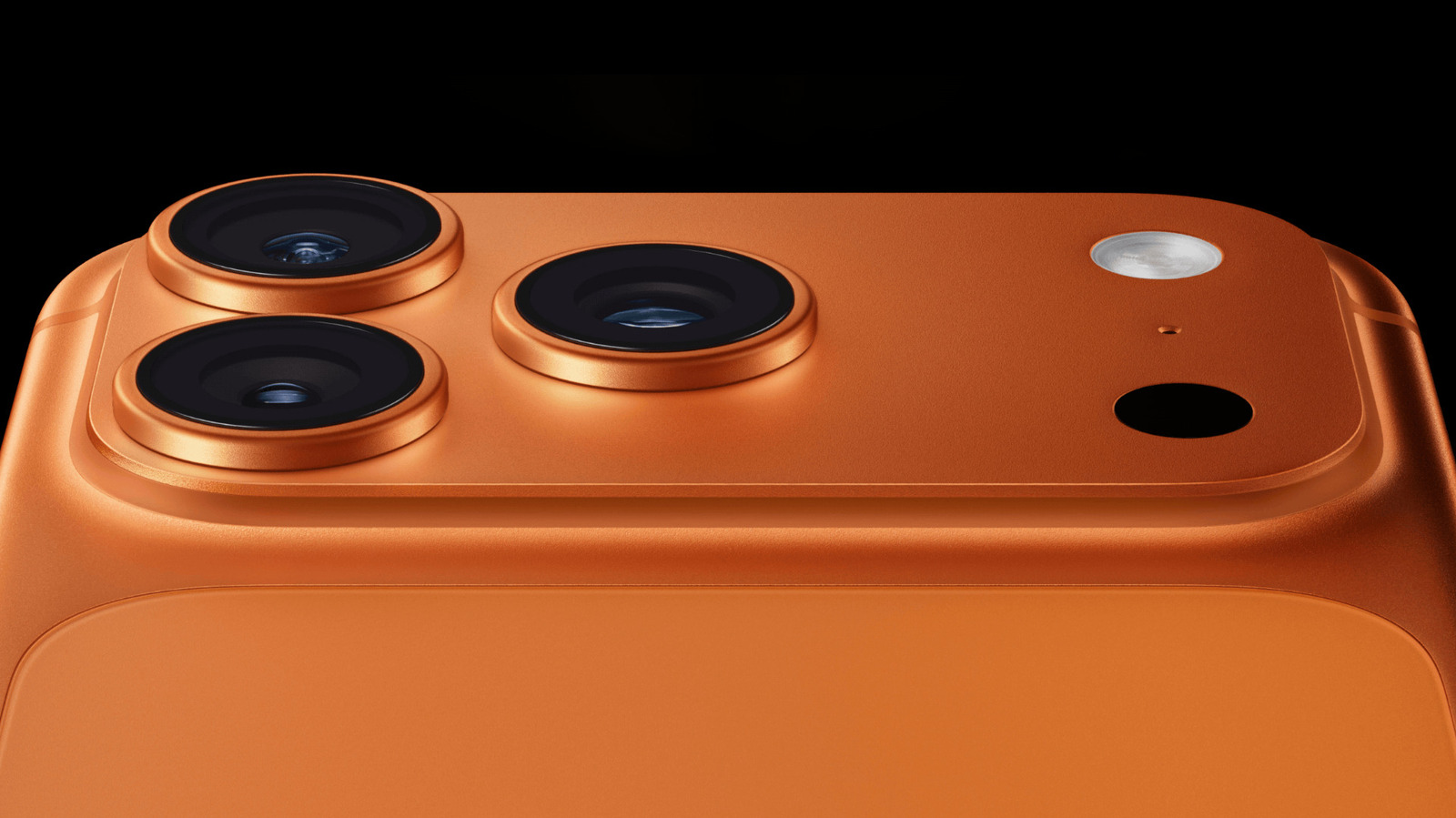
That small dark circle near the rear cameras on certain iPhone Pro models isn’t another camera. It’s the LiDAR scanner, a sensor that helps your iPhone figure out how far away nearby surfaces and objects are.

YOU MAY ALSO LIKE

New Accenture Gemini Enterprise Business Group Targets Agentic AI Scaling – Unite.AI

Your Largest Bottleneck May Be Your Most Self-Assured AI Champion – Unite.AI

You won’t find a dedicated LiDAR app or a toggle for it in Settings. Instead, iOS features and compatible apps use the scanner when they need depth information. That might be for measuring an object, understanding the shape of a room or detecting something nearby.

What does the LiDAR scanner on an iPhone do?
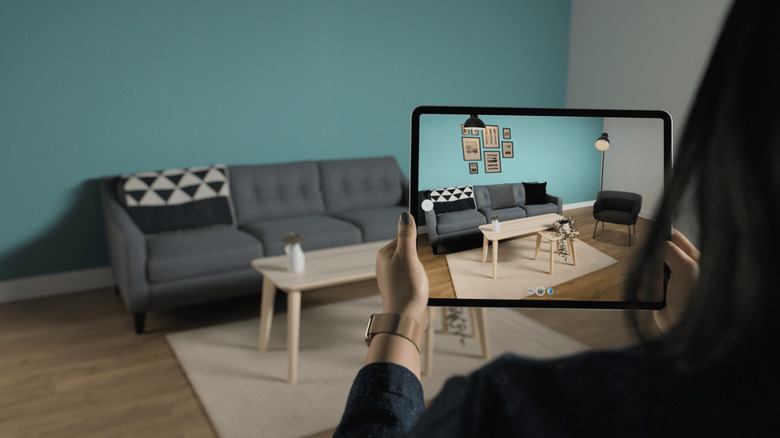

Person using a tablet to scan a living room with augmented reality room-mapping software.
Apple

LiDAR stands for “light detection and ranging.” The sensor sends out invisible pulses of light and measures how long they take to return after hitting nearby surfaces. Those measurements give your iPhone information about the distance and shape of objects in front of it.

A useful way to think about it is that the cameras show the iPhone what a scene looks like, while LiDAR adds information about how far away items are. ARKit, Apple’s augmented reality (AR) framework, can use those readings to create a rough 3D mesh of the physical environment. This helps compatible augmented reality apps understand the position of floors, walls and other surfaces.

And apps are able to put that information to practical use. Apple’s RoomPlan framework, for example, combines camera and LiDAR readings to identify walls, windows, doors, furniture and other room features while creating a 3D model of an interior space.

LiDAR can assist the camera as well. On supported Pro models, this sensor is used for features including Night mode portraits and faster autofocus in low light.

Which iPhones have LiDAR?
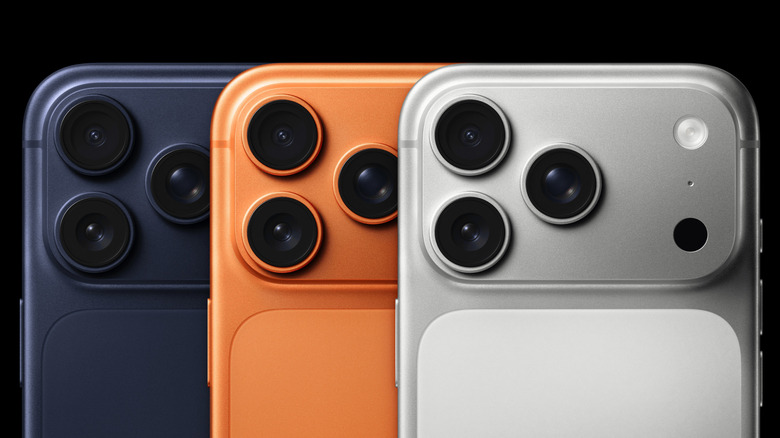

Three iPhone Pro models in blue, orange, and silver showing their rear camera systems and LiDAR Scanners.
Apple

Apple introduced the LiDAR Scanner with the iPhone 12 Pro and iPhone 12 Pro Max in 2020. It has remained a Pro-exclusive feature since then, appearing on every Pro and Pro Max generation through the iPhone 17 Pro and iPhone 17 Pro Max.

Apple has kept LiDAR off its non-Pro iPhones. So if you have a standard iPhone, mini, Plus, Air or any other model, your phone can’t take advantage of what it offers. If you’re not sure which iPhone you own, go to Settings > General > About and check the model name.

Outside of the iPhone, every iPad Pro since the fourth-gen lineup in March 2020 has featured a LiDAR sensor. It performs the same function on the tablet.

How to use LiDAR on an iPhone
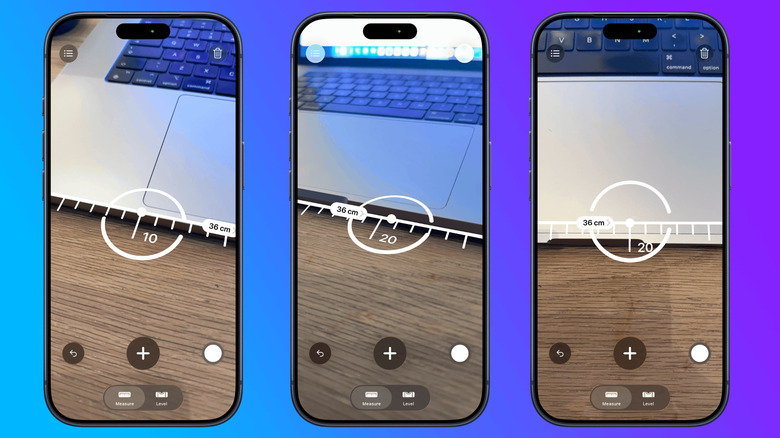

Three iPhone screenshots showing the Measure app measuring the width of a laptop.
Novak Božović for Engadget

The easiest built-in way to experiment with depth-assisted measuring is the Measure app. Measure isn’t exclusive to LiDAR-equipped iPhones; Apple also includes it on base iPhone models that lack the sensor.

To take a manual measurement, open Measure and slowly point the camera around the nearby area. Align the dot in the center of the screen with the starting point and tap the Plus/Add button. Move the iPhone to the other end of the object, then tap Plus/Add again. Apple notes that measurements are approximate, so this is better for quick estimates than work where an exact dimension matters.

On supported Pro models with the LiDAR sensor, Measure offers extra features such as automatic edge guides and Ruler view. It can measure a person’s height when they are fully visible in the camera view.

For more elaborate uses, you’ll need an app built to take advantage of the sensor. Apps using Apple’s RoomPlan framework can scan interior spaces and produce 3D room models, while AR apps can use LiDAR depth data to place virtual objects more accurately in the physical environment. You don’t need to switch the scanner on; supported apps will call on it when required.

LiDAR also has an accessibility role. On iPhones with the sensor, Detection Mode in the Magnifier app can detect nearby people, doors and furniture, then provide information through sounds, speech or haptic feedback. That said, Apple warns that Detection Mode shouldn’t be relied on for navigation or in situations where an inaccurate result could cause harm.

Credit: Source link

ShareTweetSendSharePin

Related Posts

New Accenture Gemini Enterprise Business Group Targets Agentic AI Scaling – Unite.AI
AI & Technology

New Accenture Gemini Enterprise Business Group Targets Agentic AI Scaling – Unite.AI

September 8, 2026
Your Largest Bottleneck May Be Your Most Self-Assured AI Champion – Unite.AI
AI & Technology

Your Largest Bottleneck May Be Your Most Self-Assured AI Champion – Unite.AI

September 8, 2026
What Is Considered Good Speed For Home Internet And How Can You Test It?
AI & Technology

What Is Considered Good Speed For Home Internet And How Can You Test It?

September 8, 2026
What Is The Anker ‘Smart Display Charger’ And What Does That Screen Even Do?
AI & Technology

What Is The Anker ‘Smart Display Charger’ And What Does That Screen Even Do?

September 8, 2026
Next Post
Building a GPT-6 Kalshi AI Trading Bot From Scratch (full guide)

Building a GPT-6 Kalshi AI Trading Bot From Scratch (full guide)

Leave a Reply Cancel reply

Your email address will not be published. Required fields are marked *

Search

No Result
View All Result
Tracking Jeremy Grantham's GMO Capital Portfolio – Q2 2026 Update

Tracking Jeremy Grantham's GMO Capital Portfolio – Q2 2026 Update

September 2, 2026
Full Episode: TODAY Show – July 29

Full Episode: TODAY Show – July 29

September 3, 2026
Negotiating Your Salary Once Has Decades of Compounding Impact

Negotiating Your Salary Once Has Decades of Compounding Impact

September 4, 2026

About

Learn more

Our Services

Legal

Privacy Policy

Terms of Use

Bloggers

Learn more

Article Links

Contact

Advertise

Ask us anything

©2020- TradePoint.io - All rights reserved!

Tradepoint.io, being just a publishing and technology platform, is not a registered broker-dealer or investment adviser. So we do not provide investment advice. Rather, brokerage services are provided to clients of Tradepoint.io by independent SEC-registered broker-dealers and members of FINRA/SIPC. Every form of investing carries some risk and past performance is not a guarantee of future results. “Tradepoint.io“, “Instant Investing” and “My Trading Tools” are registered trademarks of Apperbuild, LLC.

This website is operated by Apperbuild, LLC. We have no link to any brokerage firm and we do not provide investment advice. Every information and resource we provide is solely for the education of our readers. © 2020 Apperbuild, LLC. All rights reserved.

No Result
View All Result
  • Main
  • AI & Technology
  • Stock Charts
  • Market & News
  • Business
  • Finance Tips
  • Trade Tube
  • Blog
  • Shop

© 2023 - TradePoint.io - All Rights Reserved!