
• bitcoinBitcoin(BTC)$64,312.00-0.50%
  • ethereumEthereum(ETH)$1,902.72-0.20%
  • tetherTether(USDT)$1.000.00%
  • binancecoinBNB(BNB)$591.57-0.80%
  • usd-coinUSDC(USDC)$1.000.00%
  • rippleXRP(XRP)$1.04-3.00%
  • solanaSolana(SOL)$72.65-1.80%
  • tronTRON(TRX)$0.327079-0.30%
  • Figure HelocFigure Heloc(FIGR_HELOC)$1.00-2.20%
  • HyperliquidHyperliquid(HYPE)$56.24-1.90%
  • dogecoinDogecoin(DOGE)$0.068893-1.60%
  • USDSUSDS(USDS)$1.000.00%
  • RainRain(RAIN)$0.012573-0.10%
  • leo-tokenLEO Token(LEO)$9.760.00%
  • zcashZcash(ZEC)$494.92-4.30%
  • cardanoCardano(ADA)$0.2022897.50%
  • moneroMonero(XMR)$369.241.90%
  • whitebitWhiteBIT Coin(WBT)$55.71-0.50%
  • chainlinkChainlink(LINK)$8.180.50%
  • stellarStellar(XLM)$0.161651-3.00%
  • daiDai(DAI)$1.000.00%
  • bitcoin-cashBitcoin Cash(BCH)$212.81-1.20%
  • USD1USD1(USD1)$1.000.00%
  • Ethena USDeEthena USDe(USDE)$1.000.00%
  • the-open-networkGram (prev. Toncoin)(GRAM)$1.37-2.10%
  • CantonCanton(CC)$0.091042-10.80%
  • litecoinLitecoin(LTC)$45.420.70%
  • Global DollarGlobal Dollar(USDG)$1.00-0.10%
  • Circle USYCCircle USYC(USYC)$1.130.00%
  • hedera-hashgraphHedera(HBAR)$0.068402-1.60%
  • avalanche-2Avalanche(AVAX)$6.45-3.20%
  • paypal-usdPayPal USD(PYUSD)$1.000.00%
  • shiba-inuShiba Inu(SHIB)$0.000005-4.00%
  • suiSui(SUI)$0.67-2.30%
  • BlackRock USD Institutional Digital Liquidity FundBlackRock USD Institutional Digital Liquidity Fund(BUIDL)$1.000.00%
  • tether-goldTether Gold(XAUT)$4,221.25-0.20%
  • crypto-com-chainCronos(CRO)$0.053336-1.40%
  • uniswapUniswap(UNI)$4.01-1.10%
  • nearNEAR Protocol(NEAR)$1.66-2.20%
  • Ondo US Dollar YieldOndo US Dollar Yield(USDY)$1.140.20%
  • pax-goldPAX Gold(PAXG)$4,233.65-0.20%
  • BittensorBittensor(TAO)$192.21-2.10%
  • okbOKB(OKB)$85.36-0.60%
  • OndoOndo(ONDO)$0.358734-3.10%
  • World Liberty FinancialWorld Liberty Financial(WLFI)$0.052622-1.50%
  • HTX DAOHTX DAO(HTX)$0.0000020.00%
  • AsterAster(ASTER)$0.60-1.00%
  • Ripple USDRipple USD(RLUSD)$1.000.00%
  • usddUSDD(USDD)$1.000.10%
  • MemeCoreMemeCore(M)$1.14-7.40%
TradePoint.io
  • Main
  • AI & Technology
  • Stock Charts
  • Market & News
  • Business
  • Finance Tips
  • Trade Tube
  • Blog
  • Shop
No Result
View All Result
TradePoint.io
No Result
View All Result

What Is USB Tethering And How Do You Enable It For Mobile Hotspot?

August 1, 2026
in AI & Technology
Reading Time: 4 mins read
A A
What Is USB Tethering And How Do You Enable It For Mobile Hotspot?
ShareShareShareShareShare

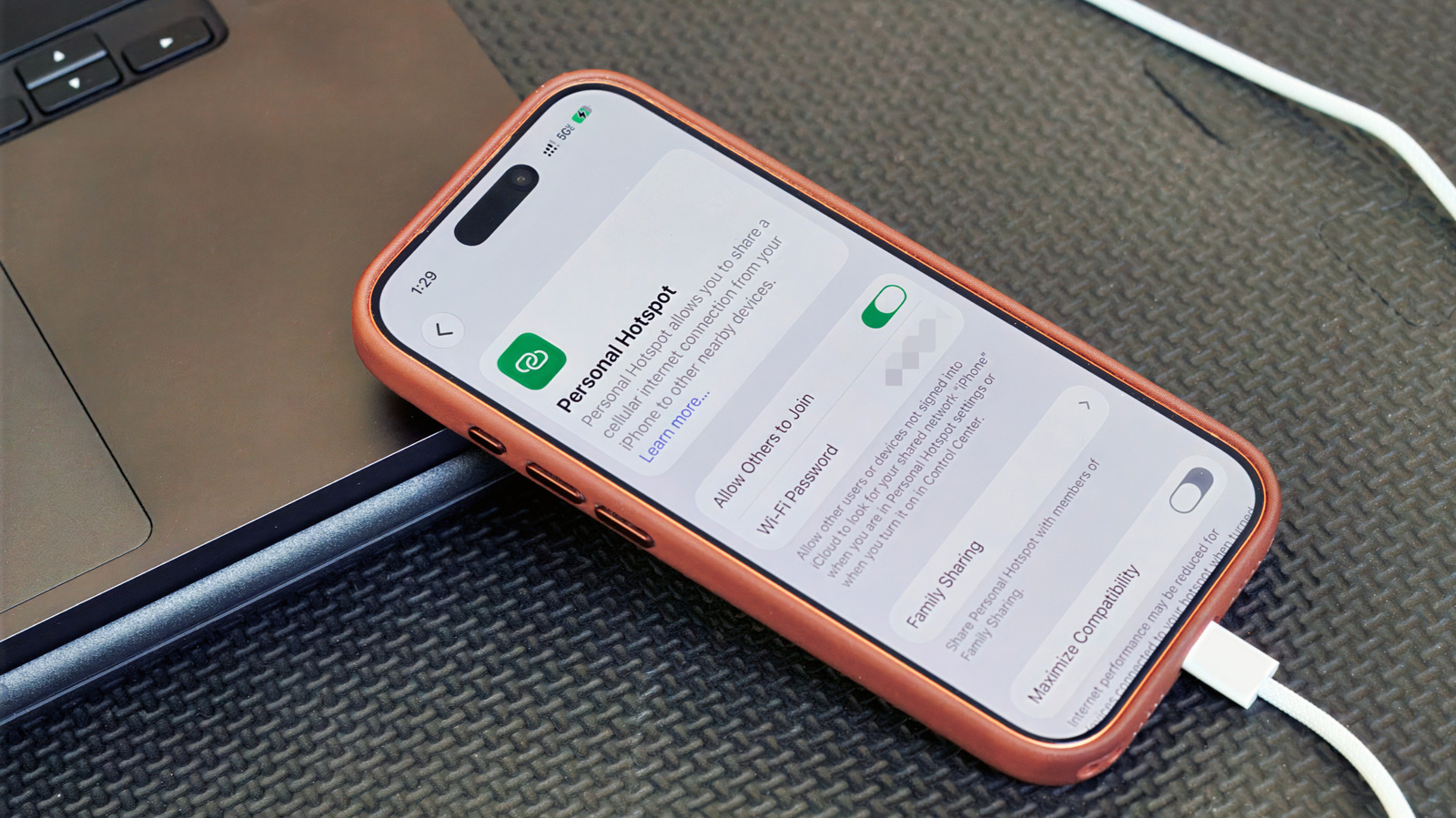
There are times when a physical connection works better. Here’s how to set it up.

Will Shanklin for Engadget

When you think of using a smartphone as a mobile hotspot, the wireless version is probably what comes to mind. But there’s also USB tethering, which lets you share your phone’s cellular connection with a computer over a cable. Here’s how it works, what it’s good for and how to set it up.

YOU MAY ALSO LIKE

OpenAI’s Ring-Shaped Smart Speaker Will Reportedly Cost Between $300 And $400

Cloudflare Introduces Kitesurf: An Agent-First Web Browser That Runs Entirely in V8 Isolates on Cloudflare Workers

Why USB tethering?

For most people, a wireless hotspot is still the easiest way to get a laptop online when you’re away from regular Wi-Fi. It’s more flexible, supporting multiple simultaneous connections. And unlike the USB kind, you’re free to move your phone away from the computer.

But there are some cases where USB tethering could make sense. A wired connection can be more stable, which is handy for crowded places like convention centers or airports. It also means you aren’t broadcasting a visible network in public. As a bonus, your phone might charge while it’s connected.

How to set up USB tethering

The tethering screen on a Samsung Galaxy phone Screenshot by Will Shanklin (Samsung)

Before we dive in, note that there’s one big catch: Android phones can’t tether via USB to a Mac. (You can still use a Wi-Fi hotspot instead.) Otherwise, USB tethering works with other phone-to-computer setups, including Android to Windows and iPhone to Mac or Windows.

If you’re tethering from an iPhone to Windows, you may need to install the Apple Devices app or iTunes for Windows from the Microsoft Store.

On Android:

  1. Connect your phone to a Windows PC using a USB cable.
  2. On your phone, navigate to Settings > Network & internet > Hotspot & tethering. (On some devices, it’s under Settings > Connections > Hotspot & tethering.) You can also swipe down to open Quick Settings, then press and hold Hotspot to jump to the tethering menu.
  3. Toggle on USB tethering. If the option is grayed out, make sure you’re using a data-capable USB cable and not a charge-only one.

On iPhone:

  1. Plug your iPhone into a computer using a USB cable.
  2. You may see authentication prompts. If your iPhone asks whether to trust the computer, tap Trust and enter your passcode. If you’re connecting to a Mac and see an “Allow accessory to connect” prompt on your computer, click Allow.
  3. On your iPhone, go to Settings > Personal Hotspot. (If you’ve never used a hotspot before, you may need to start under Settings > Cellular > Set up Personal Hotspot.)
  4. Turn on Allow Others to Join.

A few things to keep in mind

USB tethering usually makes more sense for one device than as a full hotspot replacement. So, for example, if you’re trying to get both your laptop and tablet online at the same time, a Wi-Fi hotspot is the solution.

Keep in mind that laptops can burn through data with background tasks like updates and cloud syncing. Your carrier may also limit hotspot use, charge extra for it, count it against a separate data allowance or not support it at all. So it’s worth checking your plan before tethering over USB or Wi-Fi.

And while a wired connection can be more stable than a wireless hotspot, it’s still relying on your phone’s cellular signal. Spotty service will still mean spotty internet, no matter how you connect.

Credit: Source link

ShareTweetSendSharePin

Related Posts

OpenAI’s Ring-Shaped Smart Speaker Will Reportedly Cost Between 0 And 0
AI & Technology

OpenAI’s Ring-Shaped Smart Speaker Will Reportedly Cost Between $300 And $400

August 6, 2026
Cloudflare Introduces Kitesurf: An Agent-First Web Browser That Runs Entirely in V8 Isolates on Cloudflare Workers
AI & Technology

Cloudflare Introduces Kitesurf: An Agent-First Web Browser That Runs Entirely in V8 Isolates on Cloudflare Workers

August 6, 2026
Suno Is Adding Audio Watermarks So AI-Generated Songs Are More Easily Identifiable
AI & Technology

Suno Is Adding Audio Watermarks So AI-Generated Songs Are More Easily Identifiable

August 6, 2026
OpenAI Gives Free ChatGPT Users Unlimited Text Chats on GPT-5.6 Luna – Unite.AI
AI & Technology

OpenAI Gives Free ChatGPT Users Unlimited Text Chats on GPT-5.6 Luna – Unite.AI

August 6, 2026
Next Post
Prince Harry loses privacy battle against British tabloid

Prince Harry loses privacy battle against British tabloid

Leave a Reply Cancel reply

Your email address will not be published. Required fields are marked *

Search

No Result
View All Result
Prosecution shows new video of moments before and after Charlie Kirk’s assassination

Prosecution shows new video of moments before and after Charlie Kirk’s assassination

August 2, 2026
America’s greatest strength is ‘not running away from its history’: Smithsonian’s Lonnie Bunch

America’s greatest strength is ‘not running away from its history’: Smithsonian’s Lonnie Bunch

August 5, 2026
Former judge spared prison time for obstructing ICE arrest

Former judge spared prison time for obstructing ICE arrest

July 31, 2026

About

Learn more

Our Services

Legal

Privacy Policy

Terms of Use

Bloggers

Learn more

Article Links

Contact

Advertise

Ask us anything

©2020- TradePoint.io - All rights reserved!

Tradepoint.io, being just a publishing and technology platform, is not a registered broker-dealer or investment adviser. So we do not provide investment advice. Rather, brokerage services are provided to clients of Tradepoint.io by independent SEC-registered broker-dealers and members of FINRA/SIPC. Every form of investing carries some risk and past performance is not a guarantee of future results. “Tradepoint.io“, “Instant Investing” and “My Trading Tools” are registered trademarks of Apperbuild, LLC.

This website is operated by Apperbuild, LLC. We have no link to any brokerage firm and we do not provide investment advice. Every information and resource we provide is solely for the education of our readers. © 2020 Apperbuild, LLC. All rights reserved.

No Result
View All Result
  • Main
  • AI & Technology
  • Stock Charts
  • Market & News
  • Business
  • Finance Tips
  • Trade Tube
  • Blog
  • Shop

© 2023 - TradePoint.io - All Rights Reserved!