
• bitcoinBitcoin(BTC)$66,185.002.96%
  • ethereumEthereum(ETH)$1,928.133.00%
  • tetherTether(USDT)$1.000.03%
  • binancecoinBNB(BNB)$576.571.74%
  • usd-coinUSDC(USDC)$1.000.01%
  • rippleXRP(XRP)$1.133.32%
  • solanaSolana(SOL)$78.102.15%
  • tronTRON(TRX)$0.3273360.47%
  • Figure HelocFigure Heloc(FIGR_HELOC)$1.00-1.68%
  • HyperliquidHyperliquid(HYPE)$62.703.26%
  • dogecoinDogecoin(DOGE)$0.0734651.70%
  • USDSUSDS(USDS)$1.000.01%
  • RainRain(RAIN)$0.013886-2.45%
  • zcashZcash(ZEC)$538.521.12%
  • leo-tokenLEO Token(LEO)$9.710.35%
  • whitebitWhiteBIT Coin(WBT)$57.702.81%
  • stellarStellar(XLM)$0.1916012.57%
  • chainlinkChainlink(LINK)$8.693.49%
  • cardanoCardano(ADA)$0.1743796.93%
  • moneroMonero(XMR)$345.312.97%
  • CantonCanton(CC)$0.1261191.40%
  • daiDai(DAI)$1.000.02%
  • bitcoin-cashBitcoin Cash(BCH)$224.425.45%
  • USD1USD1(USD1)$1.000.01%
  • Ethena USDeEthena USDe(USDE)$1.000.02%
  • the-open-networkGram (prev. Toncoin)(GRAM)$1.450.98%
  • litecoinLitecoin(LTC)$47.350.62%
  • Global DollarGlobal Dollar(USDG)$1.00-0.16%
  • suiSui(SUI)$0.773.04%
  • hedera-hashgraphHedera(HBAR)$0.0683113.48%
  • Circle USYCCircle USYC(USYC)$1.130.00%
  • avalanche-2Avalanche(AVAX)$6.620.95%
  • paypal-usdPayPal USD(PYUSD)$1.000.01%
  • crypto-com-chainCronos(CRO)$0.0579810.83%
  • nearNEAR Protocol(NEAR)$1.992.60%
  • BlackRock USD Institutional Digital Liquidity FundBlackRock USD Institutional Digital Liquidity Fund(BUIDL)$1.000.00%
  • shiba-inuShiba Inu(SHIB)$0.0000041.33%
  • tether-goldTether Gold(XAUT)$4,054.940.95%
  • uniswapUniswap(UNI)$3.696.75%
  • Ondo US Dollar YieldOndo US Dollar Yield(USDY)$1.140.34%
  • OndoOndo(ONDO)$0.40051214.83%
  • BittensorBittensor(TAO)$199.912.76%
  • pax-goldPAX Gold(PAXG)$4,051.310.94%
  • World Liberty FinancialWorld Liberty Financial(WLFI)$0.056604-0.48%
  • okbOKB(OKB)$81.851.92%
  • AsterAster(ASTER)$0.631.43%
  • HTX DAOHTX DAO(HTX)$0.0000020.84%
  • Ripple USDRipple USD(RLUSD)$1.000.01%
  • MemeCoreMemeCore(M)$1.17-5.07%
  • usddUSDD(USDD)$1.000.01%
TradePoint.io
  • Main
  • AI & Technology
  • Stock Charts
  • Market & News
  • Business
  • Finance Tips
  • Trade Tube
  • Blog
  • Shop
No Result
View All Result
TradePoint.io
No Result
View All Result

How To Use Claude’s Reflect Dashboard And Learn When It’s Time To Touch Grass

July 19, 2026
in AI & Technology
Reading Time: 3 mins read
A A
How To Use Claude’s Reflect Dashboard And Learn When It’s Time To Touch Grass
ShareShareShareShareShare

First, you’ll want to access the dashboard and generate your first reflect report. To do so, follow these steps:

  1. Open your browser and navigate to claude.ai.

    YOU MAY ALSO LIKE

    Sony Files Another Lawsuit Against AI Music Generator Udio

    Meta Open-Sources Astryx: An Agent-Ready React Design System With 150+ Accessible Components, Seven Themes, and a CLI

  2. Click on your name and profile photo. 

  3. Click Settings.

  4. Select Reflect.

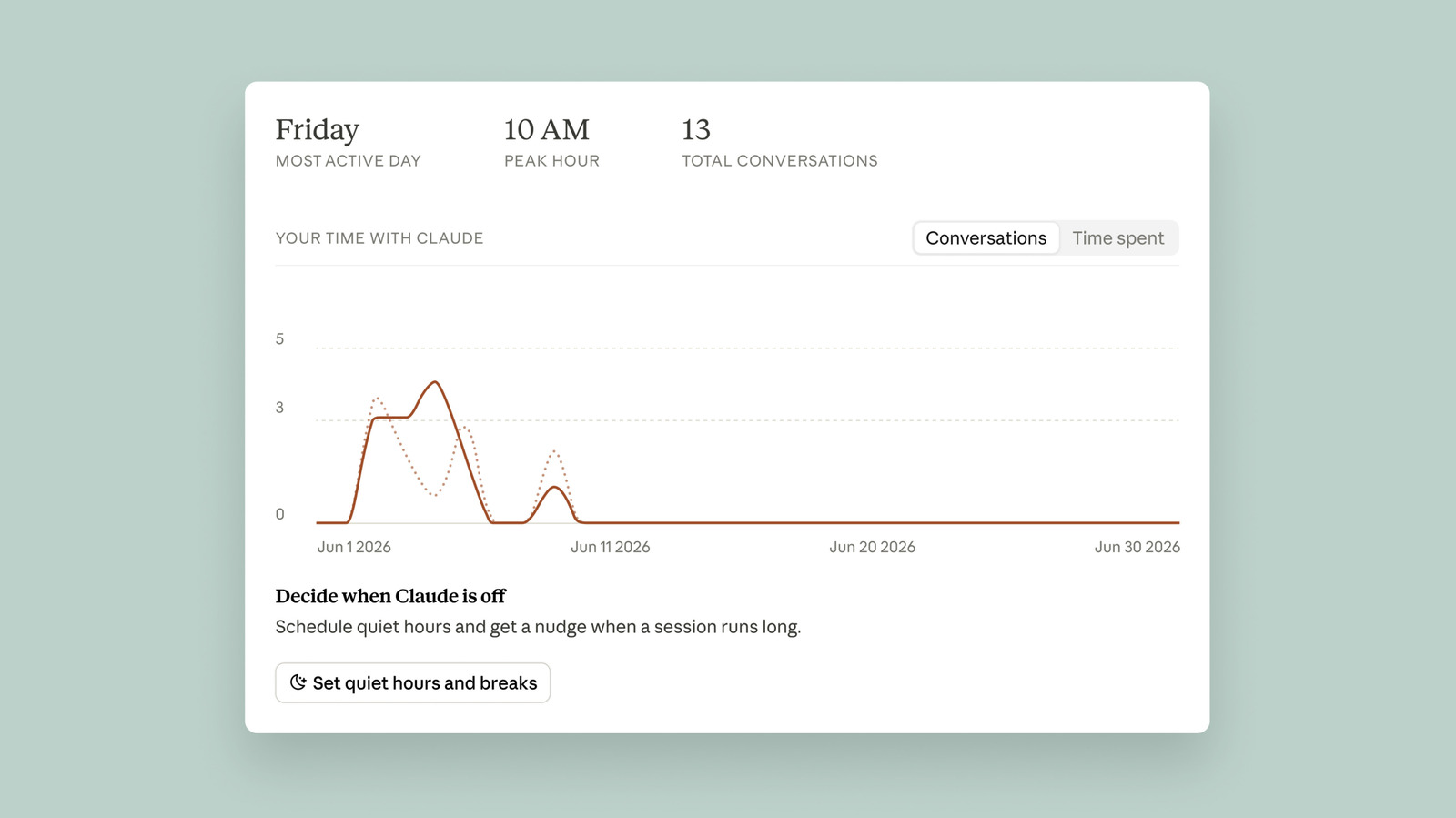
Claude will take a moment to generate your report. By default, the chatbot will summarize the last month of your usage, but you can also see the last three, six or 12 months by clicking the toggle at the top.

Once your first report is ready, you’ll see a short summary of your conversations with Claude. As of the writing of this article, you can’t see the exact amount of time you’ve spent using Claude. If you click the Time spent tab, the page just says “coming soon.” Ryn Linthicum, Anthropic’s head of wellbeing policy, told Engadget the reason for that is the company didn’t have an internal system for measuring time spent on Claude when it began working on the Reflect dashboard.

In any case, the dashboard gives you two different ways to manage your time on Claude. First, you can set break reminders, which the chatbot will deliver in the form of a nudge after you use it for a set amount of time. After just how much time Claude prompts you to take a break, is up to you. You can set reminders for every 15, 30 or 45 minutes, or every few hours. Separately, you can set quiet hours, which are designed to prevent you from using Claude during certain hours of the day. You can set different hours for each day of the week independently of each other. So, for example, on Monday you can put up a roadblock from 5PM to 8PM, while on Saturday you can set it from 12PM to 4PM.

As with any screen time tool, it’s ultimately up to you to honor the usage limits you’ve set for yourself since you can freely dismiss all of Claude’s nudges. If you want to tweak your break reminders, you can do so from the Time and focus section of the settings menu.

Anthropic

One more feature of the dashboard I’ll highlight here involves the AI fluency section, which you’ll find toward the bottom of the interface. Under this section, Claude will generate recommendations designed to streamline your usage of the chatbot. For example, if Claude finds you frequently re-establish the same or similar context when you go to write a question or request, it will recommend you use its Projects feature to group your prompts together, so that you don’t need to repeat yourself so often. In my testing, this tool has helped me use Claude smarter. So I recommend giving some of the tips Claude generates a try.

Credit: Source link

ShareTweetSendSharePin

Related Posts

Sony Files Another Lawsuit Against AI Music Generator Udio
AI & Technology

Sony Files Another Lawsuit Against AI Music Generator Udio

July 21, 2026
Meta Open-Sources Astryx: An Agent-Ready React Design System With 150+ Accessible Components, Seven Themes, and a CLI
AI & Technology

Meta Open-Sources Astryx: An Agent-Ready React Design System With 150+ Accessible Components, Seven Themes, and a CLI

July 21, 2026
Amazon’s Adaptive Display For Fire TVs Is Officially Rolling Out Today
AI & Technology

Amazon’s Adaptive Display For Fire TVs Is Officially Rolling Out Today

July 20, 2026
The First UL 3700-Compliant Plug-In Solar Microinverter Is Now Available In The US
AI & Technology

The First UL 3700-Compliant Plug-In Solar Microinverter Is Now Available In The US

July 20, 2026
Next Post
United Talent Agency taking its talents to the Empire State Building

United Talent Agency taking its talents to the Empire State Building

Leave a Reply Cancel reply

Your email address will not be published. Required fields are marked *

Search

No Result
View All Result
The S&P 500 Isn’t Overvalued. Here’s Why

The S&P 500 Isn’t Overvalued. Here’s Why

July 17, 2026
Elon Musk’s xAI sues Grok user over sexualized deepfakes

Elon Musk’s xAI sues Grok user over sexualized deepfakes

July 15, 2026
Wall Street Brunch: Tesla Reports With Earnings In Full Swing (undefined:TSLA)

Wall Street Brunch: Tesla Reports With Earnings In Full Swing (undefined:TSLA)

July 19, 2026

About

Learn more

Our Services

Legal

Privacy Policy

Terms of Use

Bloggers

Learn more

Article Links

Contact

Advertise

Ask us anything

©2020- TradePoint.io - All rights reserved!

Tradepoint.io, being just a publishing and technology platform, is not a registered broker-dealer or investment adviser. So we do not provide investment advice. Rather, brokerage services are provided to clients of Tradepoint.io by independent SEC-registered broker-dealers and members of FINRA/SIPC. Every form of investing carries some risk and past performance is not a guarantee of future results. “Tradepoint.io“, “Instant Investing” and “My Trading Tools” are registered trademarks of Apperbuild, LLC.

This website is operated by Apperbuild, LLC. We have no link to any brokerage firm and we do not provide investment advice. Every information and resource we provide is solely for the education of our readers. © 2020 Apperbuild, LLC. All rights reserved.

No Result
View All Result
  • Main
  • AI & Technology
  • Stock Charts
  • Market & News
  • Business
  • Finance Tips
  • Trade Tube
  • Blog
  • Shop

© 2023 - TradePoint.io - All Rights Reserved!