• bitcoinBitcoin(BTC)$84,770.000.91%
  • ethereumEthereum(ETH)$2,694.500.45%
  • tetherTether(USDT)$1.000.00%
  • binancecoinBNB(BNB)$778.571.09%
  • rippleXRP(XRP)$1.531.01%
  • usd-coinUSDC(USDC)$1.000.00%
  • solanaSolana(SOL)$123.181.83%
  • tronTRON(TRX)$0.333974-0.61%
  • zcashZcash(ZEC)$1,608.352.77%
  • Figure HelocFigure Heloc(FIGR_HELOC)$1.063.32%
  • HyperliquidHyperliquid(HYPE)$91.940.38%
  • dogecoinDogecoin(DOGE)$0.0974730.84%
  • chainlinkChainlink(LINK)$14.110.14%
  • moneroMonero(XMR)$549.10-0.52%
  • whitebitWhiteBIT Coin(WBT)$84.490.81%
  • USDSUSDS(USDS)$1.000.00%
  • cardanoCardano(ADA)$0.2563551.27%
  • RainRain(RAIN)$0.012590-2.72%
  • leo-tokenLEO Token(LEO)$9.010.53%
  • stellarStellar(XLM)$0.2173760.28%
  • nearNEAR Protocol(NEAR)$5.4813.02%
  • bitcoin-cashBitcoin Cash(BCH)$335.07-0.27%
  • uniswapUniswap(UNI)$9.792.52%
  • litecoinLitecoin(LTC)$71.33-0.24%
  • CantonCanton(CC)$0.1378762.00%
  • suiSui(SUI)$1.2810.33%
  • Ethena USDeEthena USDe(USDE)$1.000.02%
  • avalanche-2Avalanche(AVAX)$11.043.21%
  • daiDai(DAI)$1.000.01%
  • the-open-networkGram (prev. Toncoin)(GRAM)$1.634.19%
  • USD1USD1(USD1)$1.00-0.01%
  • hedera-hashgraphHedera(HBAR)$0.0953132.51%
  • BittensorBittensor(TAO)$328.472.87%
  • shiba-inuShiba Inu(SHIB)$0.0000060.63%
  • crypto-com-chainCronos(CRO)$0.0674622.05%
  • BitwayBitway(BTW)$1.2116.20%
  • Global DollarGlobal Dollar(USDG)$1.00-0.01%
  • EthenaEthena(ENA)$0.2875086.20%
  • paypal-usdPayPal USD(PYUSD)$1.000.00%
  • OndoOndo(ONDO)$0.564.87%
  • quant-networkQuant(QNT)$188.0155.05%
  • MemeCoreMemeCore(M)$1.20-1.09%
  • tether-goldTether Gold(XAUT)$4,279.19-0.04%
  • okbOKB(OKB)$121.590.70%
  • Ripple USDRipple USD(RLUSD)$1.000.01%
  • Circle USYCCircle USYC(USYC)$1.140.00%
  • aaveAave(AAVE)$155.300.61%
  • Pump.funPump.fun(PUMP)$0.00499013.54%
  • BlackRock USD Institutional Digital Liquidity FundBlackRock USD Institutional Digital Liquidity Fund(BUIDL)$1.000.00%
  • Ondo US Dollar YieldOndo US Dollar Yield(USDY)$1.150.08%
TradePoint.io
  • Main
  • AI & Technology
  • Stock Charts
  • Market & News
  • Business
  • Finance Tips
  • Trade Tube
  • Blog
  • Shop
No Result
View All Result
TradePoint.io
No Result
View All Result

Getting Started with GitHub: Upload, Clone, and Create a README

February 24, 2025
in AI & Technology
Reading Time: 8 mins read
A A
Getting Started with GitHub: Upload, Clone, and Create a README
ShareShareShareShareShare


Introduction

GitHub is an essential platform for version control and collaboration. This guide will walk you through three fundamental GitHub skills: creating and uploading a repository, cloning an existing repository, and writing an effective README file. By following these step-by-step instructions, you’ll be able to start using GitHub efficiently for your projects.

1. Creating and Uploading a Repository on GitHub

1.1 Create a GitHub Account

  1. Visit github.com
  2. Click “Sign up” and follow the registration process
  3. Verify your email address

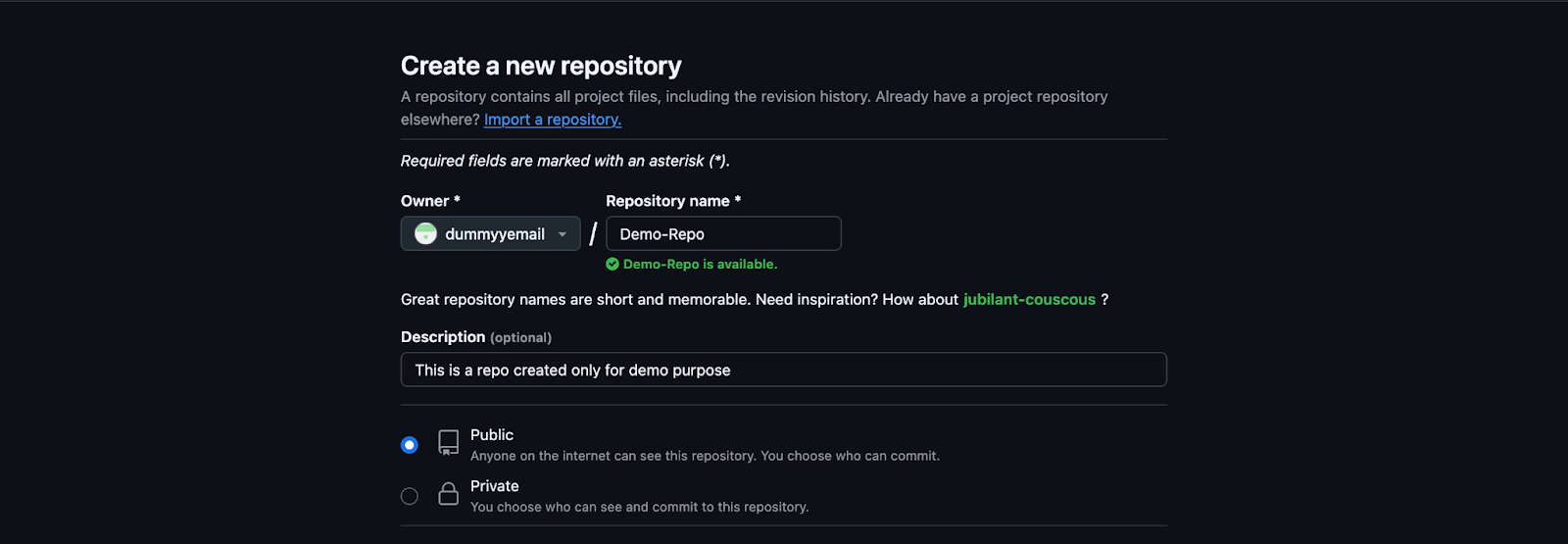
1.2 Create a New Repository

  1. Log in to your GitHub account
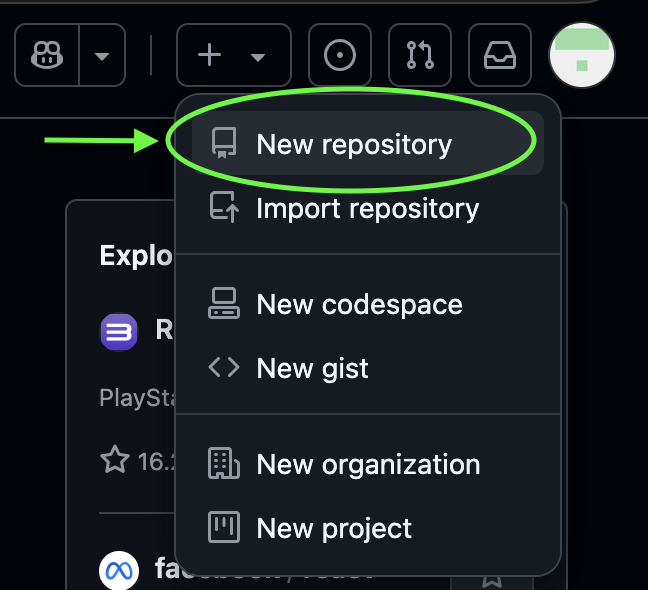
  2. Click on the “+” icon in the top-right corner
  3. Select “New repository” from the dropdown menu
1.3 Set Up Your Repository

  1. Enter a name for your repository
  2. Add an optional description
  3. Choose public or private visibility
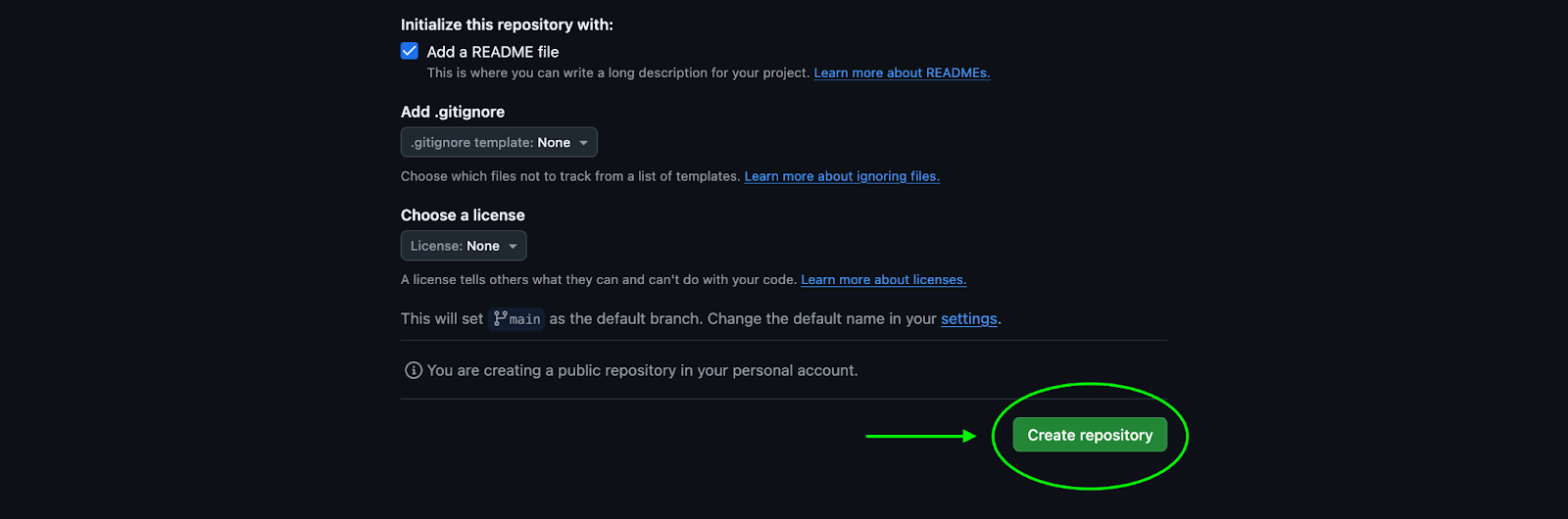
  4. Check “Add a README file” (optional at this stage)
  5. Click “Create repository”

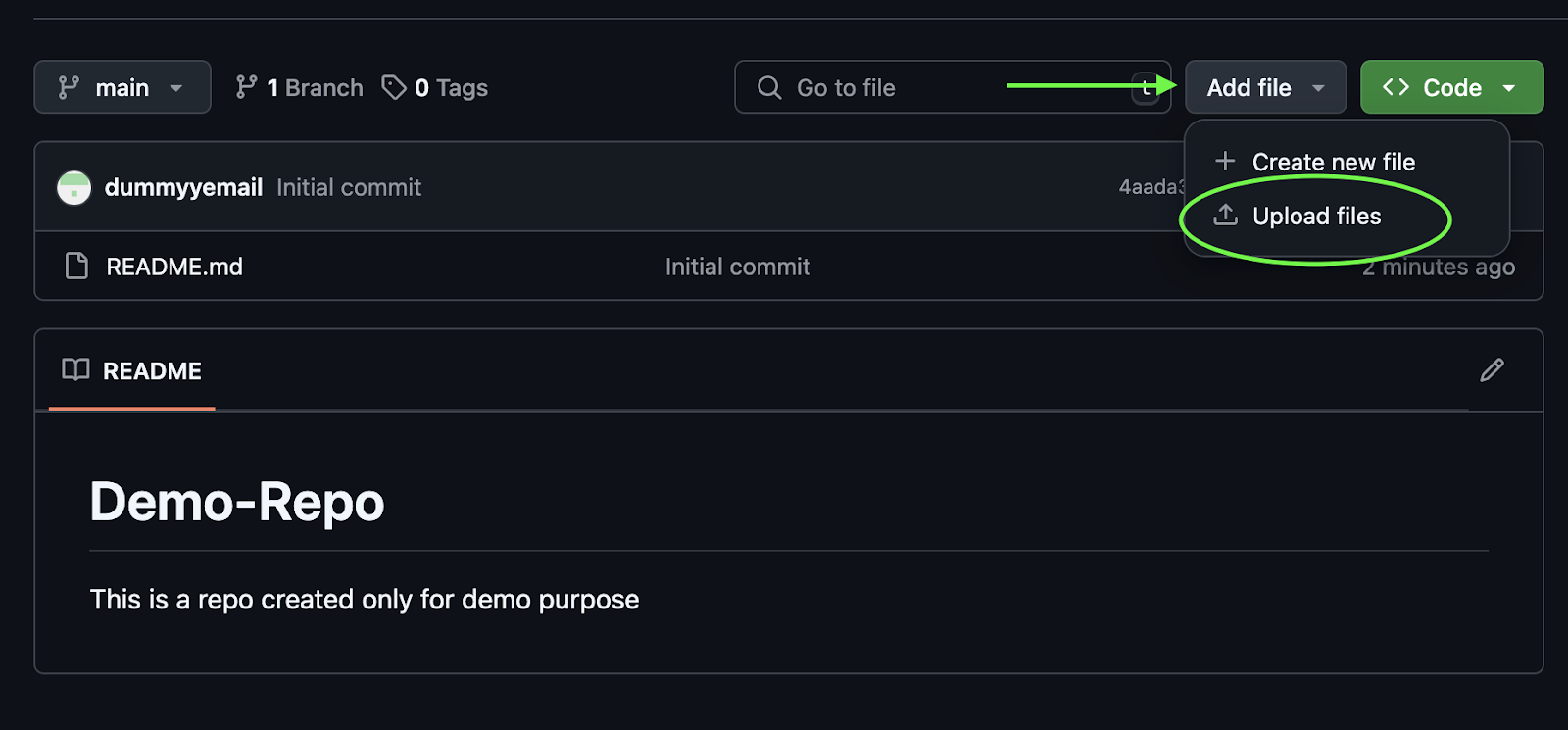
1.4 Upload Files to Your Repository

  1. In your new repository, click on “Add file” dropdown
  2. Select “Upload files”
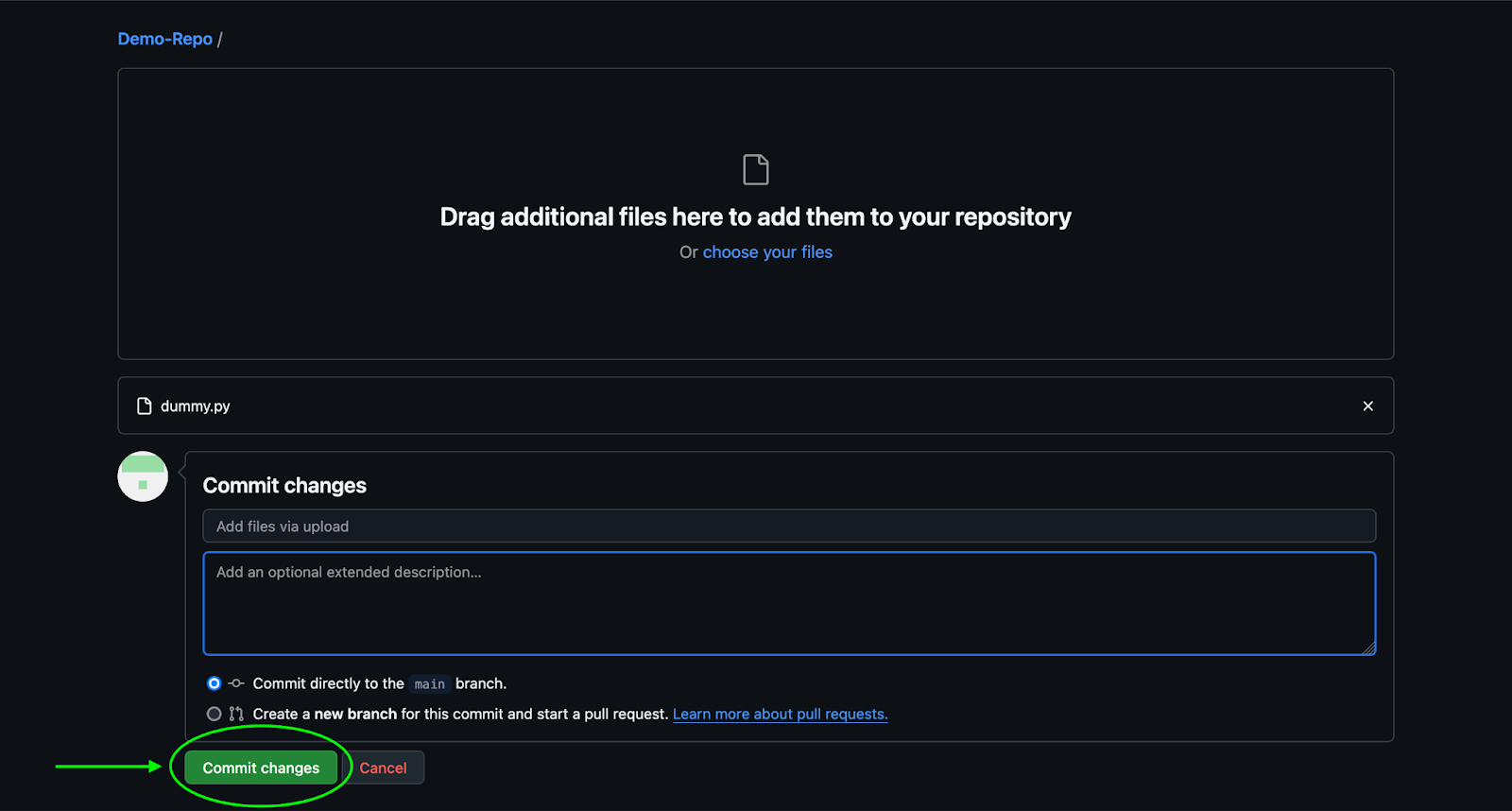
  3. Drag and drop files or click to select from your computer
  4. Add a commit message describing your changes
  5. Click “Commit changes”

2. Cloning a Repository

2.1 Find the Repository URL

  1. Navigate to the repository you want to clone
  2. Click the green “Code” button
  3. Copy the HTTPS URL (or SSH URL if you have SSH set up)
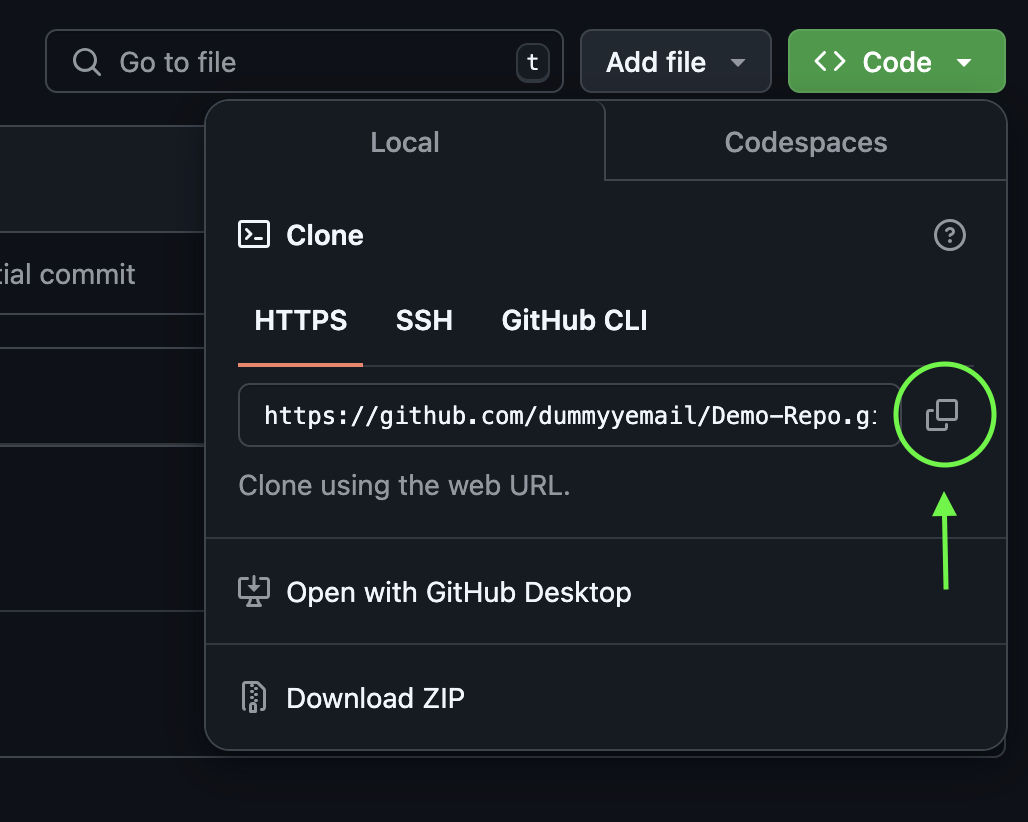
2.2 Clone Using Command Line

  1. Open your terminal or command prompt
  2. Navigate to the location where you want to store the repository
  3. Type git clone followed by the repository URL:
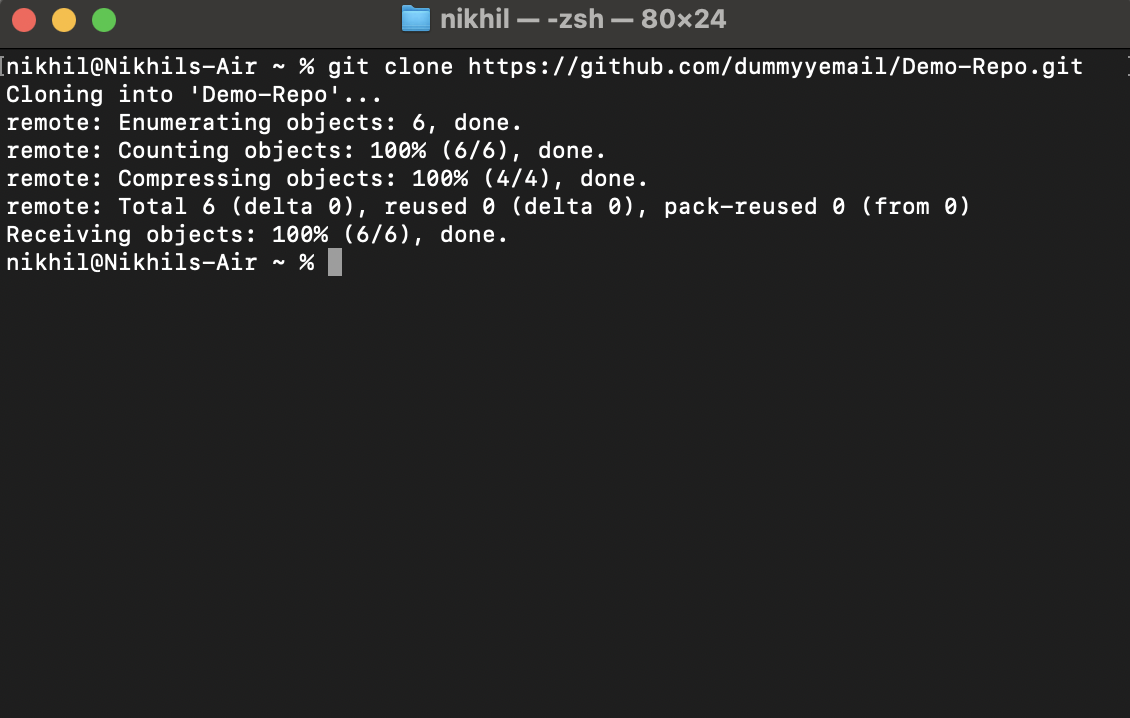
  1. Press Enter and wait for the repository to download

3. Writing an Effective README

3.1 Open the README.md File

  1. In your cloned repository, locate the README.md file
  2. Open it using any text editor (VS Code, Notepad++, etc.)
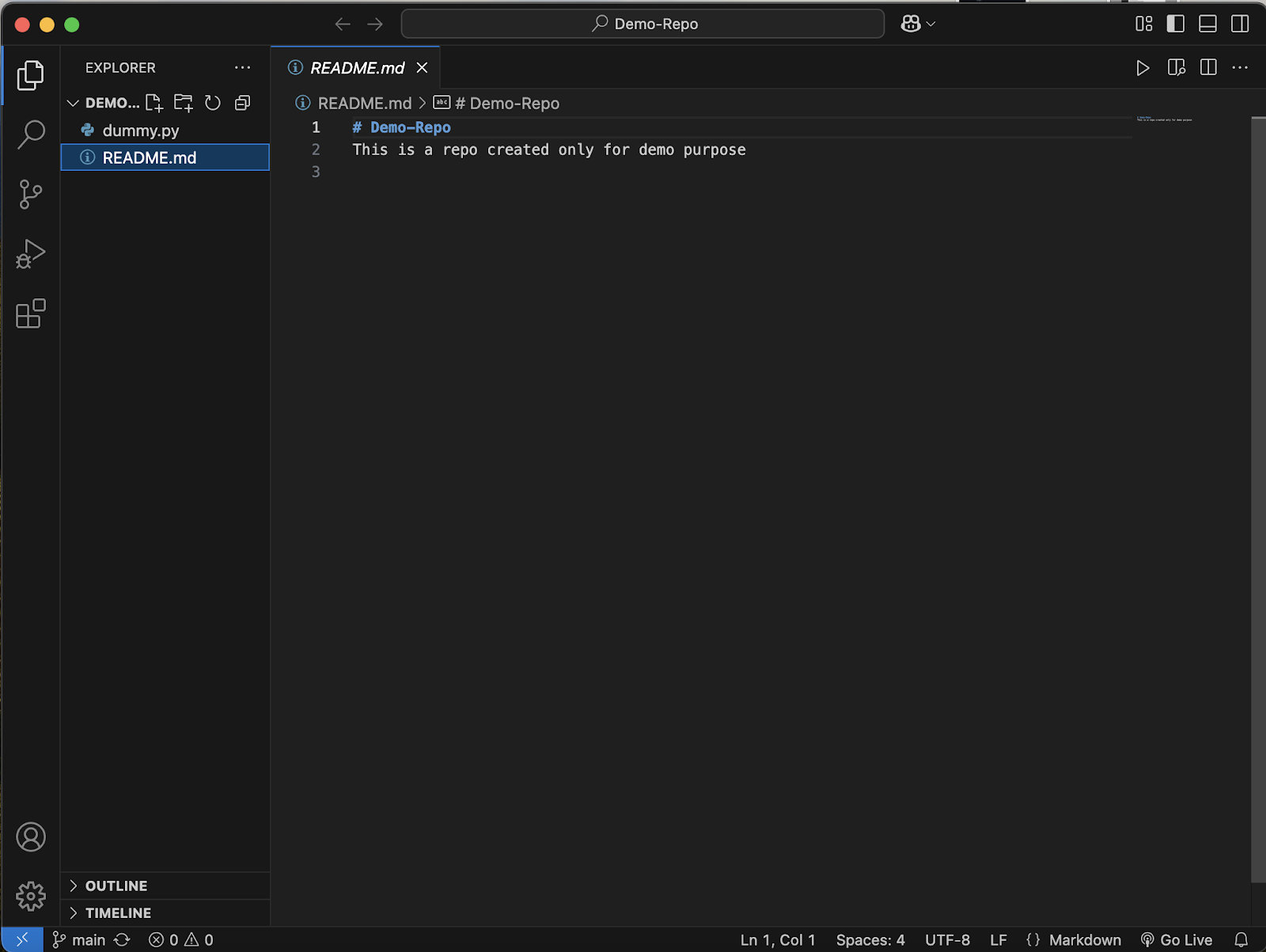
3.2 Structure Your README

A good README typically includes:

YOU MAY ALSO LIKE

Bill Gates Says It’s ‘Completely Irresponsible’ For AI To Not Have Safeguards

Why The iPhone Duo Could Be Beneficial For Samsung’s Galaxy Z Fold 8

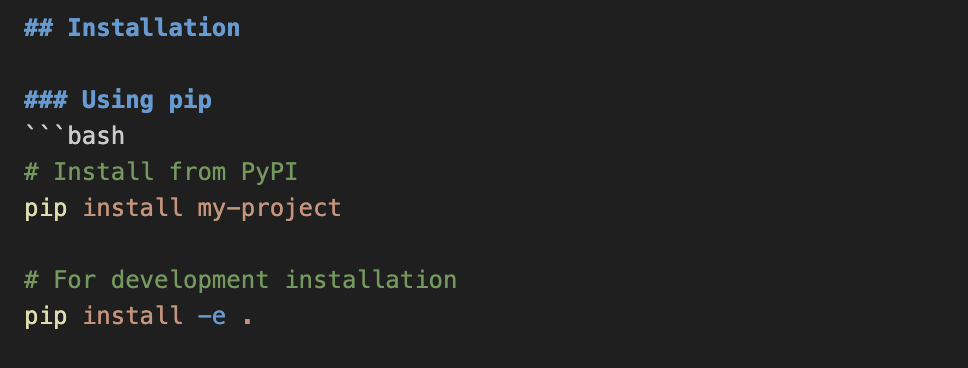
  1. Project Title and Description
  1. Installation Instructions
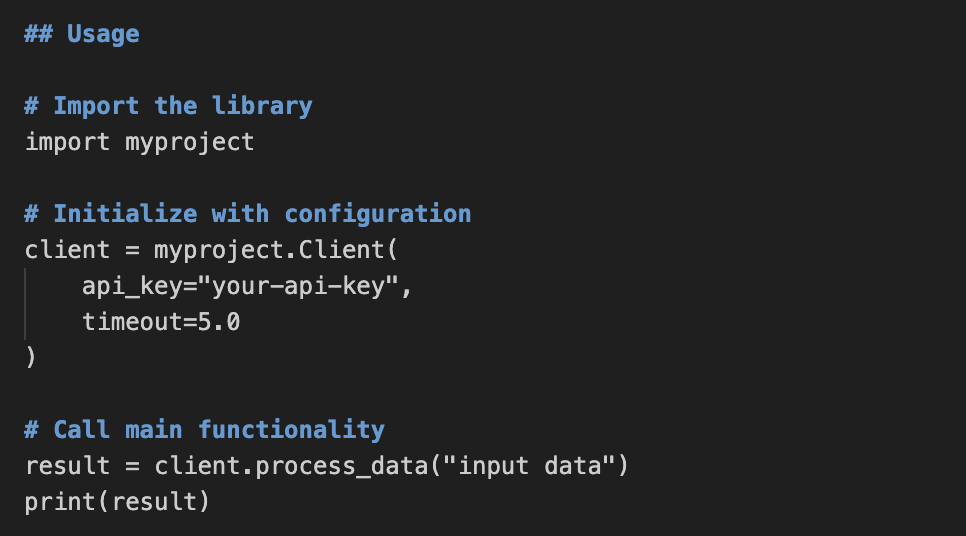
  1. Usage Examples
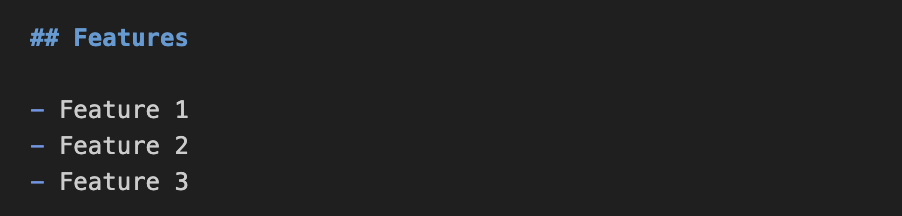
  1. Features
  1. Contributing Guidelines
  1. Licence Information

3.3 Commit and Push Your README

  1. Save your README.md file
  2. Open terminal in your repository folder
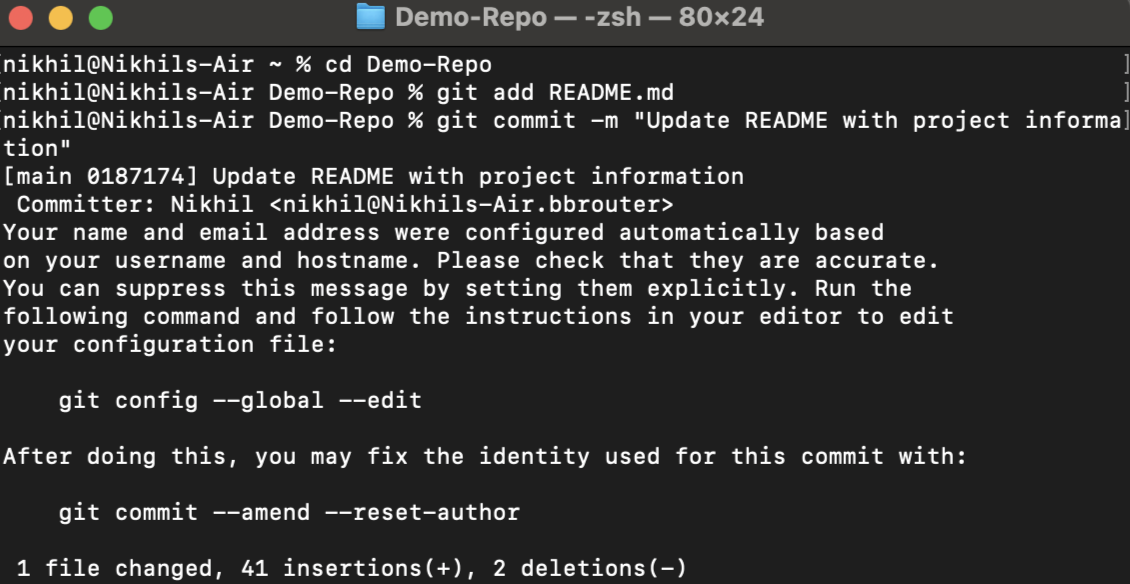
  3. Add the file to staging with git add README.md
  4. Commit changes with git commit -m “Update README with project information”
  5. Push to GitHub with git push origin main (or git push origin master for older repositories)
Conclusion

In this tutorial, we’ve learned the essential skills for getting started with GitHub: creating repositories, cloning existing projects, and writing effective README documentation. These fundamental skills form the backbone of efficient version control and collaboration in software development. By mastering these techniques, you can now properly showcase your projects, contribute to open-source initiatives, and collaborate seamlessly with other developers. More importantly, you’ve taken the first steps toward professional Git workflows that are indispensable in modern development environments.


Nikhil is an intern consultant at Marktechpost. He is pursuing an integrated dual degree in Materials at the Indian Institute of Technology, Kharagpur. Nikhil is an AI/ML enthusiast who is always researching applications in fields like biomaterials and biomedical science. With a strong background in Material Science, he is exploring new advancements and creating opportunities to contribute.

🚨 Recommended Open-Source AI Platform: ‘IntellAgent is a An Open-Source Multi-Agent Framework to Evaluate Complex Conversational AI System’ (Promoted)


Previous articleMeta AI Introduces MLGym: A New AI Framework and Benchmark for Advancing AI Research Agents
Next articleOptimizing LLM Reasoning: Balancing Internal Knowledge and Tool Use with SMART


Credit: Source link

ShareTweetSendSharePin

Related Posts

Bill Gates Says It’s ‘Completely Irresponsible’ For AI To Not Have Safeguards
AI & Technology

Bill Gates Says It’s ‘Completely Irresponsible’ For AI To Not Have Safeguards

September 27, 2026
Why The iPhone Duo Could Be Beneficial For Samsung’s Galaxy Z Fold 8
AI & Technology

Why The iPhone Duo Could Be Beneficial For Samsung’s Galaxy Z Fold 8

September 27, 2026
How To Improve Your Router’s Security In 10 Minutes
AI & Technology

How To Improve Your Router’s Security In 10 Minutes

September 27, 2026
Humanoid Robots Are Getting Even Creepier (This One Can Cry On Command)
AI & Technology

Humanoid Robots Are Getting Even Creepier (This One Can Cry On Command)

September 27, 2026
Next Post
Optimizing LLM Reasoning: Balancing Internal Knowledge and Tool Use with SMART

Optimizing LLM Reasoning: Balancing Internal Knowledge and Tool Use with SMART

Leave a Reply Cancel reply

Your email address will not be published. Required fields are marked *

Search

No Result
View All Result
Peloton Has Made A Foldable (Treadmill)

Peloton Has Made A Foldable (Treadmill)

September 22, 2026
Canada’s Carney responds to Trump’s executive order renaming Lake Ontario to ‘Lake America’

Canada’s Carney responds to Trump’s executive order renaming Lake Ontario to ‘Lake America’

September 22, 2026
Sen. Ted Cruz comments on possible 2028 presidential run

Sen. Ted Cruz comments on possible 2028 presidential run

September 21, 2026

About

Learn more

Our Services

Legal

Privacy Policy

Terms of Use

Bloggers

Learn more

Article Links

Contact

Advertise

Ask us anything

©2020- TradePoint.io - All rights reserved!

Tradepoint.io, being just a publishing and technology platform, is not a registered broker-dealer or investment adviser. So we do not provide investment advice. Rather, brokerage services are provided to clients of Tradepoint.io by independent SEC-registered broker-dealers and members of FINRA/SIPC. Every form of investing carries some risk and past performance is not a guarantee of future results. “Tradepoint.io“, “Instant Investing” and “My Trading Tools” are registered trademarks of Apperbuild, LLC.

This website is operated by Apperbuild, LLC. We have no link to any brokerage firm and we do not provide investment advice. Every information and resource we provide is solely for the education of our readers. © 2020 Apperbuild, LLC. All rights reserved.

No Result
View All Result
  • Main
  • AI & Technology
  • Stock Charts
  • Market & News
  • Business
  • Finance Tips
  • Trade Tube
  • Blog
  • Shop

© 2023 - TradePoint.io - All Rights Reserved!