







We’re still waiting for the perfect hybrid PC that can work as well as a tablet as it does as a laptop. As we enter 2024, it seems like many companies have also given up on that ideal — but Microsoft, Apple and Samsung still have some options to consider. And we’re still seeing OS tweaks to make iOS and Android more usable for larger displays. If you’re on the hunt for your next computer and are dead-set on it being a 2-in-1, we’ve collected our current top picks here plus all of the things you should know before making a purchase.
Factors to consider before buying a 2-in-1 laptop
When you’re shopping for a 2-in-1, there are some basic criteria to keep in mind. First, look at the spec sheet to see how heavy the tablet is (alone, and with the keyboard). Most modern hybrids weigh less than 2 pounds. If the overall weight of the tablet and its keyboard come close to 3 pounds, you may be better off getting an ultraportable laptop.
Also, while some 2-in-1s offer built-in LTE or 5G connectivity, not everyone will want to pay the premium for it. An integrated cellular radio makes checking emails or replying to messages on the go far more convenient. But it also often costs more, and that’s not counting what you’ll pay for data. And, as for 5G — you can hold off on it unless you live within range of a mmWave beacon. Coverage is still spotty and existing nationwide networks use the slower sub-6 technology that’s barely faster than LTE. For now, tethering a PC to your phone is still the best way to get online.
These machines still have their limits, of course. Since they’re smaller than proper laptops, they tend to have less-powerful processors. Keyboards are often less sturdy, with condensed layouts and shallower travel. Plus, they’re almost always tablets first, leaving you to buy a keyboard case separately. (And those ain’t cheap!) So, you can’t always assume the advertised price is what you’ll actually spend on the 2-in-1 you want.
See Also:
Sometimes, getting a third-party keyboard might be just as good, and they’re often cheaper than first-party offerings. If you’re looking to save some money, Logitech’s Slim Folio is an affordable option, and if you don’t need your keyboard to attach to your tablet, Logitech’s K780 Multi-Device wireless keyboard is also a good pick.
While we’ve typically made sure to include a budget 2-in-1 in previous years, this time there isn’t a great choice. We would usually pick a Surface Go, but the latest model is still too expensive. Other alternatives, like cheaper Android tablets, are underpowered and don’t offer a great multitasking interface. If you want something around $500 that’s thin, lightweight and long-lasting, you’re better off this year looking at a conventional laptop (like those on our best budget PCs list).
Photo by Devindra Hardawar / Engadget
Display: 14-inch OLED touchscreen | CPU: Intel Core Ultra 5 125H | Weight: 3.19 pounds | RAM: Up to 32GB | Storage: Up to 2TB
Read our full HP Spectre x360 14 review
HP’s new Spectre x360 14 is our new top pick if you want a laptop that can occasionally turn into a tablet. It’s a beautiful notebook that can rotate its screen into a variety of orientations: a tent mode for propping it up in bed or on a table and a tablet mode with the keyboard tucked away neatly behind the lid. While it wouldn’t completely replace something like an iPad, the x360’s rotating hinge makes it more versatile than a conventional notebook. It’s perfect for diving into a lengthy article or PDF or using the bundled stylus to jot down some notes. The Spectre x360 14 is also a solid laptop in its own right, with an excellent keyboard, an extra-large touchpad and some of the best PC industrial design on the market.
- Versatile convertible screen
- OLED display is incredibly vibrant
- Solid CPU upgrade
- Starts with 16GB RAM
- Excellent keyboard
- Plenty of ports
- HP’s design hasn’t changed in years
- Haptic touchpad is a bit finicky
- Average battery life
$1,449 at HP
Apple
Display: 11- or 13-inch 120Hz tandem OLED XDR touchscreen | CPU: Apple M4 | Weight: Starting at 0.98 pounds | RAM: Up to 16GB | Storage: Up to 2TB
Read our full Apple iPad Pro (M4) review
Unsurprisingly, the brand-new iPad Pro with the M4 chip is our best 2-in-1 for Apple users, replacing the 2022 model. This redesigned tablet improves on its predecessor in a number of ways, most notably the new, incredible OLED display. It’s one of the nicest screens we’ve seen, not just on a tablet but on any device. It’s made of two OLED panels for increased brightness and contrast, and it looks great no matter what you’re doing with it. The M4 chip, meanwhile, means this tablet will be extremely powerful for years to come. And Apple made the iPad Pro noticeably thinner and lighter than before — it’s a little shocking just how compact it feels now. Finally, the front camera is now on the landscape edge, which makes it work a lot better for video calls.
Apple also updated the iPad Pro’s accessories this year. The new Magic Keyboard is thinner and lighter than before, a welcome improvement. The old keyboard and iPad Pro ended up weighing more than a MacBook Air, but that’s no longer the case. It also has aluminum palm rests, a larger, haptic trackpad and a much-needed row of function keys. It’s still quite expensive at $349 for the 13-inch model, but it’s a lot better than before. Meanwhile, the Apple Pencil Pro includes a new squeeze gesture for quick access to menus as well as haptic feedback, gyroscopes that allow you to spin the pencil and support for the Find My network. The iPad Pro is unfortunately more expensive than ever, but Apple fixed about all its lingering issues and added a host of impressive features this time. — Nathan Ingraham, Deputy Editor, News
- Possibly the best screen I’ve ever seen
- M4 chip is extremely powerful
- Thinner and lighter than before, making it easier to hold
- Front camera is now on the landscape edge
- Magic Keyboard and Apple Pencil Pro include significant new features
- Prohibitively expensive
- Not backwards compatible with old accessories, and new ones are still pricey
$950 at Amazon
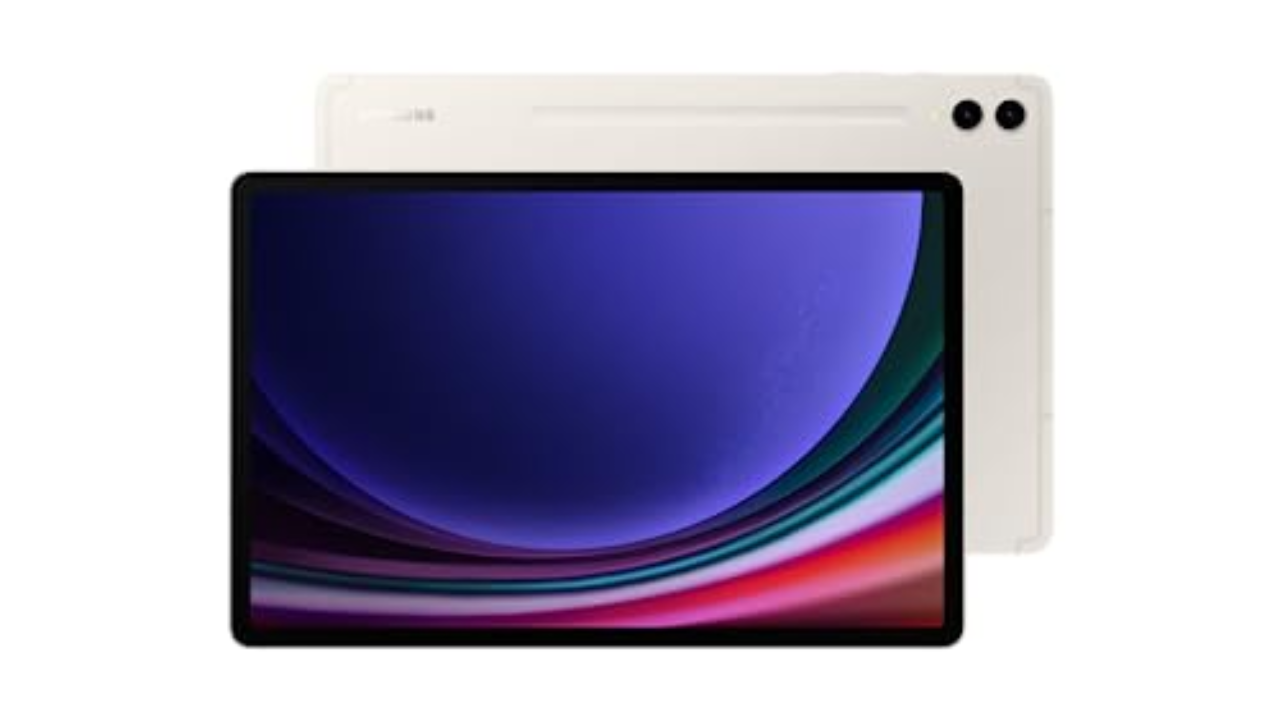
SAMSUNG
Display: 12.4-inch Dynamic AMOLED 2X touchscreen | CPU: Snapdragon 8 Gen 2 | Weight: 1.3 pounds | RAM: Up to 12GB | Storage: Up to 512GB
Read our full Samsung Galaxy Tab S9 Ultra review
While Windows is better than iPadOS and Android for productivity, it lags when it comes to apps specifically designed for touchscreens. If you want a tablet that has all the apps you want, and only need it to occasionally double as a laptop, the Galaxy Tab S9+ is a solid option. You’ll enjoy watching movies and playing games on its gorgeous 12.4-inch 120Hz AMOLED screen, and Samsung includes the S Pen, which is great for sketching and taking notes. The Snapdragon 8 Gen 2 chip and 12GB of RAM (4GB more than the last model) keep things running smoothly, too.
Samsung dramatically improved its keyboard case a few years ago for the S7+, making the Tab an even better laptop replacement. You could type for hours on this thing and not hate yourself (or Samsung). The battery life is also excellent, so you won’t need to worry about staying close to an outlet. The main caveat is that Android isn’t great as a desktop OS. And while Samsung’s DeX mode offers a somewhat workable solution, it has plenty of quirks.
- Beautiful screen
- Great speakers
- Powerful hardware
- S Pen is extremely responsive
- Dex mode is a surprisingly powerful multitasking interface
$899 at Amazon
Photo by Sam Rutherford / Engadget
Display: 14-inch WQUXGA (3840 x 2400) OLED touchscreen | CPU: 13th-gen Intel Core i7 | Weight: 3.09 pounds | RAM: 16GB | Storage: Up to 1TB
Read our full Lenovo Yoga 9i review
Adaptability is the biggest strength of a 2-in-1, with devices like the Yoga 9i capable of transforming into a number of different modes at a moment’s notice. Even though it’s got a relatively portable 14-inch OLED display, Lenovo still found room on the Yoga 9i for three USB-C ports, a fingerprint scanner and a clever rotating soundbar to ensure audio sounds good in any position. Lenovo also includes a free stylus in the box but, unlike previous models, there isn’t a dedicated storage slot for it on the machine anymore. It’s also worth noting that, while its general design hasn’t changed much for 2023, Lenovo has improved the Yoga 9i’s performance with updated 13th-gen Intel processors.
- Gorgeous OLED display
- Powerful speakers
- Strong battery life
- Four USB-C ports
- Physical webcam shutter
- Included stylus and travel sleeve
- Whiny fans
- Shallow keyboard
- No built-in stylus storage
$1,400 at Lenovo
Nathan Ingraham contributed to this report.
Credit: Source link